34
The ISP IR code table has been added to Harmony
Logitech database. It is therefore possible to
create Activities involving the ISP as the audio
reproduction device. Check for StormAudio and
ISP Elite, brand and device names respectively in
the MyHarmony app. See MyHarmony website
for more information.
Do not connect directly to the Harmony Hub
using a jack to jack cable as this can harm the
ISP IR internal circuitry, use only IR receiver/
transmitter.
When using IR to control the ISP, we recommend
activating the “Fast boot mode” defined in
previous page to ensure there is no loss of IR
commands while the ISP powers up, especially
when using Logitech Harmony and the IR
sequences it may generate.
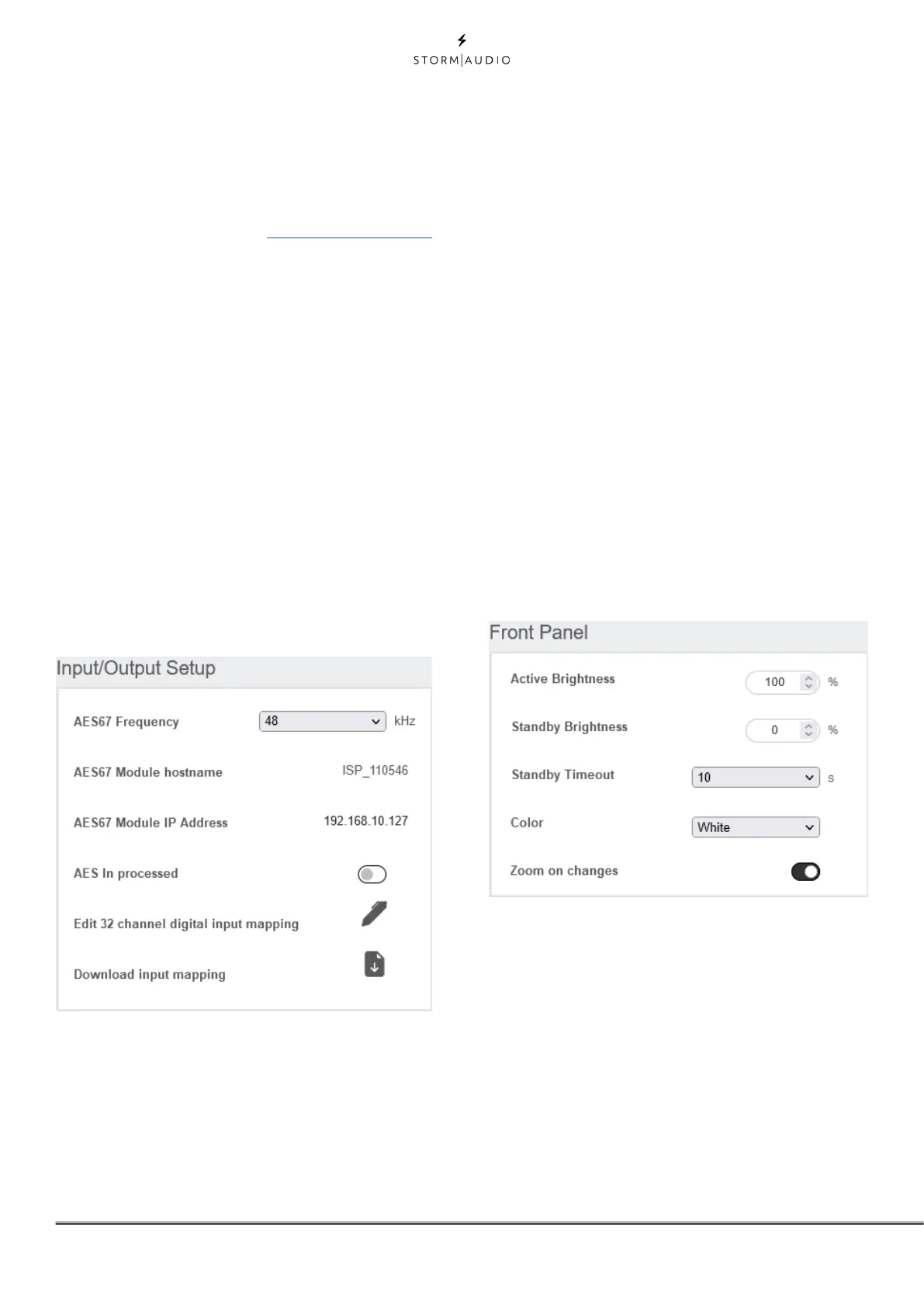
Input/Output Setup
With the Optional 16ch AES/EBU Digital Input
and Digital 32ch I/O AoIP modules installed,
multiple parameters need to be set, as shown
below.
• AES In processed: Defines whether the upmixing
capability is enabled (<8ch input) or bypassed, so
Processed/Upmixed with your Preferred Upmix or
only post-processed up to 32ch respectively. In
case of Processed enabled, the channel mapping
is fixed: L, R, C, LFE, Ls, Rs, Lb, Rb. In case of bypass
mode, see 16/32 channel digital input mapping
section below. Note that Lb/Rb are equivalent to
Lrs/Rrs of DCI specifications.
• AES67 Frequency: With the Digital AoIP module,
it is necessary to indicate what the network
Sampling Rate is to allow for a stream to be
defined. Choose between 48 kHz or 96 kHz.
• AES67 Module hostname: This is the name given
to the module at the factory. It is adjustable in
the AoIP module specific WebUI. Consult our
Knowledge Base and the dedicated AoIP module
documentation for more information.
• AES67 Module IP address: The AoIP module
comes by default in DHCP. When connected to
the network, you’ll find here the IP address that
was automactically assigned, necessary for you
to identify the module and define streams. Note
that clicking on the IP address will open the AoIP
module WebUI in another browser tab.
• 16/32 channel digital input mapping: The
channel mapping between the audio server and
the ISP defined theater might not match. Selecting
EDIT will provide access to a mapping matrix
allowing you to remap the signals accordingly.
Front Panel
Settings that govern behavior of the front panel
screen.
• Active Brightness: Brightness of the screen when
the screen is actively being used.
• Standby Brightness: Brightness of the screen
when not actively being used.
• Standby Timeout: Length of time elapsed
between active use of screen and reduction of
brightness to standby level.
• Color: Change the color of the display amongst
white, magenta, orange, blue, red and green.
• Zoom on Changes: When ON, changes made
via remote control (input, volume, etc.) will
temporarily be shown in a large type so these
changes can easily be read from across the room.



 To Next Page