ISP Immersive Sound Processor
37
Web UI Remote Control
Using the recommended web browser on your
laptop, one can access the remote control.
When not logged in as an expert user or installer,
the remote is accessible as well, but the header
(above Main Source) is not visible. The web UI
remote control is best used with a computer or
tablet. It can be used with a mobile phone, but
items do not properly fit the screen. iPad users
can also download the iPad app from the App
Store (see next page).
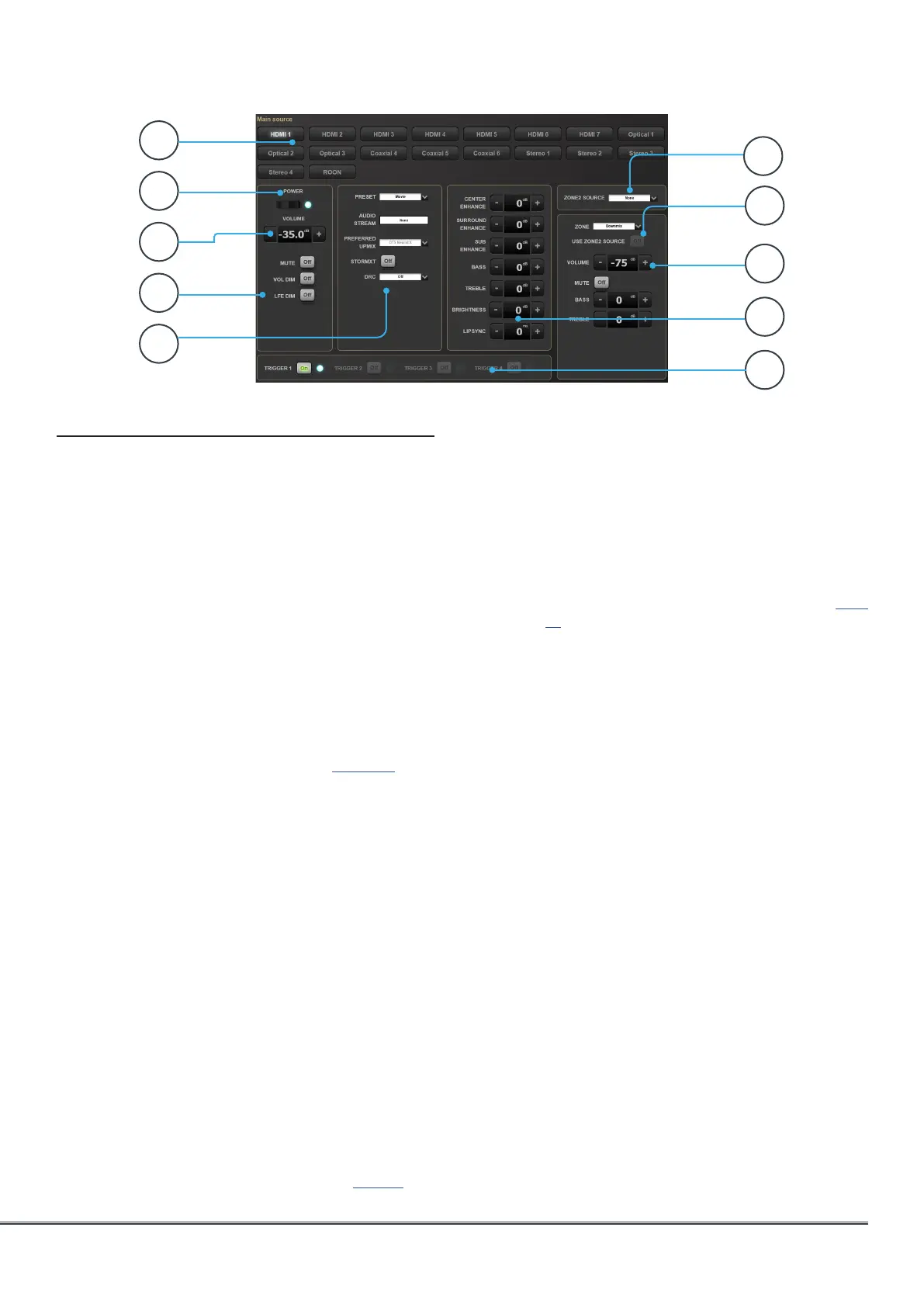
1. Input Select
Any inputs enabled on the Inputs setup page
will appear here titled according to your
setup. See “Input Settings” on page 14. The
currently selected input will be highlighted in
gray. Tap any input to select it.
2. Power
Toggle the standby/ON status by pressing
this button.
3. Main Volume
Adjust the volume in the currently selected
theater by pressing the +/- buttons. One
press is a 1dB increment.
4. Mute / Dim / LFE Dim
This section contains easy access to select
features.
• Mute: Cuts sound to the currently selected
theater.
• Vol Dim: Immediately attenuates volume by the
amount specified in “Parameters” on page 32.
• LFE Dim: In some cases, movies encoded with
Dolby may have bass that appears to be too
loud. Use LFE Dim to attenuate the LFE channel
by -10dB.
5. Preset & Audio Decoder Options
• Preset: Use the Preset dropdown menu to
select the desired preset. Remember that Preset
includes activating a specific theater, so if your
ISP includes multiple theaters, you should have
presets available for each. See “Presets” on page
35.
• Audio Stream: Indicates real time information
about the incoming audio of the selected source.
• Preferred Upmix:
• Native plays audio back in the recorded format
and/or channel count according to the source
material.
• Stereo Downmix will downmix surround material
to 2 channel played through front left and right
(and sub if loudspeakers are configured as Small
or Large and Sub) loudspeakers only.
• Dolby Surround, DTS Neural:X and Auro-Matic
will force any legacy surround audio into one of
these 3 formats. Immsersive source audio will
be rendered natively and this selection will be
grayed out.
• DRC: Dynamic range control for Dolby and DTS
streams. On will reduce the range of volume levels
on the soundtrack by compressing the loudest
sounds. Auto will engage DRC when directed to
by the soundtrack.
• STORMXT: Depending on the codec played,
some speakers can become silent. By activating
StormXT, adjacent channels are analysed to
separate ambiance from direct sound. This
ambiance sound is then redirected to the silent
speakers, offering a smooth reproduction from
speakers to speakers, without degrading spatial
resolution.
1
2
4
5
6
7
8
3
10
9



 To Next Page