ISP Immersive Sound Processor
23
4
5
3
2
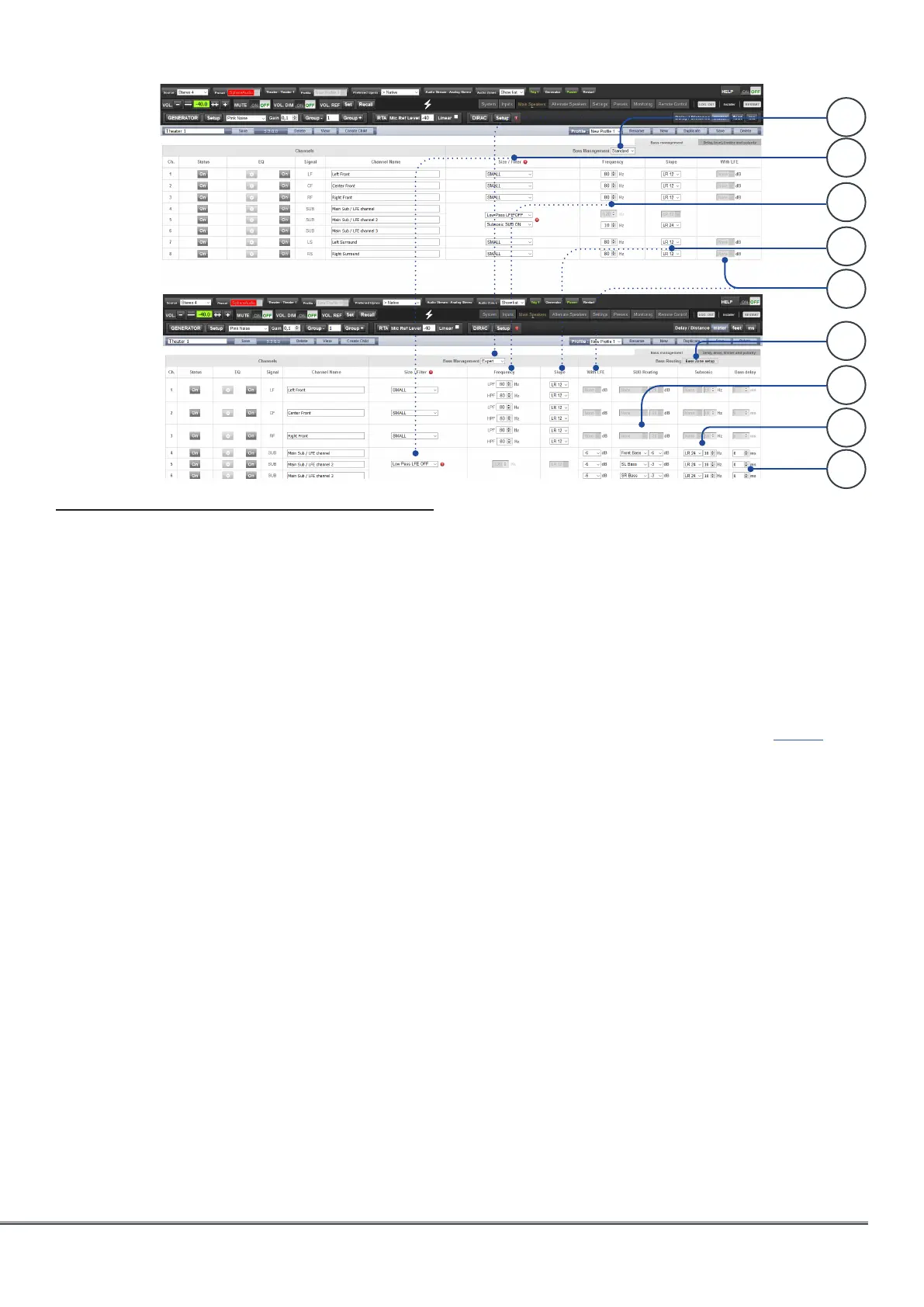
Bass Management
Bass Management is one of the most important
and critical part to adjust in the ISP in order to
achieve the best bass response of your system
depending on the speakers and subwoofers
used but also on their integration in the room.
There are various use cases. Whether your
installation is built around a traditional THX®
type speakers system for which all the low
frequencies below 80 Hz shall be reproduced by
subwoofers or it includes speakers capable to
reproduce very low frequencies, the adjustments
in the ISP will be very different. In the first case,
you can decide to go for a fully automated
adjustment going through the Dirac Live Room
Correction, making this delicate phase an easy
going process with extremely good acoustical
results when combined with the Bass Control
add on module.
1. Modes
The ISP offers three different modes:
• Standard: This mode is the basic mode, usually
suitable for most of the use cases where the low
frequencies are reproduced by subwoofers and
with the need of a single crossover adjustment
between each speaker and the subwoofers.
• Expert: This mode allows for more advanced
adjustments such as the definition of Bass Zones
that can be flexibly routed to any Bass reproducer
in the system, independant crossover adjustment
between subwoofer and speakers or when
speakers have to be used as Bass reproducer.
While it can help achieve greater subwoofer
integration and low frequencies reproduction, it
should only be used by calibrators with sufficient
skill otherwise comparably poor results may be
inevitable.
• Dirac: The Dirac mode is only accessible when
applying the Dirac Live Room Correction process
and selecting either the Upmix or Bass Control
modes of the Dirac Live® Control Tool. In this
Dirac mode, the Bass Management crossovers
will be set in the Dirac tool with no possibility to
override them in the ISP UI (all adjustments will be
grayed out). See Dirac specific part page 27.
2. Size/filter
When in Standard or Expert modes, the system
offers the possibility to define how the bass are
exctracted from the speakers and redirected
to the bass reproducers, whether they are
subwoofers or speakers.
• Small: When a channel is set to Small, bass in this
channel is redirected to the Bass reproducers.
The channel is high pass filtered according to
the HPF frequency and slope. Low frequencies
are routed to the bass SUB channel according
to LPF frequency and slope. Individual HPF and
LPF definitions are only available in Expert mode.
Small speakers cannot have SUB bass channel or
LFE bass mixed in.
• Large: Channel is not band limited. When a
channel is set to Large, no bass is redirected
from this channel to the bass SUB channel. Use
this setting when the loudspeaker has sufficient
bandwidth and output capability to reproduce
low frequencies. Channel can have SUB bass
channel and/or LFE bass mixed in.
1
6
7
8
9



 To Next Page