ISP Immersive Sound Processor
31
below its low frequency limit as this will only lead
to high distortion and likely damage
• High quality speakers usually benefit from limiting
the correction window to low frequencies.
• Ideal curves usually have a slightly downward
slope. A loudspeaker may have a flat amplitude
response on axis, but will rarely be flat off axis.
There are different possible viewing options
available (H). Save the Target Curve through
the Menu (G) for use in another channel or
for other future use. Repeat for all speakers
groups and then press Calculate (I) so the
bass control filters got calculated.
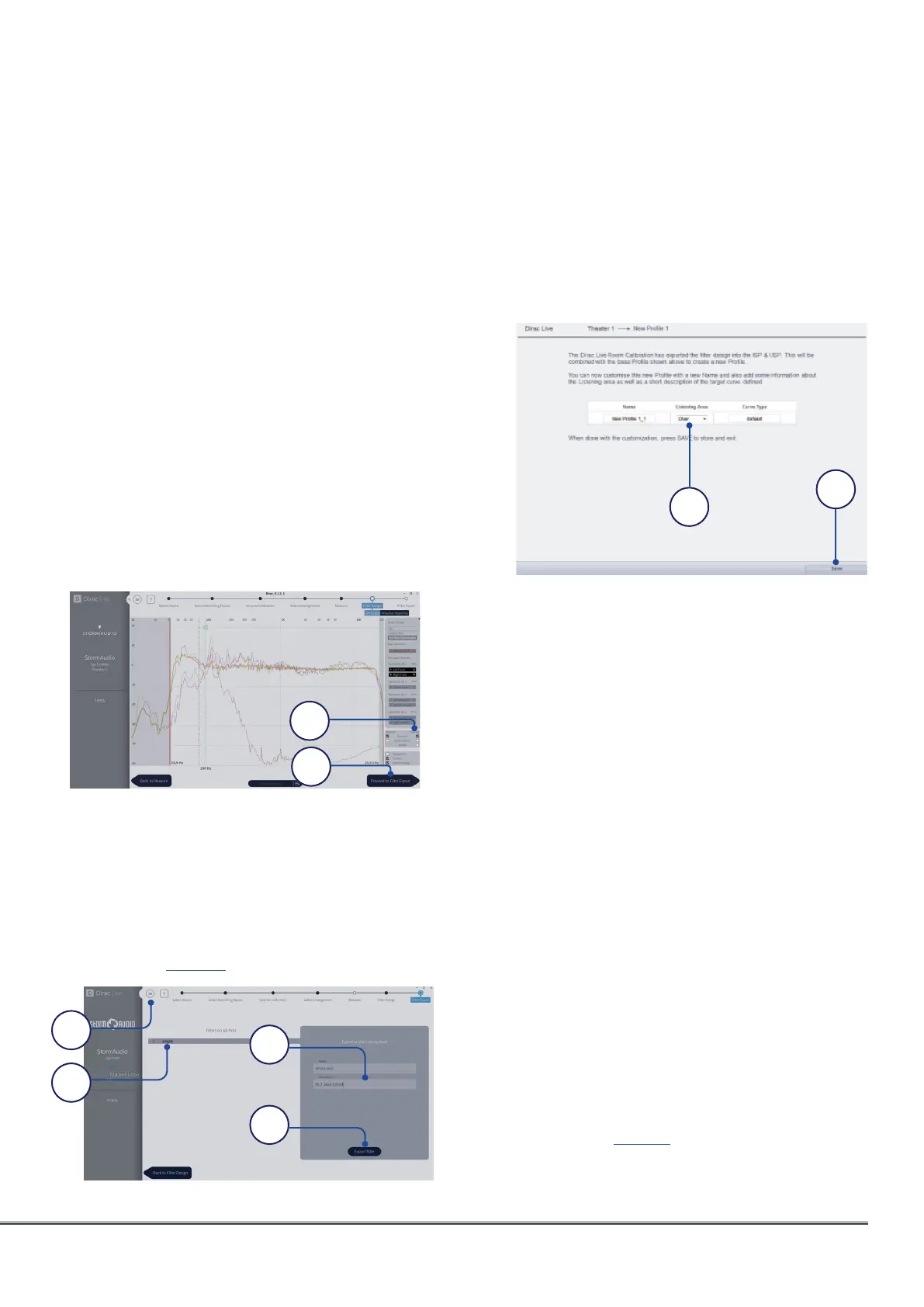
16. Corrected response
After the Bass Control calculation is done,
select the “Corrected” check-box in the
plot options (A) to show the resulting input
magnitude response for the selected channel.
The corrected curve should conform to the
target curve, as illustrated below.
If satisfied by the result, press “Process to
filter export” (B).
17. Export Filters to ISP
In this last step, filters created in previous
steps are exported to the ISP and combined
into the new profile selected “5. Select Base
Profile” on page 27.
Select the “empty” slot 1 (A), give a name and
a description to your new Dirac profile (B).
Save your project for future use (C) before
selecting Export filter (D) and return to the
ISP Web UI.
18. Return to ISP web UI
A popup has been updated to confirm
that you wish to combine the Dirac
Live corrections with the base profile.
The Name and Description Target curve can
be changed using Latin-1 table characters.
We also recommend to select the correct
listening area that you used to make the
Dirac Live® corrections (A). Click save (B) to
continue. For corrections made to a zone,
options are not available. Simply click save.
Note that each time you go through the Dirac
Live® process, the former filter design gets
replaced. Each time the calibration is run, a
new profile is created with the new Dirac Live
correction.
19. Return to Speakers Page
Now that you are back at the page where
individual speakers can be edited, you will
notice the new Dirac reference profile you
named in the previous step is selected. New
columns created indicate the calculated
Dirac Delay and Dirac Level. No changes can
be made to this reference profile. Should you
wish to make changes, duplicate the profile,
make desired changes to the duplicate, save
changes to the profile and the theater. See
“Profiles” on page 17.
B
A
A
D
B
C
A
B



 To Next Page