ISP Immersive Sound Processor
21
1
3
7
8
9
4
5
6
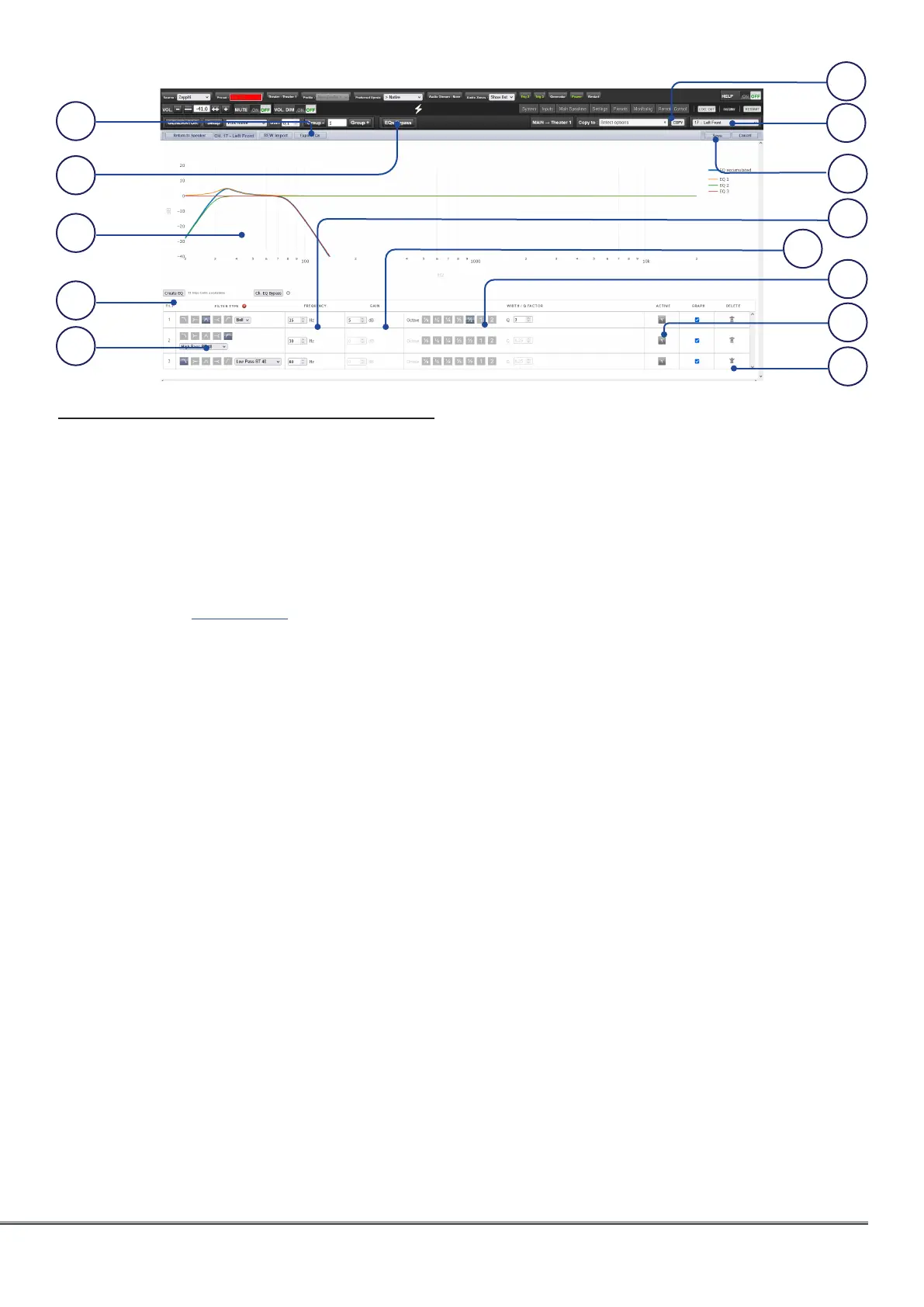
Channel EQ
Each channel can have up to 20 filters cells for
equalization, including additional crossover
capabilities.
1. EQ Export
The complete EQ settings can be exported
into a file with .txt extension that can be
reloaded in any ISP using the REW import
function (see REW section).
2. EQ Bypass
When developing a custom set of EQ per
channel, it is sometimes helpful to bypass
the entire group of EQ to check your progress
against the starting point.
3. Graphical UI
The EQs defined are visualised in a graphical
window. Individual and combined EQ
curves are shown, providing an instant
understanding of EQ impact on the
correction curve.
4. Create EQ
To design EQ curves for any channel, you
need to add EQ definition line using the
Create EQ button.
5. Filter Shape
Each filter must begin with a variation of one
of 5 types.
• Low Pass: Continuously declining output above a
cutoff frequency at a defined rate.
• High Pass: Continuously declining output below
a cutoff frequency at a defined rate.
• Bell: Band pass or cut filter with a defined center
frequency, boost or cut amount, and Q.
• Low Shelf: Boost or cut frequencies below a cutoff
frequency by a fixed amount.
• High Shelf: Boost or cut frequencies above a
cutoff frequency by a fixed amount.
For LPF and HPF choose a type and slope
amongst Butterworth (6dB / oct, 12dB / oct,
18dB / oct, 24dB / oct and 48dB / oct), Linkwitz
Riley (12dB / oct, 24dB / oct, 36dB / oct and
48dB / oct).
6. Delete
Unused EQ line can be removed using the Bin
button.
7. Status
In the course of designing your filter, you
may wish to measure or listen to progress
compared to the absence of that filter. Click
Active “No” to temporarily omit that filter from
the aggregate curve. Click “Yes” to activate it
back. You can also decide here whether it is
shown in the visualization curve by checking
the Graph item.
8. Quality Factor / Bandwidth
Bell filters require that you specify a Q. High
Q affects a narrow bandwidth, and low Q
affects a wide bandwidth. You can enter this
number directly in the text box or increment/
decrement by the amount chosen in the
header row using the +/- buttons to the right.
Or, click a fractional or multiple octave button
to automatically calculate Q.
10
11
13
2
12



 To Next Page