Application
Instructions for use • VITOMEAGLE • TVA900_EN_V1.0_05-2023_IFU_CE-MDR 23
1 Position the selected region of interest 4 Zoom bar
2 Total overview area 5 Min. zoom
3 Max. zoom
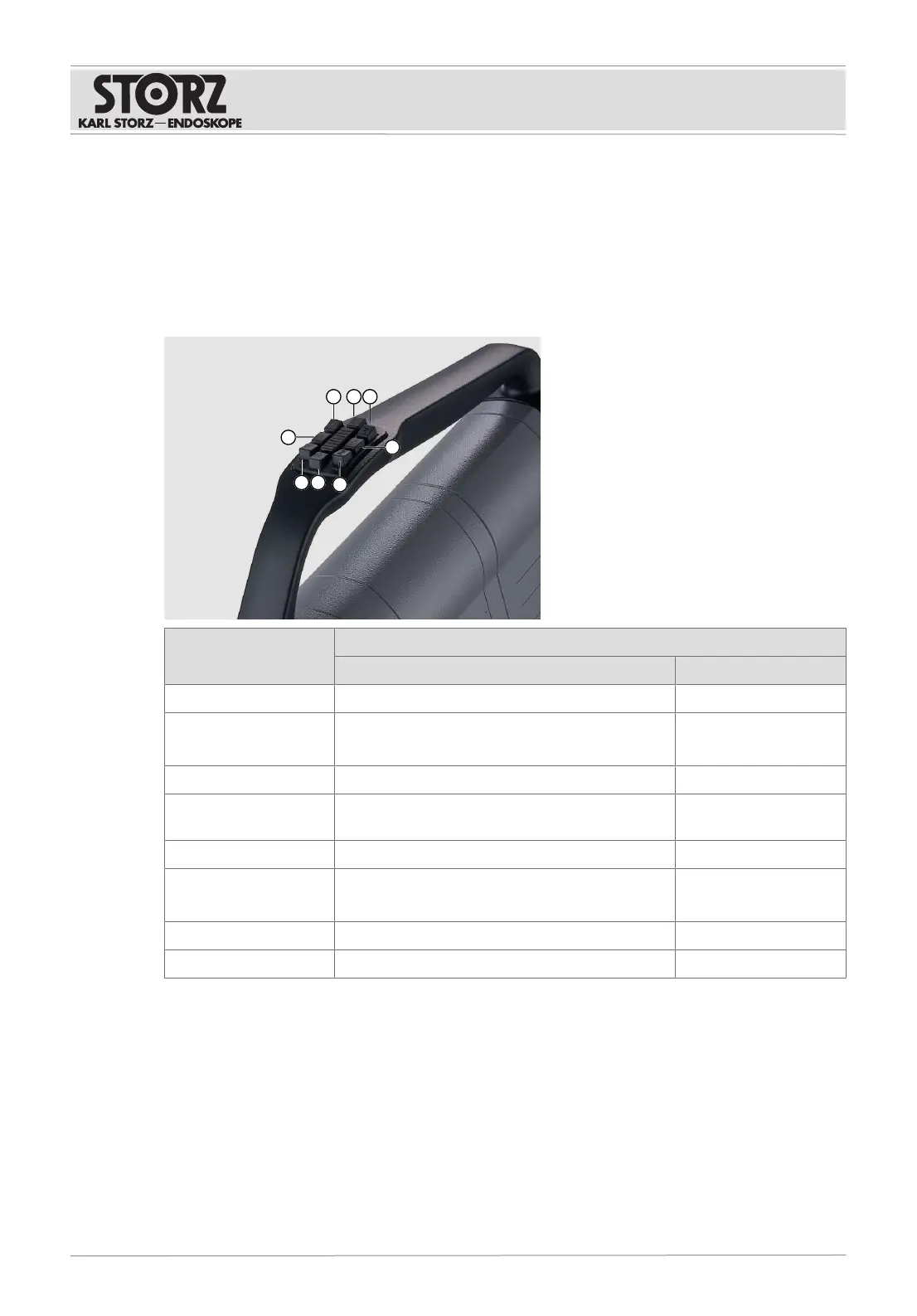
6.4 Function buttons on the VITOM EAGLE
6.4.1
Preset functions
Function button Function
Short actuation Long actuation
1 Focus on a higher level Focus on a higher level
2 Switch fluorescence on/off
When the menu is active: navigate upward
Set the brightness
3 Enlarge image Enlarge image
4 When the menu is active: back/close menu When the menu is ac-
tive: back/close menu
5 Reduce image Reduce image
6 Capture an image
When the menu is active: navigate downward
Record video
7 Focus on a lower level Focus on a lower level
8 Open Live menu Open Setup menu
6.4.2
Programmable functions
The VITOM EAGLE function buttons can be programmed and the following functions assigned to
them:
– White Balance
– Capture
– Light Source Intensity
– Video
– Brightness
– Nothing











 To Next Page