Stratasys J826 User Guide 4 Operating and Maintaining the Printer
DOC-28000 Rev. I 4-46
9. Clean the roller waste collector and the scraper blade surface using cotton
swabs. Make sure to remove any remaining printing materials.
Figure 4-54 Cleaning the roller waste collector
Before replacing the covering, you can check the effectiveness of the roller
scraper—see below.
To check the effectiveness of the roller scraper:
1. Put on the cleaning gloves.
2. Wet a cloth with isopropanol.
3. Use the cloth to wet the bottom of the roller.
4. Turn the roller slowly with your hand. As the blade scrapes the roller, make
sure the isopropanol is spread evenly over the entire length of the blade.
5. Inspect the roller. If it is not dry, replace the blade. (See "Replacing the
Roller Scraper" on the next page.)
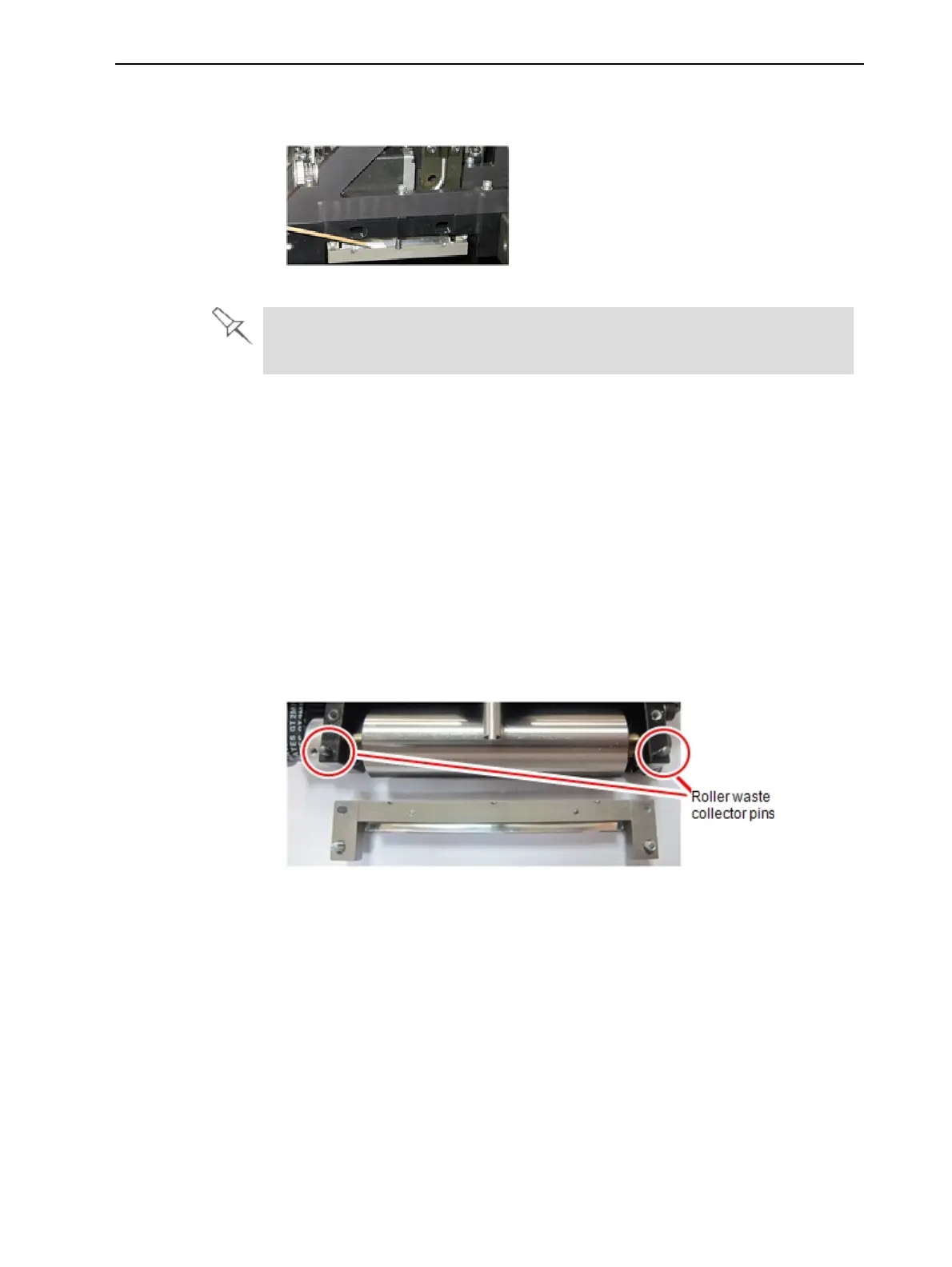
6. Before returning the roller waste collector to the print block, make sure that
the pins are clean.
Figure 4-55 Roller waste collector pins
To re-assemble the components:
1. Return the roller waste collector to the print block and screw on the
covering (see Figure 4-53 on the previous page).















 To Next Page