Stratasys J826 User Guide 4 Operating and Maintaining the Printer
DOC-28000 Rev. I 4-47
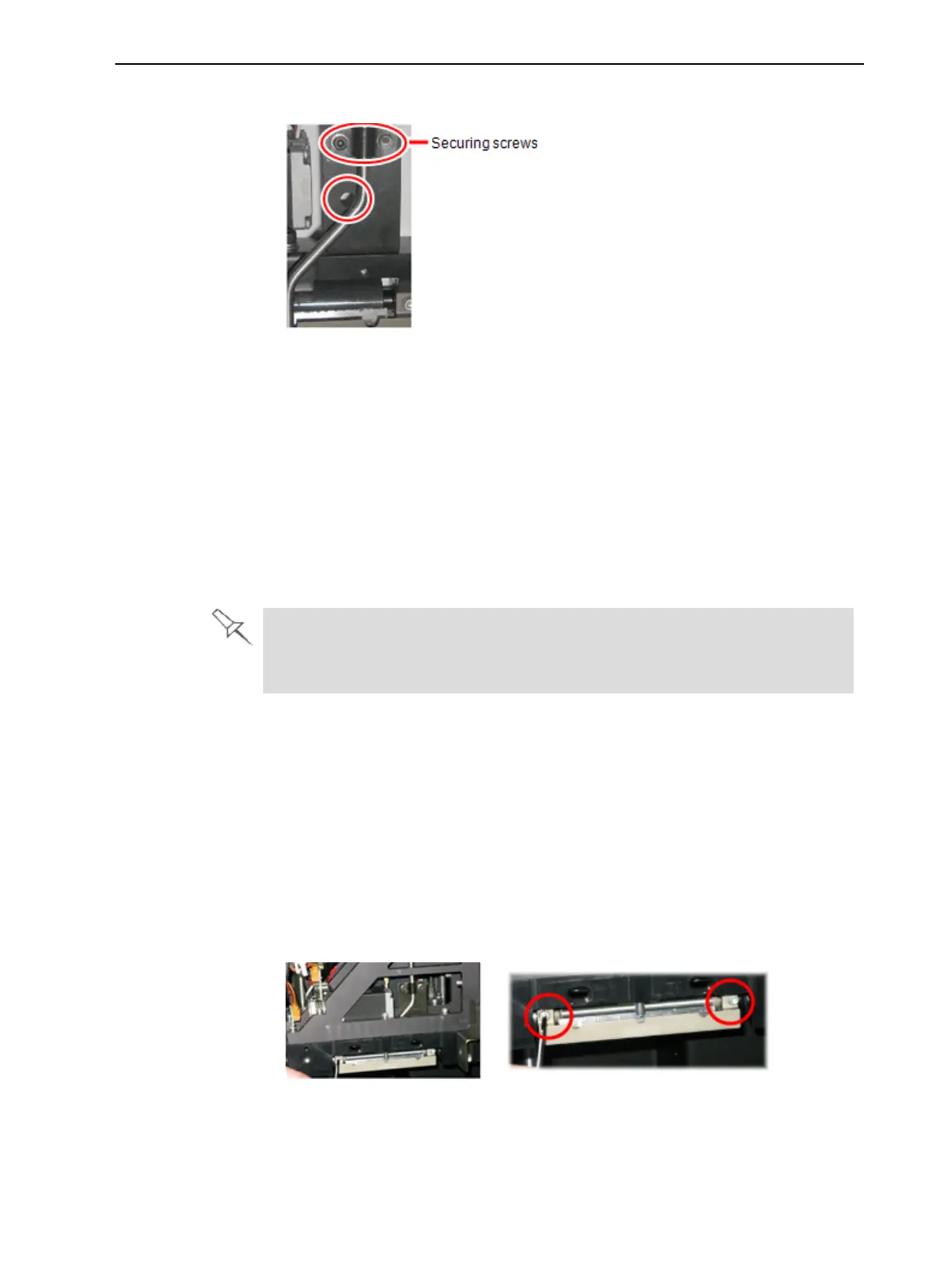
2. Loosen the screws securing the suction tube.
Figure 4-56 Positioning the suction tube
3. Lower the suction tube so that the hole in the panel behind the tube is
visible, and tighten the screws to secure the tube.
4. Attach the right-UV-lamp assembly to the print block and reconnect the UV
power and fan cables.
Replacing the Roller Scraper
You should replace the roller scraper blade—
• after 1,000 hours of printing.
• if it does not effectively keep the roller clean.
You should periodically test the effectiveness of the roller scraper when you
clean the roller waste collector. See "Cleaning the Roller Waste Collector
and Inspecting the Roller Scraper" on page 4-43.
To replace the roller scraper:
1. Prepare—
❒ a new roller scraper blade
❒ a Phillips 1x75 mm screwdriver
❒ a 2.5-mm and a 2-mm hex (Allen) key
2. Remove the right UV lamp and the roller waste collector covering (see
steps 4 to 7 on page 4-44).
3. Loosen the two screws securing the roller waste collector and pull it out.
Figure 4-57 Removing the roller waste collector





 To Next Page