Note
If you have placed several specimen holders in the conveyor, the specimen
holders are queued based on the order in which you have pressed Run for each
of the specimen holders. To modify the queue, tap Eject, and press Run for each
specimen holder in the order you want them to be processed.
Place the specimen holder in the vertical conveyor
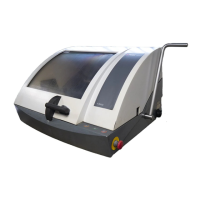
1. If a specimen holder is in a closed drawer, tap its icon/button on the main screen, and tap the
Eject button.
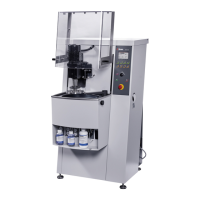
2. If the drawer is open or partially open, pull it open.
3. Place the specimen holder as shown in the illustration, and close the drawer.
4. The machine automatically detects the specimen holder.
Remove the specimen holder from the vertical conveyor
When a specimen holder has been processed, the machine automatically opens the drawer to the
partially open position.
Open the drawer and remove the specimen holder.
If the specimen holder has not been processed yet, the drawer remains closed. To open it, tap the
specimen holder button, and select the Eject button.
7 Operate the device
Xmatic 53









 To Next Page