HOW TO OVERVIEW
This “how to” appendix provides detailed, step-by-step instructions to easily connect with
features of your Impreza.
If you need some help with these features or want to
learn more, we are here to assist you:
Your Subaru Owner’s Manuals:
Located in the glovebox
Online Subaru Owner’s Resources:
www.subaru.com/owners
Subaru Customer Support:
www.subaru.com/customer-support
1-800-782-2783 (1-800-SUBARU3 )
BLUETOOTH
®
PAIRING
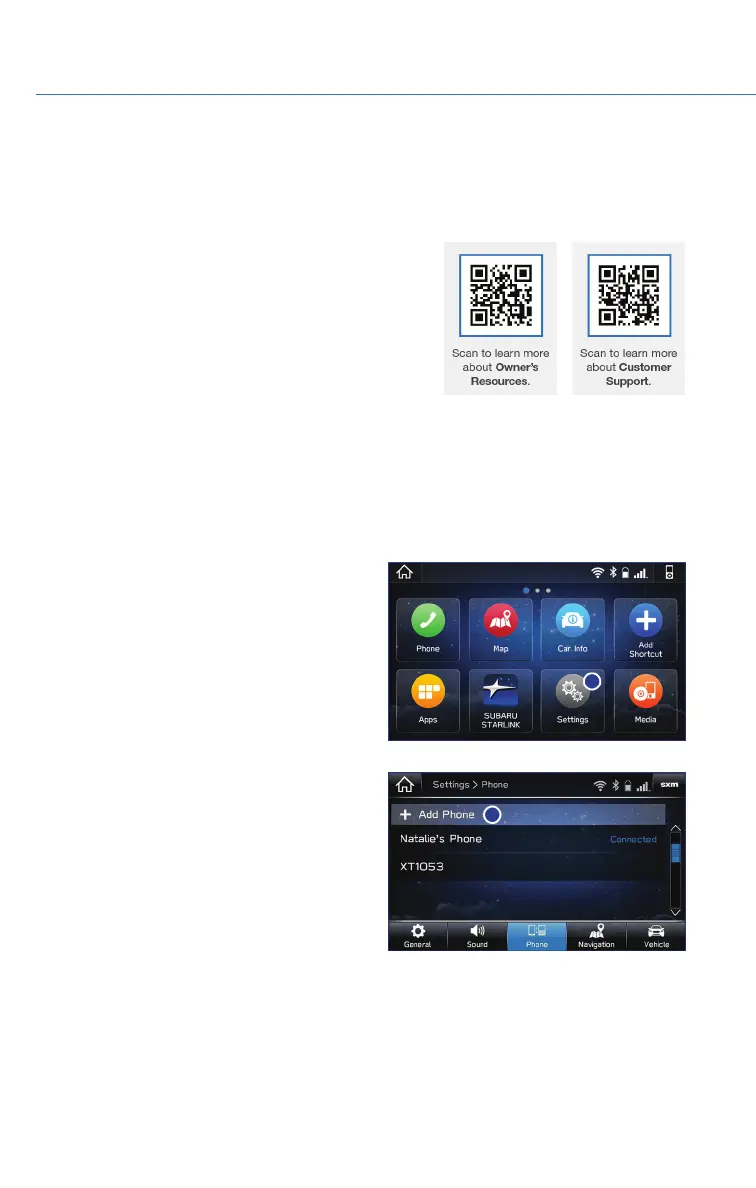
Pairing an Android Device
1. To pair an Android device, start by touching
the “Settings” icon on the “Home” screen
and then the “Phone” icon to go to the
phone screen.
2. Select “Add Device”/”Add Phone”.
HOW TO APPENDIX
98















 To Next Page