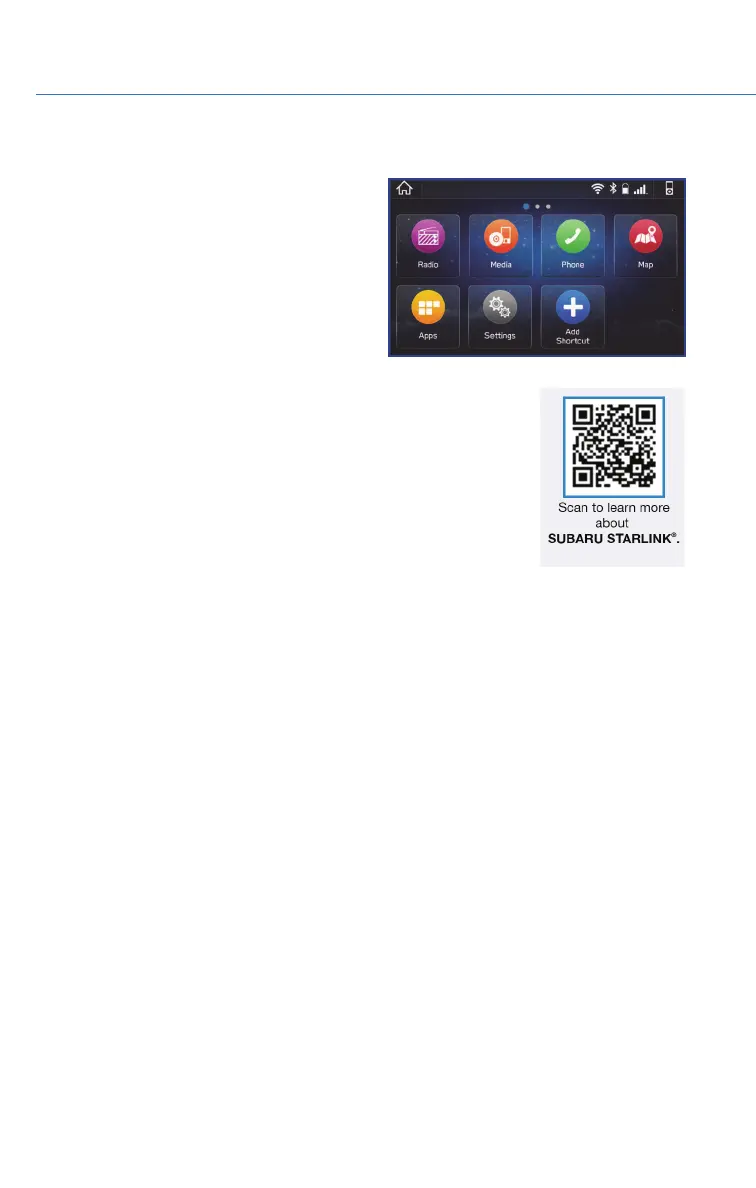
HOME SCREEN ICONS
Phone – Allows you to place and receive calls
and text messages.
Map – Allows you to enter a destination and
have route guidance to get you where you are
going.
Settings – Allows you to change the settings
to your personal choice for select systems
inside the vehicle.
Add Shortcut – Allows you to add icons for
various functions to the home screen.
Apps – Entertainment and convenience applications that can be
used to enhance your driving experience. The apps included are:
MySubaru, Pandora
®
, Travel Link
®
, Android Auto™, SUBARU
STARLINK
®
, aha™, and Apple Car Play
®
.
Media – Allows you to play CDs, USB/iPod music, or Bluetooth
®
audio by connecting to the device.
Radio – Allows you to select a station to listen to as well as pause and playback live radio.
REARRANGING ICONS
You can rearrange the icons on the Home Screen when the Home Screen Shortcuts
function is turned on. You can turn on the Home Screen Shortcuts function by selecting
“Settings”, then the “General” tab.
To rearrange icons on the Home Screen:
1. Select and hold the shortcut icon you want to move.
2. Drag the icon to the desired position and release.
3. To delete an icon, drag the icon to the bottom of the screen and release.
Home Screen Icons
STARLINK HOME
54















 To Next Page