CREATING HOME AND WORK PROFILES
You can create a driver profile that includes your home address and work address through
the “Settings Menu”. A detailed process on how to do this can be found on page 56.
FINDING A DESTINATION
You can use the navigation system to find a destination by address or by Points Of
Interest.
Finding a Destination by Address
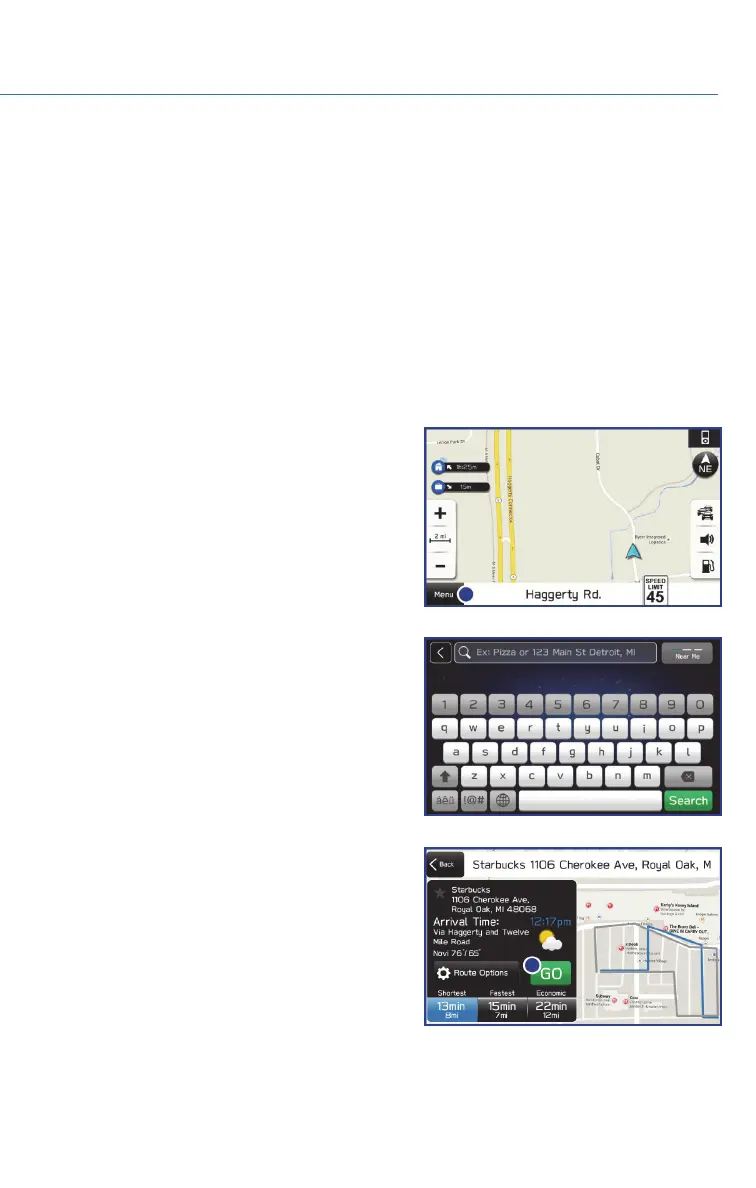
To search by address:
1. Start by pushing the “Map” button to
display the map screen. Then touch
“Menu”. Next select “Search by Destination
Enter Address”.
2. The keypad screen displays. As you type
the address or name of the destination,
suggestions will display. Touch the desired
destination.
3. The route calculation screen displays three
recommended routes at the bottom left of
the screen. Select the desired route, then
touch “GO”. You can also press and hold
the route on the map to begin navigation.
MAPS (if equipped)
69















 To Next Page