LIGHT CONTROLS
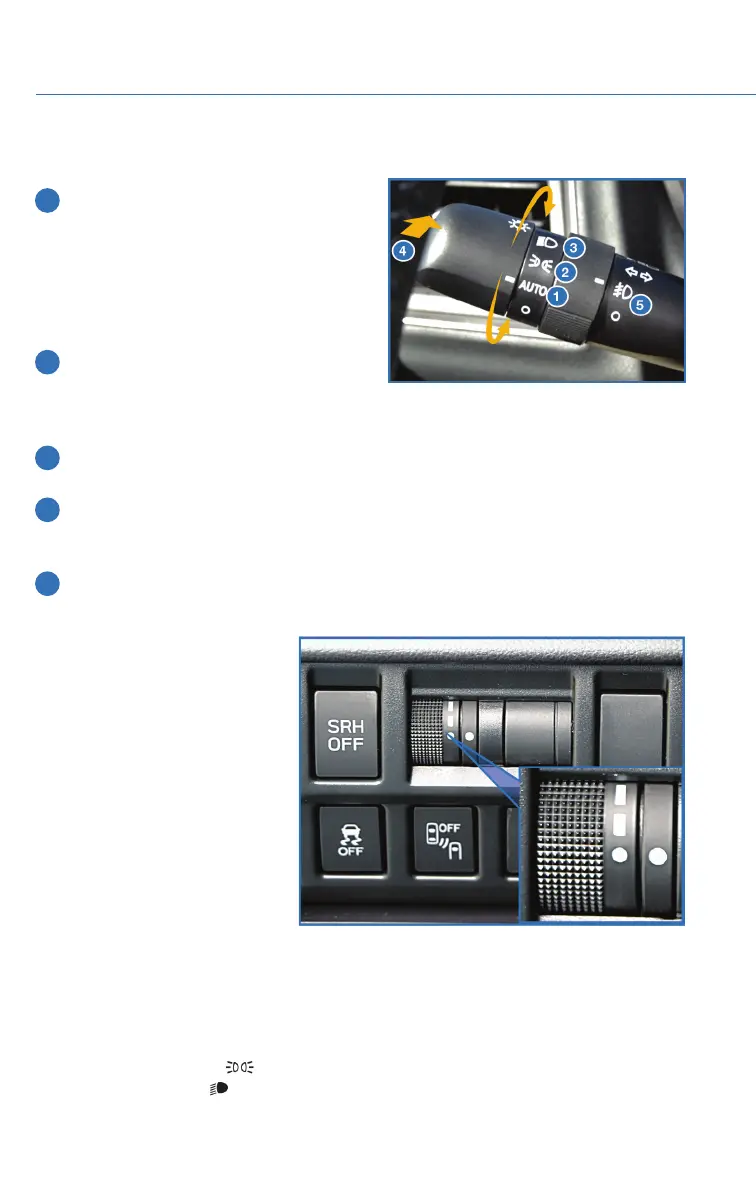
1 AUTO: If equipped, rotate the end of the
lever to set your headlights to
automatically turn on or off, depending
on the level of light outside.
NOTE: The sensitivity of the automatic
headlights can be adjusted through the
STARLINK
®
multimedia display.
2 Parking Lights: Rotate the end of the
lever to turn on the instrument panel
lights, parking lights, side marker lights,
tail lights, and license plate lights.
3 Headlights: Rotate the end of the lever to turn on the headlights, instrument panel
lights, parking lights, side marker lights, tail lights, and license plate lights.
4 High Beams: Push the lever forward to change from low beam to high beam. When
set to the “AUTO” position, pushing the lever forward also activates the High Beam
Assist (HBA) system, if equipped. Pull the lever back to center to return to low beam.
5 Fog Lights: If equipped, rotate the dial to turn on the fog lights.
Illumination Brightness
While the light controls are on,
rotating the illumination
brightness dial on the instrument
panel upward will make the
instrument panel illumination
brighter. When the dial is fully
rotated upward (dots aligned), the
instrument panel illumination
stays at full brightness. Rotating
the dial downward dims the
instrument panel illumination.
For map equipped vehicles, this
setting also adjusts the day/night
view and illumination level.
Daytime Running Lights
The daytime running lights automatically turn on when the engine is running, the parking
brake released, the select lever is out of the “P” position, and the light switch is set to Off,
“AUTO” (if equipped), or “
”. Always turn on the headlights when it’s dark outside by
rotating the dial to the “
” or “AUTO” position.
Illumination Brightness Dial
CONTROLS
28















 To Next Page