GENERAL
Many settings can be customized for different features in your Subaru. In this section you
will find examples and instructions for some of the settings you can tailor to fit your
preferences, as well as ways to keep your system updated.
For the 8.0-inch Multimedia Plus and the 8.0-inch Multimedia Navigation systems, the
system software can be updated via a Wi-Fi network or using the aha application on your
smartphone (depending on your smartphone communication and transfer speed). The
update process involves downloading and installing the software update. You can also ask
your preferred Subaru retailer to update the system software.
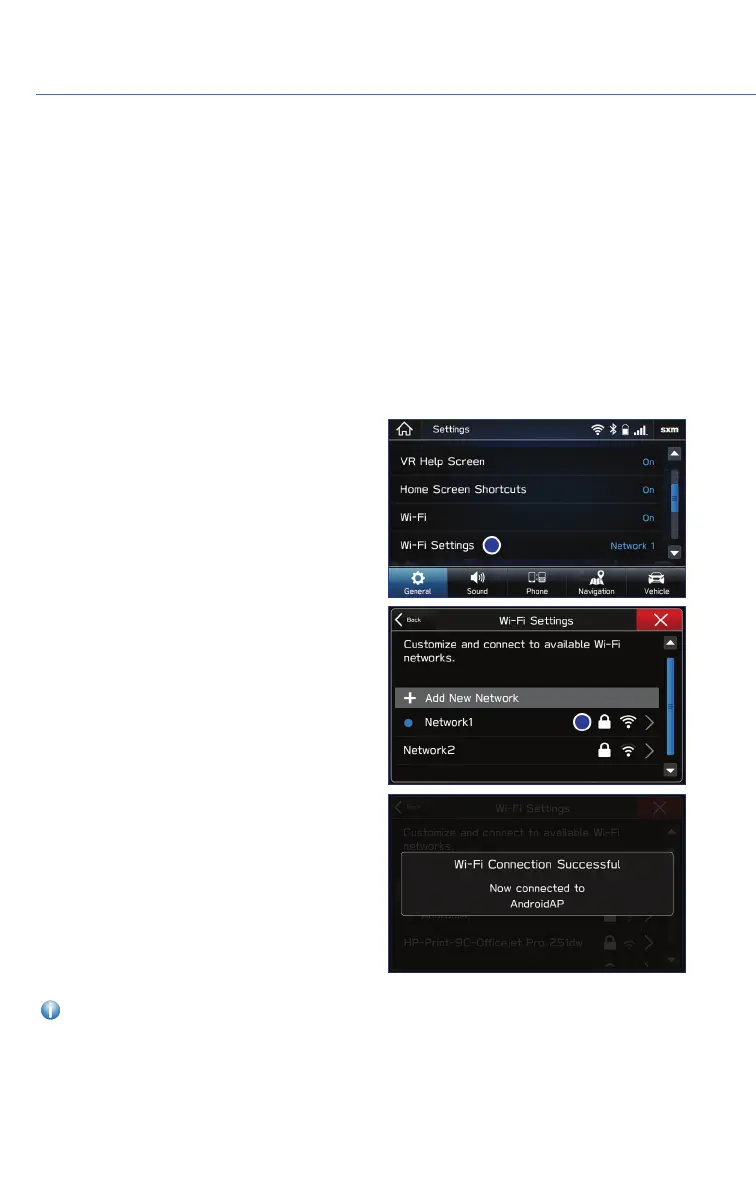
Connect to Home Wi-Fi
You can connect your SUBARU STARLINK
®
Multimedia system to your home Wi-Fi to
update the software and maps. To connect to
Wi-Fi, first go to the “Settings” screen, select
the “General” tab, and then select “Wi-Fi
Settings”.
Next, select the desired network and then
select “Connect”. If the network is a secure
network, enter the password and select “Join”.
You will get a notification on the screen when
the connection is complete. If an error
message appears, follow the guidance on the
screen to try again.
For more information, please refer to page 110 or your STARLINK
®
Owner’s Manual.
SETTINGS AND UPDATES
78















 To Next Page