WI-FI
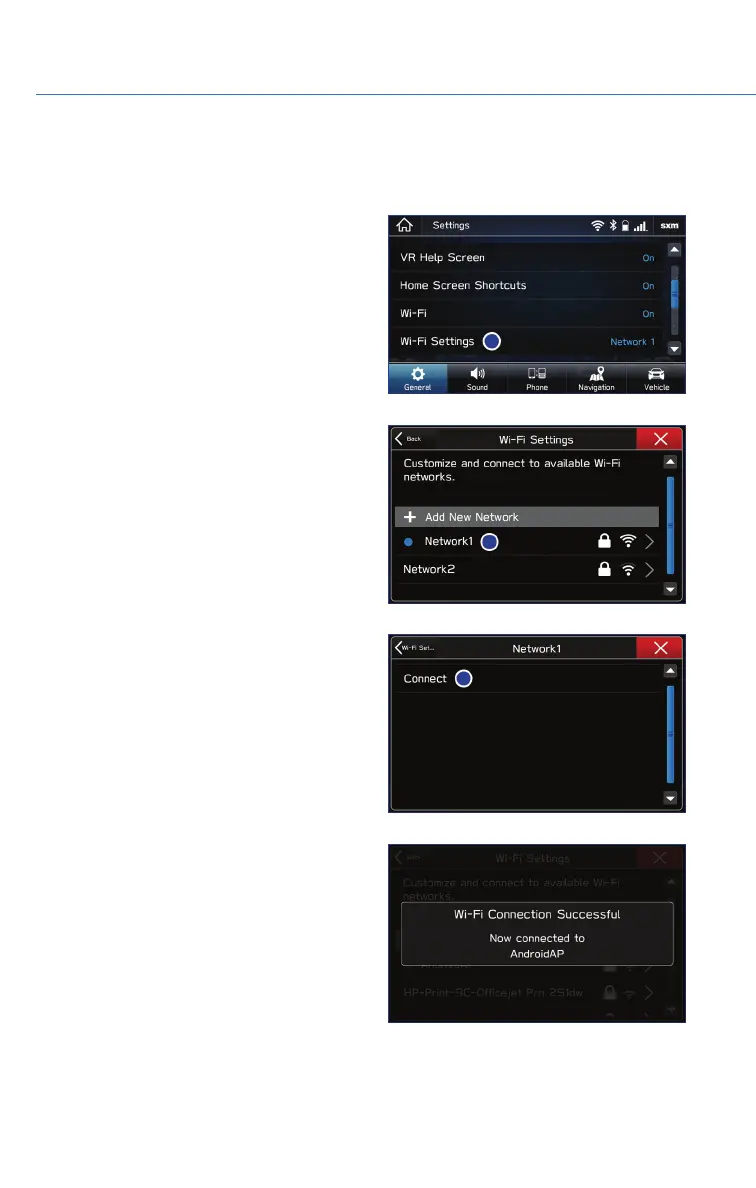
Connecting to a Wi-Fi Network
1. Display the General Settings screen by
pressing the “Home” button, then select
“Settings”.
2. Under the “General” tab, select “Wi-Fi
Settings”.
3. Select the desired network. If the network is
a secure network, a lock symbol appears
on the right side of the screen.
4. Select “Connect” to connect to the network
or “Disconnect” to disconnect from the
network. Selecting “Forget This Network”
deletes the network. If you are connecting
to a secure network, enter the password
and select “Join”.
5. Check that a confirmation message
appears when the connection is complete.
If an error message appears, follow the
guidance on the screen to try again.
HOW TO APPENDIX
110















 To Next Page