TOUCHSCREEN
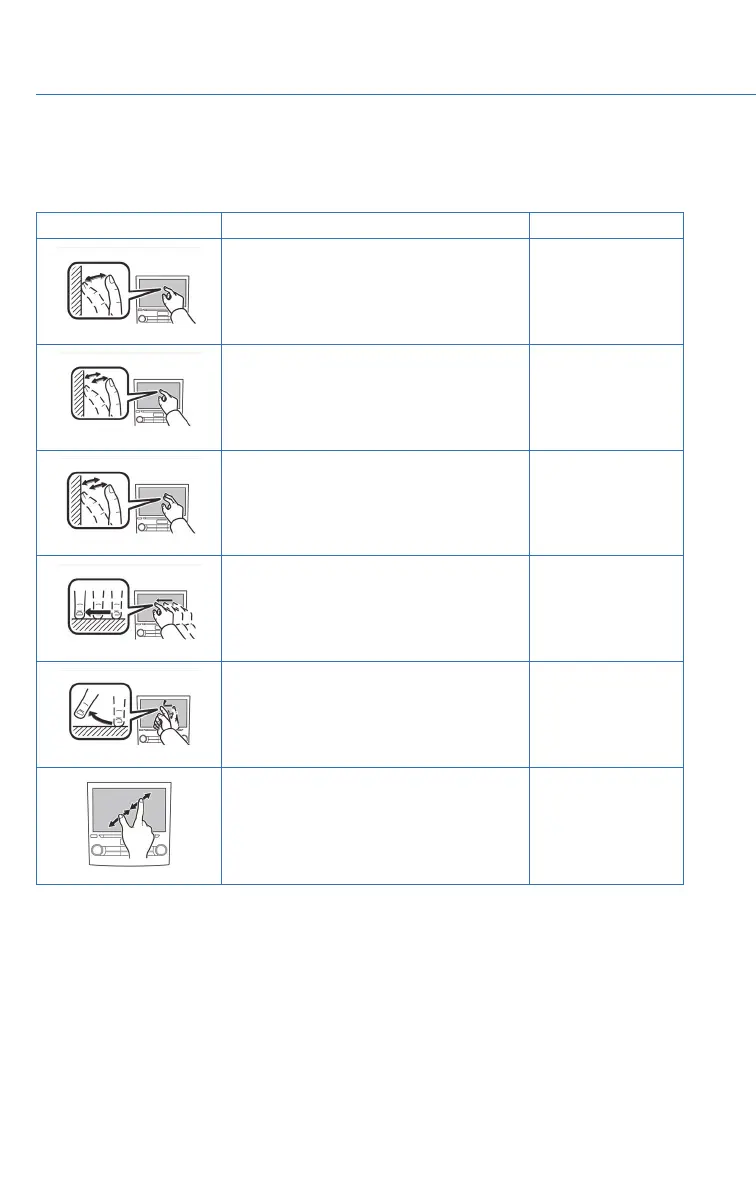
Operations are performed by touching the screen directly with your finger.
MOTION ACTION USE
Touch
Quickly touch and release once.
Changing and
selecting various
settings
Double Touch with one finger*
Quickly touch and release twice with one
finger.
Enlarging the scale
of the map screen
Double Touch with two fingers*
Quickly touch and release twice with two
fingers.
Reducing the scale
of the map screen
Drag**
Touch and drag your finger on the screen
to move the screen to the desired
position.
•
Scrolling the lists
• Scrolling the
map screen*
Swipe**
Quickly move the screen by swiping with
your finger.
•
Scrolling the lists
• Scrolling the
map screen*
Pinch*
Move your two fingers further apart
(pinch-out) to zoom in on the map. Move
your two fingers closer together
(pinch-in) to zoom out on the map.
Changing the scale
of the map screen
* 8-inch with Navi system only
** The operations may not be performed on all screens.
STARLINK OVERVIEW
50















 To Next Page