OVERVIEW OF YOUR MULTIMEDIA SYSTEM
SUBARU STARLINK
®
Multimedia combines the radio along with the ability to connect your
phone* through Bluetooth
®
to the radio for making calls, sending text messages and
listening to your favorite songs that are on your phone.
* Compatible smartphone and application required. For applications to operate, latest version of each
application required. Data provided by smartphone is displayed on the Touchscreen. Some state laws
prohibit the operation of handheld electronic devices while operating a vehicle. Smartphone apps
should only be launched when vehicle is safely parked. Your wireless carrier’s rates may apply.
Various Systems
Depending on your model and trim level there are several types of SUBARU STARLINK
®
Multimedia systems. Some of the functions described in this guide will vary by system.
• 6.5-inch Multimedia
• 6.5-inch Multimedia Plus
• 8.0-inch Multimedia Plus
• 8.0-inch Multimedia Navigation
BUTTONS
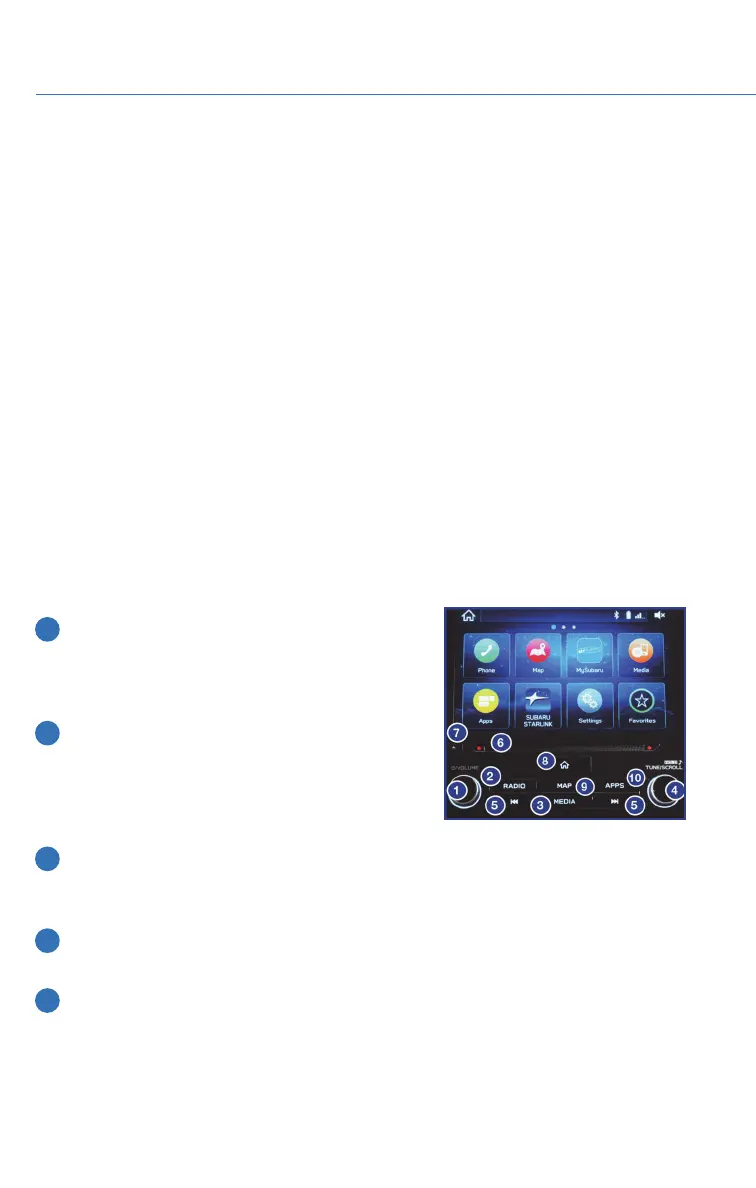
Radio Functions
1 Power/Volume Control
Press the power/volume control knob to mute or
un-mute the audio. Rotate the knob left to
decrease or right to increase the volume.
2 Radio
Press the RADIO button to display the
AM/FM/SXM screen. The different tuner modes
can be selected by touching the source you want
to hear.
3 Media
Press the MEDIA button to display the media sources on the screen. Touch the media
source you want to hear. Connected media will display in white.
4 Tune
Rotate the knob to change the channels.
5 Seek
Press the seek up or seek down button to select the next or previous radio frequency.
You can also use the seek up or down buttons to select different audio tracks from
media sources.
STARLINK OVERVIEW
48















 To Next Page