Black plate (228,1)
北米Model "A2480BE-A" EDITED: 2011/ 7/ 26
5-42 Audio
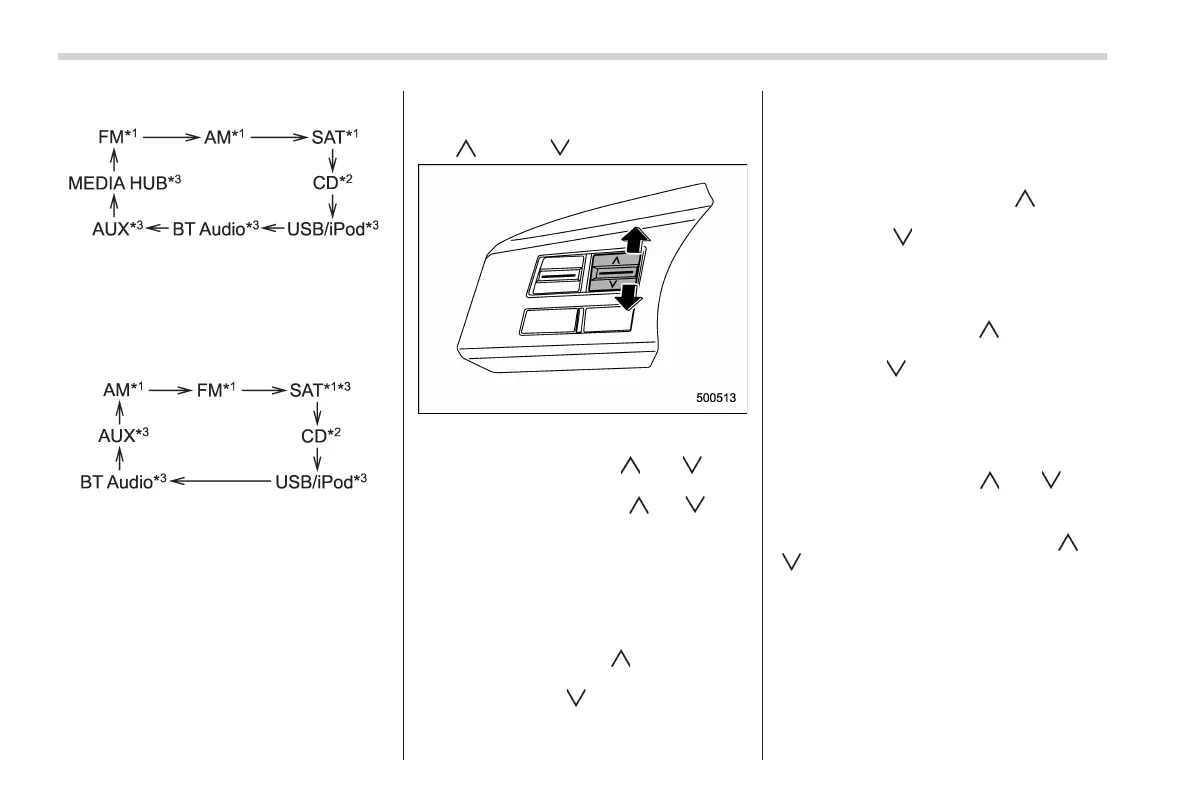
Type B audio:
*1: The frequency last received in the selected
waveband will be displayed.
*2: Only when a CD is in the player.
*3: Only when the device is connected.
Type C audio:
*1: The frequency last received in the selected
waveband will be displayed.
*2: Only when a CD is in the player.
*3: Only when the device is connected.
! Type B audio
Press and hold this button if you wish to
immediately cut the volume to zero.
The audio display will show “MUTE”.
If you press and hold the button again, the
original sound volume will return and
“MUTE” turns off.
& “ ” and “ ” switch
! With radio mode selected
Press the switch to the “
” or “ ” side
briefly to skip to a preset channel. Press
and hold the switch to the “
” or “ ” side
to seek the next receivable station and
stop at it.
That station’s frequency will be indicated
on the audio display.
! With CD/USB/Bluetooth
®
audio
mode selected
Press the switch to the “
” side briefly to
skip forward in the track/file order. Press
the switch to the “
” side briefly to skip
backward in the track/file order.
The track/file number will be shown on the
audio display.
For type B and C audio, when the MP3/
WMA/AAC format track is playing, press
and hold the switch to the “
” side to
select the next folder. Press and hold the
switch to the “
” side to go back to the
previous folder.
! With iPod
®
mode selected (type B
and C audio)
Press the switch to the “
” side to skip
forward in the track/file order. Press the
switch to the “
” side to skip backward in
the track/file order. The track/file number
will be shown on the audio display.
! With SAT mode selected (type C
audio)
Press the switch to the “
” or “ ” side
briefly. The radio will seek the next preset
channel and stop at it.
Press and hold the switch to the “
” or
“
” side. The radio will seek the next
receivable channel and stop at it.
The channel will be shown on the audio
display.














 To Next Page