Black plate (270,1)
一般Model "A2510GE-B" EDITED: 2015/ 6/ 25
5-38
Audio/Radio operation
For Europe, for Australia:
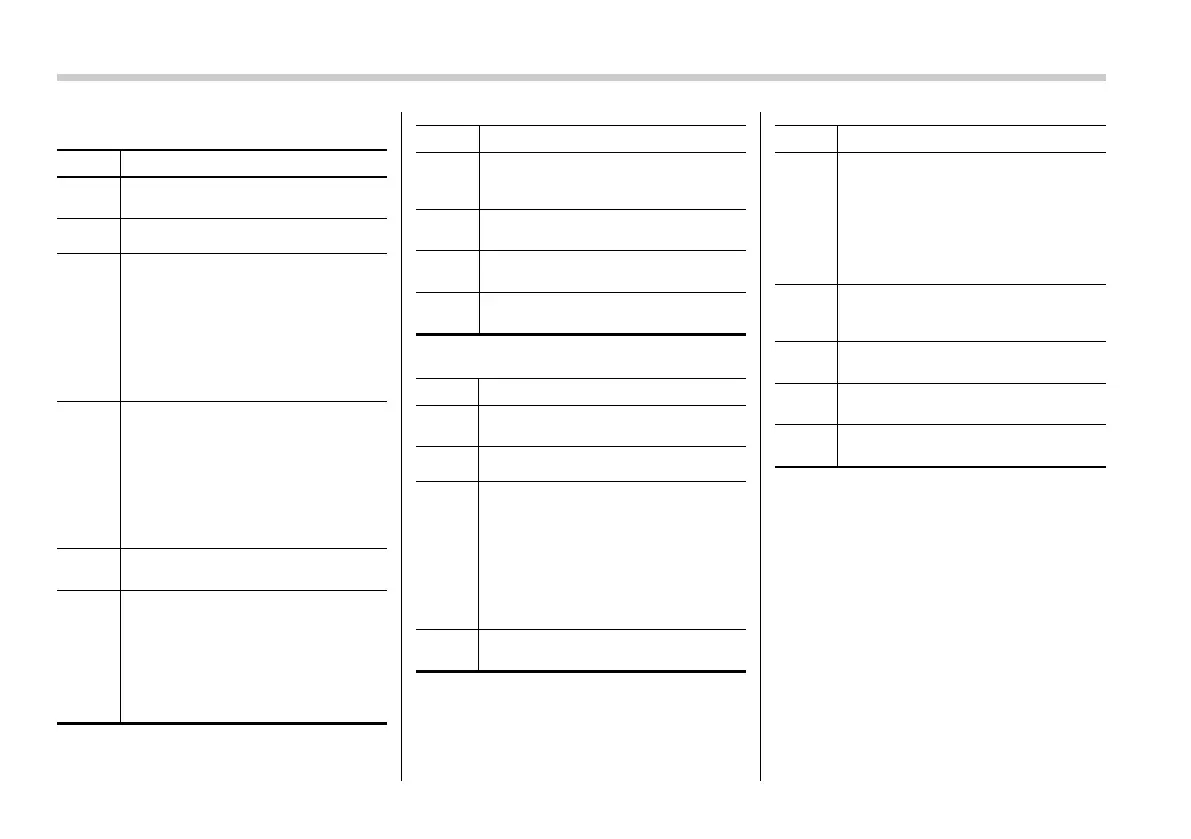
No. Function
&
1
Select to display the audio source
selection screen.
&
2
Select to change the FM band.
&
3
TA icon: It is displayed when turning
the TA setting ON on the FM Options
screen. It is not displayed when
turning the TA setting OFF.
NEWS icon: It is displayed when
turning the News setting ON on the
FM Options screen. It is not dis-
played when turning the News
setting OFF.
&
4
Preset SCAN: Select to search for
stations stored in the preset chan-
nels in the direction of a higher
frequency.
When a receivable station is found,
the system tunes in to the frequency
for 10 seconds.
The preset scan ends when all the
preset channels have been scanned.
&
5
Option key: Select to open the
Option screen.
&
6
If you press a key for less than 1.5
seconds, the system tunes in to the
stored frequency.
If you press a key for more than 1.5
seconds, the system stores the
frequency to the selected preset
channel. Refer to “Presetting a sta-
tion” F5-39.
No. Function
&
7
Select to display the sound setting
screen. Refer to “Basic operation”
F5-16.
&
8
Turn to adjust the volume. Press to
turn the audio system on/off.
&
9
Turn to step up/down frequencies.
Press to select an audio mode.
&
10
Select to seek for a station/channel.
Select and hold for continuous seek.
Except for Europe:
No. Function
&
1
Select to display the audio source
selection screen.
&
2
Select to change the FM band.
&
3
Select to scan radio channels. This
function enables searching for re-
ceivable stations automatically, and
tunes in to a frequency for 5 seconds
if a station is found. When the 5-
second period has elapsed, the
system searches for the next recei-
vable station again, and tunes in to
the frequency for 5 seconds.
&
4
Option key: Select to open the
Option screen.
No. Function
&
5
If you press a key for less than 1.5
seconds, the system tunes to the
stored frequency.
If you press a key for more than 1.5
seconds, the system stores the
frequency to the selected preset
channel. Refer to “Presetting a sta-
tion” F5-39.
&
6
Select to display the sound setting
screen. Refer to “Basic operation”
F5-16.
&
7
Turn to adjust the volume. Press to
turn the audio system on/off.
&
8
Turn to step up/down frequencies.
Press to select an audio mode.
&
9
Select to seek for a station/channel.
Select and hold for continuous seek.
NOTE
The radio automatically changes to
stereo reception when a stereo broad-
cast is received.















 To Next Page