Black plate (309,1)
一般Model "A2510GE-B" EDITED: 2015/ 6/ 25
& Setting Bluetooth details
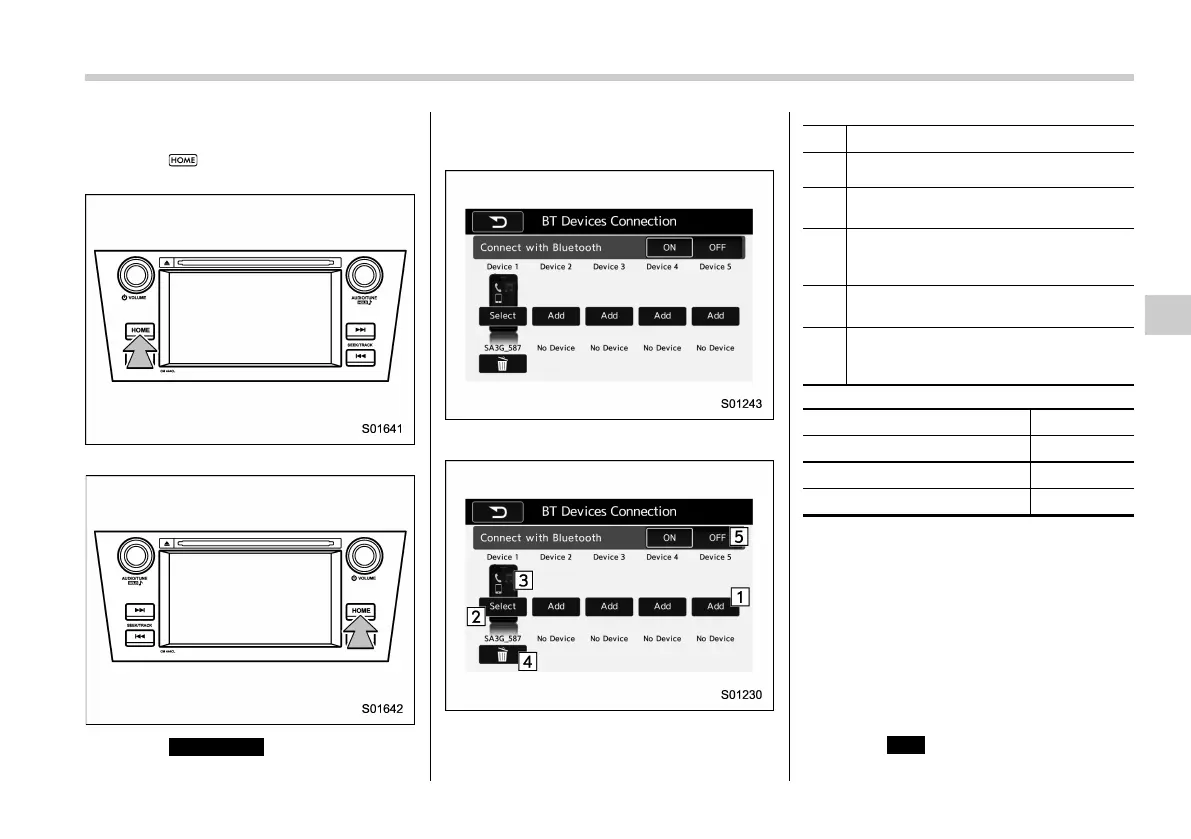
1. Select .
For LHD models:
For RHD models:
2. Select
SETTINGS
(SETTINGS).
3. To register a device, select “Add” on
“BT Devices Connection”.
! BT Devices Connection screen
“BT Devices Connection” screen (One
device is registered.)
No. Function
&
1
“Add” key: Registers the device.
&
2
“Select” key: Makes the connection to
the registered device.
&
3
This shows the status of the device
connection profile. (The icon illuminates
while connected.)
&
4
“Delete (Trash box)” key: Deletes the
registered device.
&
5
Bluetooth ON/OFF key: Switches to
connect/disconnect the Bluetooth com-
munication.
Function Page
Registering a Bluetooth device 5-77
Deleting a Bluetooth device 5-78
Connecting a Bluetooth device
5-78
! Registering a Bluetooth device
You can register up to five devices,
regardless of whether they are Bluetooth
phones or audio devices.
This operation cannot be performed while
driving.
1. Display the “BT Devices Connection”
screen. Refer to “Registering a Bluetooth
phone for the first time” F5-74.
2. Select
Add
(Add).
Audio/Bluetooth
®
settings
5-77
– CONTINUED –
5















 To Next Page