Black plate (324,1)
一般Model "A2510GE-B" EDITED: 2015/ 6/ 25
5-92
Audio/Phone operation (Hands–free system for cellular phones)
! By off hook switch
Calls can be made using the latest call
history item.
1. Press the
switch on the steering
wheel to display the phone top screen.
2. Check that the “Call (Call)” screen is
displayed.
& Receiving on the Bluetooth
phone
! Incoming calls
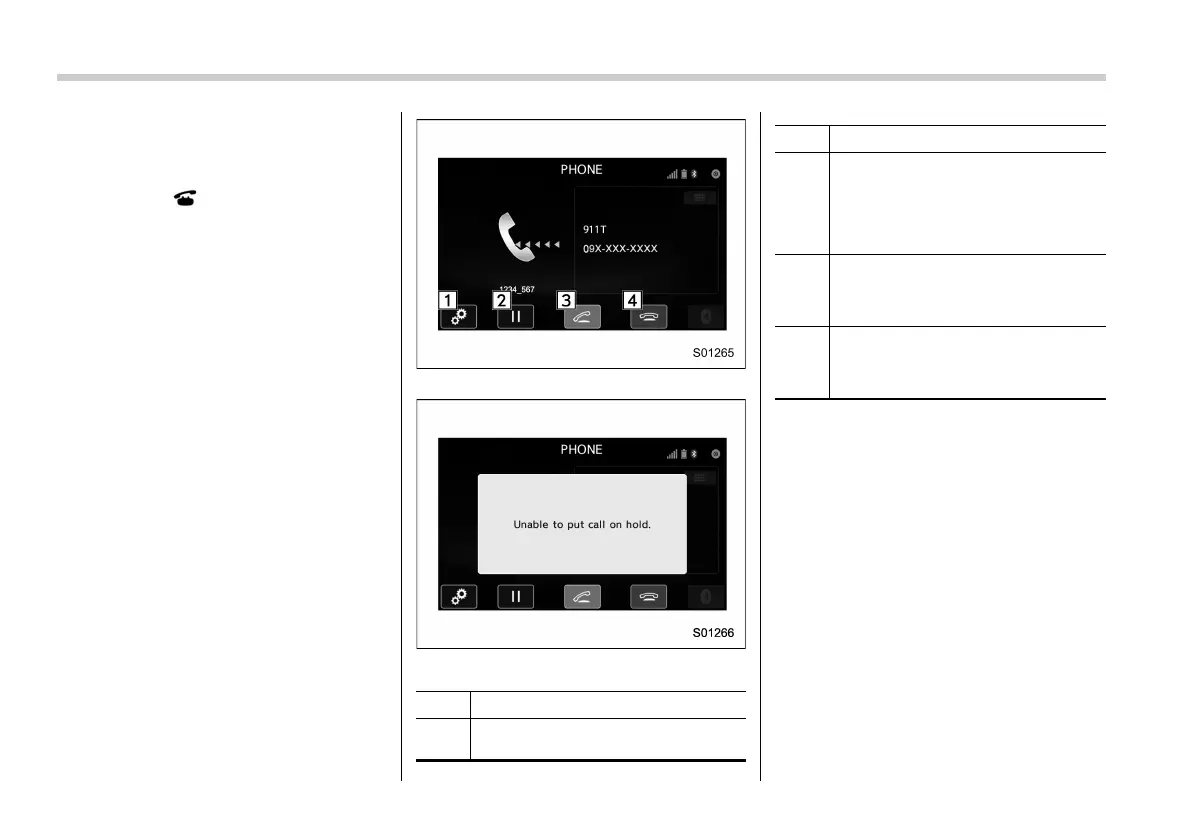
When a call is received, the incoming call
screen is displayed with a sound.
. When you are on the Outgoing Call
screen, the screen changes to the Call
screen when the other party answers the
call.
. The “Mute”, “Speaker”, and “Bluetooth”
keys are disabled on the Outgoing Call
screen.
. When you receive a phone call while
the cellular phone is connected, the
screen changes to th e Incoming Call
screen.
Incoming Call screen
Unable to put call on hold screen
No. Function
&
1
“Option” key: Opens the Options
(volume settings) screen.
No. Function
&
2
“Hold” key: Puts the incoming call on
hold. This function may not work on
some cell phone models. This func-
tion is the same as pressing the
“ON_Hook” switch on the steering
wheel for a short period of time.
&
3
“OFF_Hook” key: Opens the Call
screen. This function is the same as
pressing the “OFF_Hook” switch on
the steering wheel.
&
4
“ON_Hook” key: Rejects the incoming
call. This function is the same as
pressing and holding the “ON_Hook”
switch on the steering wheel.
NOTE
. During international phone calls, the
other party’s name or number may not
be displayed correctly depending on
the type of cellular phone you have.
. Depending on the type of Bluetooth
phone, both the system and Bluetooth
phone m ay sound simultaneously
when there is an incoming call. Refer
to ““Sound Settings (Sound Settings)”
screen” F5-95.















 To Next Page