Black plate (280,1)
一般Model "A2510GE-B" EDITED: 2015/ 6/ 25
5-48
Audio/Media operation
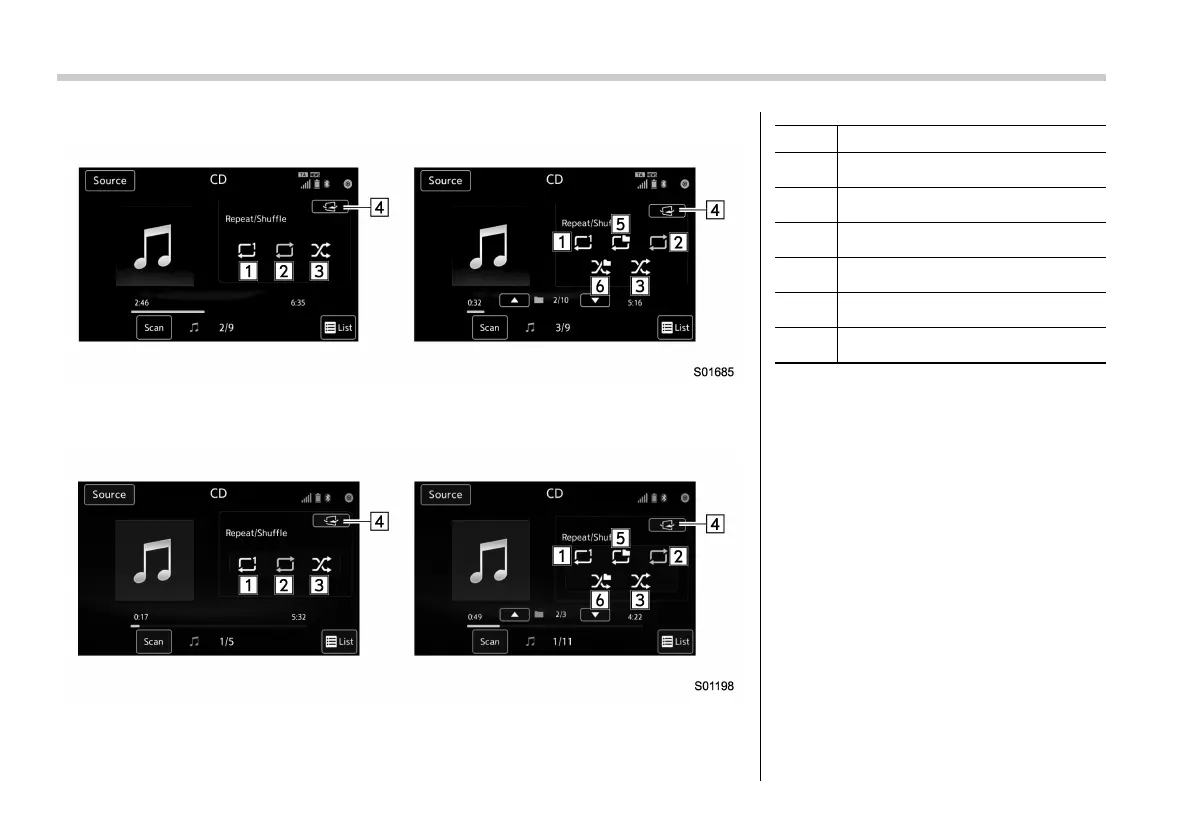
Control screen (Trick Play) (for Europe, for Australia)
Left: Audio CD, Right: MP3/WMA/AAC disc
Control screen (Trick Play) (except for Europe)
Left: Audio CD, Right: MP3/WMA/AAC disc
No. Function
&
1
Select to start 1 Track Repeat.
&
2
Select to start Repeat All.
&
3
Select to start Shuffle All.
&
4
Return to the control screen.
&
5
Select to start Folder Repeat.
&
6
Select to start Shuffle Folder.
NOTE
. If a disc contains CD-DA files and
MP3/WMA/AAC files, only the CD-DA
files can be played back.
. If a CD-TEXT disc is inserted, the
title of the disc and track will be
displayed. Up to 32 characters can be
displayed.
. If the disc contains no CD-TEXT,
only the track number would be dis-
played on the screen.
. If you press the “Mute” switch on
the steering wheel during playback, the
track pauses. If you press the “Mute”
switch once again, the playback will
resume.















 To Next Page