Black plate (311,1)
一般Model "A2510GE-B" EDITED: 2015/ 6/ 25
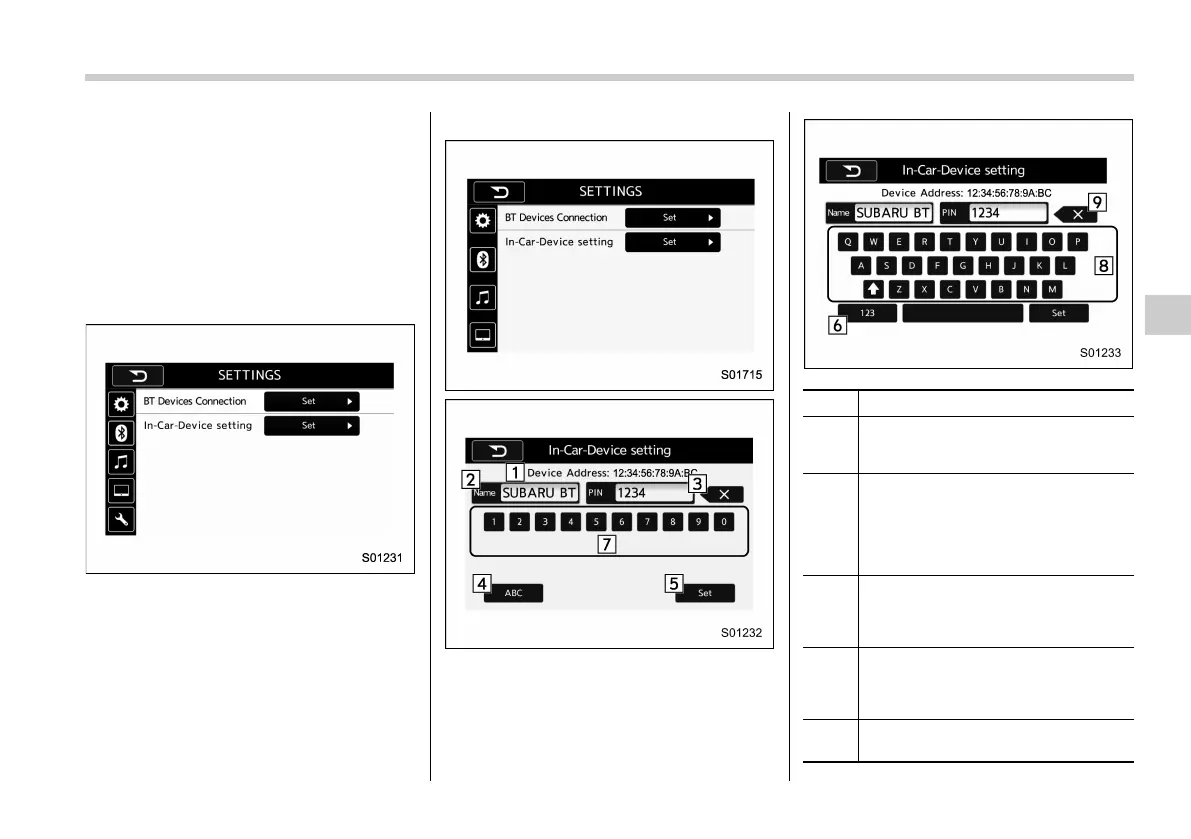
! “In-Car-Device setting” screen
The Bluetooth settings can be confirmed
and changed.
1. Display the “SETTINGS” screen. Refer
to “Registering a Bluetooth phone for the
first time” F5-74.
2. On the SETTINGS for In-Car-Device
setting select “Set” key.
For Europe:
Except for Europe, Australia:
No. Function
&
1
BT device address: Displays the
Bluetooth device address of the in-
vehicle equipment.
&
2
BT device name: Displays the Blue-
tooth device name of the in-vehicle
equipment. The default name is
“SUBARU BT”, which can be changed
by selecting it and entering alphanu-
meric characters.
&
3
PIN code: Displays the PIN code of
the in-vehicle equipment. The default
code is “1234”, which can be changed
by selecting it and entering numbers.
&
4
“ABC” key: Switches the screen to
input alphabet characters. This key
cannot be selected when entering the
PIN code.
&
5
“Set” key: Saves the current BT
device name and PIN code.
Audio/Bluetooth
®
settings
5-79
– CONTINUED –
5















 To Next Page