Black plate (326,1)
一般Model "A2510GE-B" EDITED: 2015/ 6/ 25
5-94
Audio/Phone operation (Hands–free system for cellular phones)
No. Function
&
2
“Mute” key: Mutes your voice to the
other party. Press the “Mute” key
again to deactivate the Mute mode.
This key is disabled in the Private
mode.
&
3
“Speaker” key: Changes the mode to
Private mode. The other party’s voice
emits from the cell phone. Press the
“Speaker” key again to deactivate the
Private mode.
&
4
“ON_Hook” key: Ends the call. You
return to the Phone (Menu) screen
when ending outgoing calls and the
previous screen when ending incom-
ing calls. This function is the same as
pressing and holding the “ON_Hook”
switch on the steering wheel.
&
5
“Dialpad” key: Opens the Call (Dia-
lpad) screen.
&
6
“Switch Screen” key: Switches the
screen to the Phone (Menu) screen.
&
7
“Dialpad” key: Allows you to make
DTMF (Dual Tone Multi Frequency)
calls. The numbers you enter are sent
as tone signals.
NOTE
. When cellular phone call is changed
to hands-free call, the hands-free
screen will be displayed and its func-
tions can be operated on the screen.
. Changing between cellular phone
call and hands-free call can be per-
formed by operating the cellular phone
directly.
. Transferring methods and opera-
tions will be different depending on
the type of cellular phone you have.
. For the operation of the cellular
phone, see the manual that comes with
it.
. On the PHONE (Menu) screen, the
screen changes to the Phone (Dialpad)
screen when you select “Dialpad”.
. After entering the phone number on the
keypad, the call is made when you select
the “OFF_Hook” key.
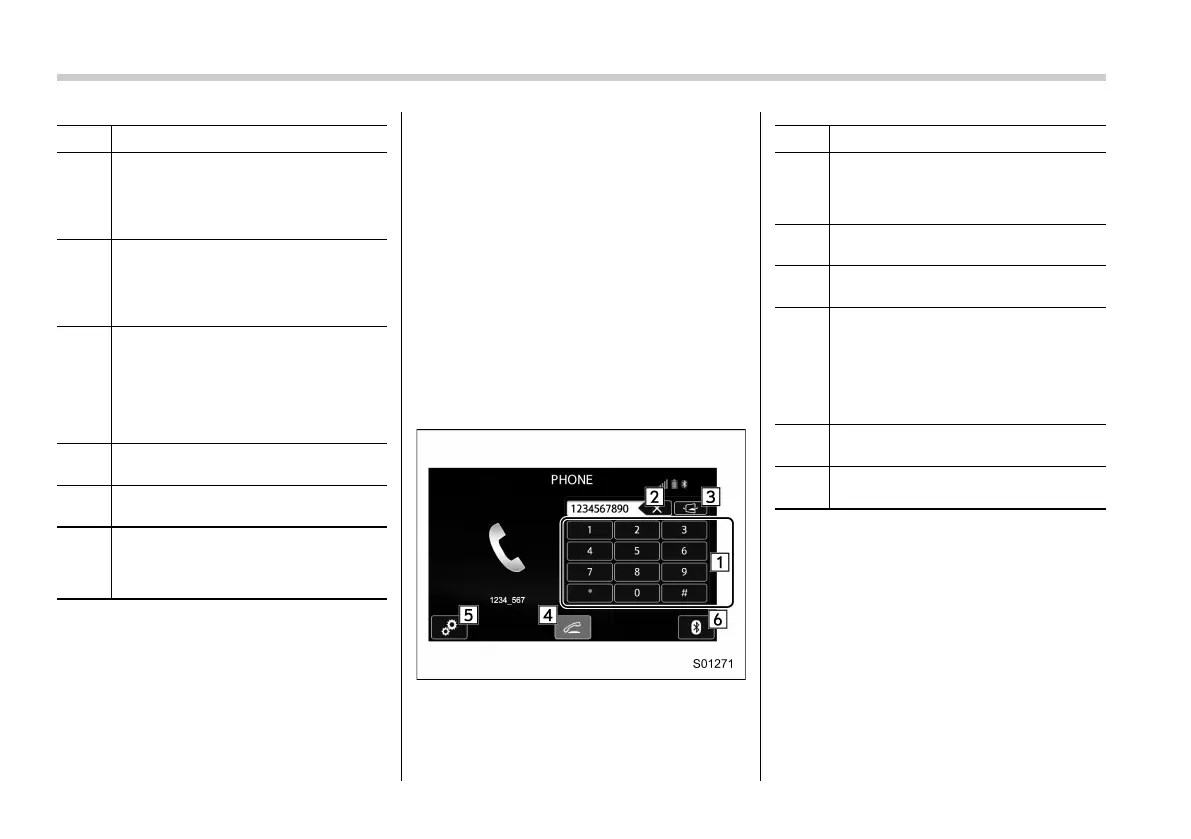
Phone (Dialpad) screen
No. Function
&
1
“Dialpad” keys: Allows you to enter
numbers from 0 to 9 and *, #, and +.
To enter “+”, press and hold the “0”
key.
&
2
“Delete” key: Deletes one character
from the entered characters.
&
3
“Switch Screen” key: Switches the
screen to the Phone (Menu) screen.
&
4
“OFF_Hook” key: Opens the Outgoing
Calls screen and dials the entered
phone number. This is the same as
pressing the “OFF_Hook” switch on
the steering wheel. This key is cross-
hatched and cannot be selected until
the phone number is entered.
&
5
“Option” key: Opens the Options
(volume settings) screen.
&
6
“Bluetooth Setting” key: Opens the BT
Devices Connection screen.
NOTE
The sound quality of the voice heard
from the other party’s speaker may be
negatively impacted.


 To Next Page
 Loading...











