EasyManua.ls Logo

SuddenLink connectedhome - Home Control Functions; Z-Wave Sensor Status; Thermostat Control; Smart Socket Management

SuddenLink connectedhome
29 pages
Print Icon
To Next Page IconTo Next Page
To Previous Page IconTo Previous Page
Loading...
Suddenlink Confidential and Proprietary. © All rights reserved 6/2014
Connected Home User Manual 14
ConnectedHome
SM
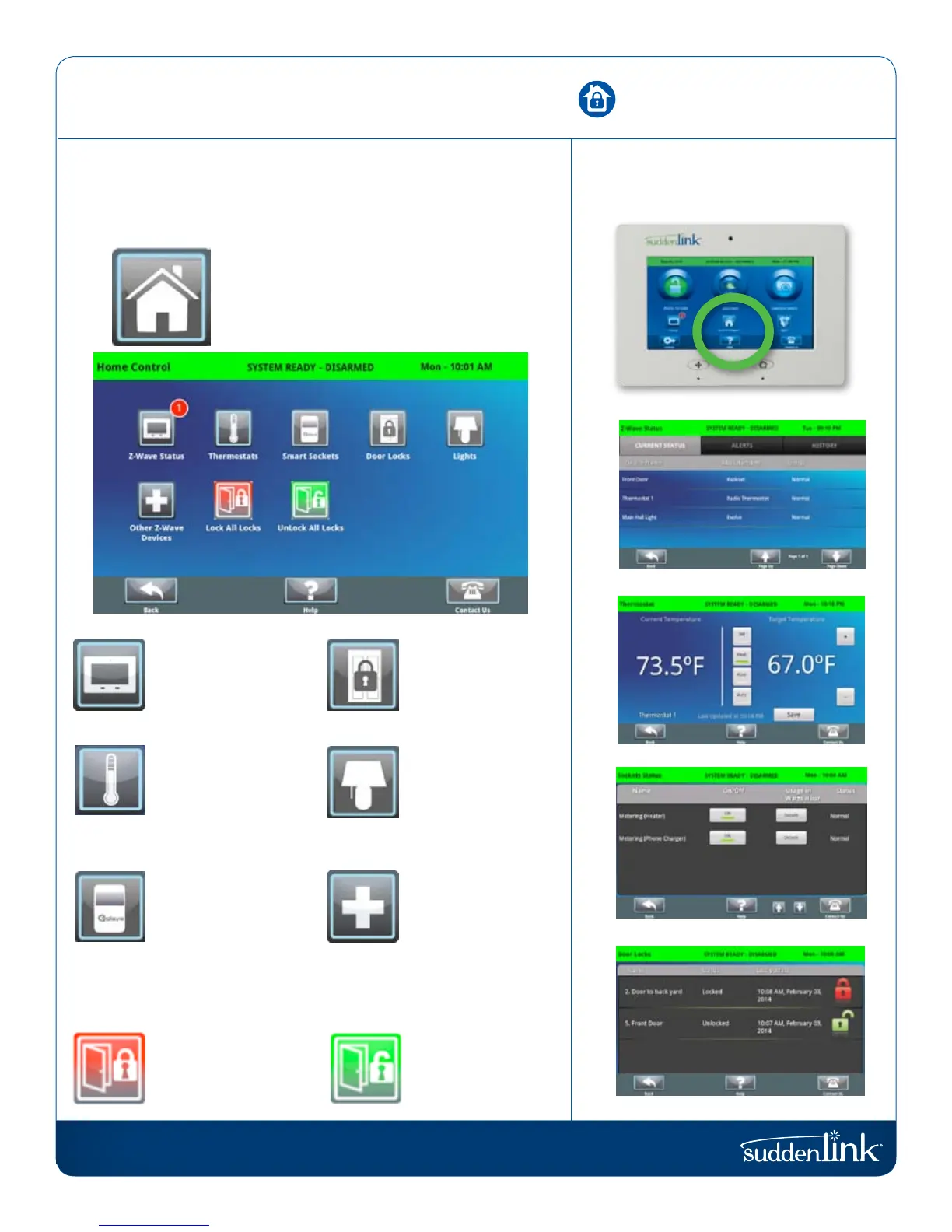
Z-Wave Status
See the status of all
your Z-Wave sensors.
Thermostat
See the current
temperature, adjust
target temps as desired,
switch from heat to
cool, auto or off.
Smart Socket
Control each side of
the smart socket, see
current energy usage.
Lock All Doors
Sends a lock command
to all doors.
Door Locks
See the current status
of each lock, send
lock or “unlock”.
Lights
Control light modules
from the Connected
Home panel to turn
lights on or off as needed.
Other Z-Wave
Devices
Pair other Z-Wave
devices with the
panel and operate
their functions from
this section.
Unlock All Doors
Sends an “unlock
command to all doors.
Z-Wave Status
Thermostat
Smart Socket
Door Locks
HOME CONTROL
The second icon on the second row is Home Control.
HOME CONTROL
Control your home automation devices from
the panels interface.
HOME CONTROL
FIND IT