Suddenlink Confidential and Proprietary. © All rights reserved 6/2014
Connected Home User Manual 4
SM
EMERGENCY BUTTON
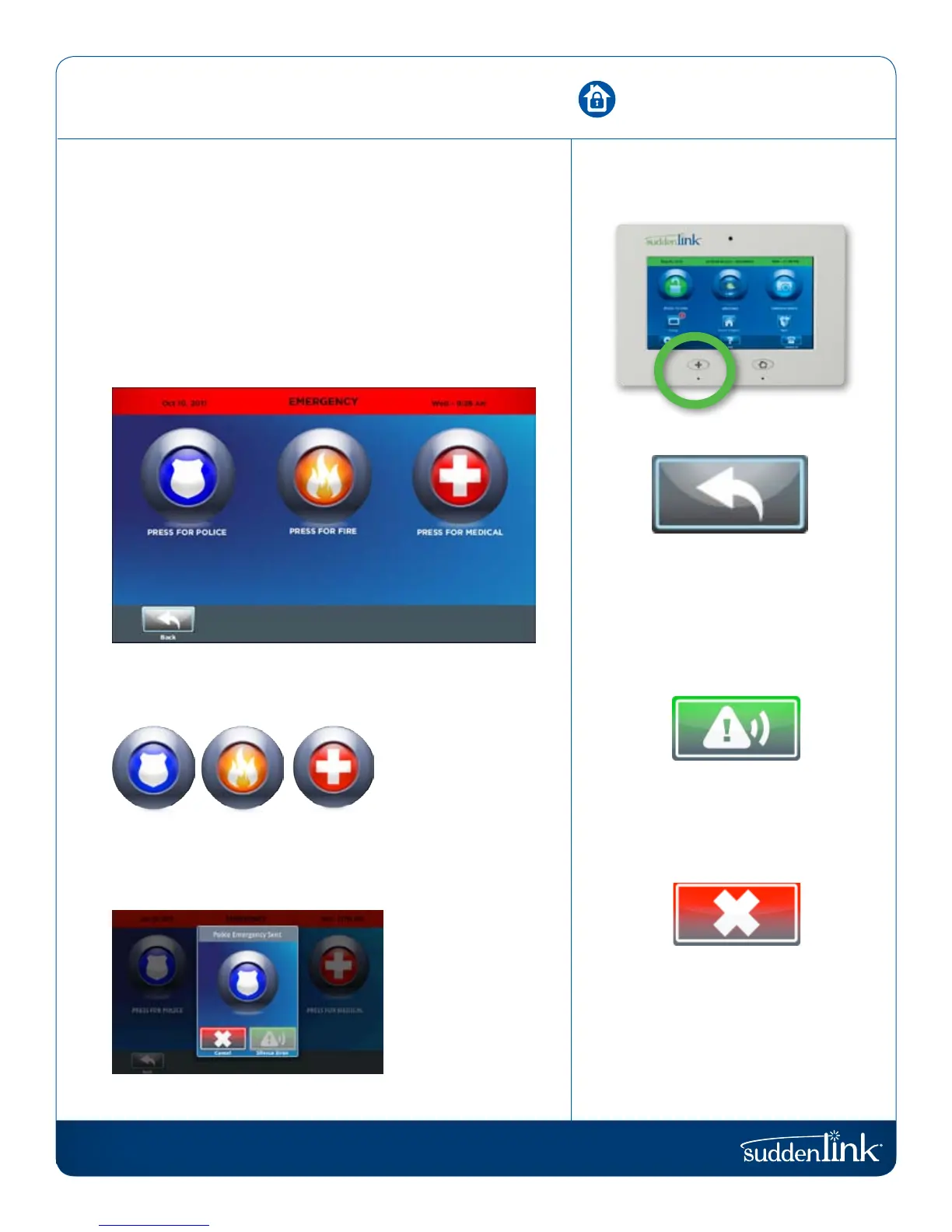
Below the 7” Touchscreen are two buttons: Emergency and Home.
The Emergency Button is marked with a “+” sign. This button
can be pressed at any time, regardless of the panel’s status or
the page currently displayed on the screen.
When pressed, the Connected Home panel will display the
emergency services page, with access to police, fire, and
medical emergency alarms.
Select the icon that represents your emergency
type. As soon as you tap the icon the siren
will sound and an “emergency sent” message
will appear.
WHOOPS!
If you press the emergency button
by mistake, simply tap the “Home”
button or click “Back” to return to
the previous page.
EMERGENCY TYPE
SILENCE SIREN
For medical and fire emergencies
you can silence the siren by pressing
the green button.
CANCEL REQUEST
To cancel an emergency request
press the “Cancel” button. For
security purposes, you will be
required to enter a valid user code.
FIND IT
EMERGENCY BUTTON


 To Next Page