Suddenlink Confidential and Proprietary. © All rights reserved 6/2014
Connected Home User Manual 20
SM
MASTER CODE
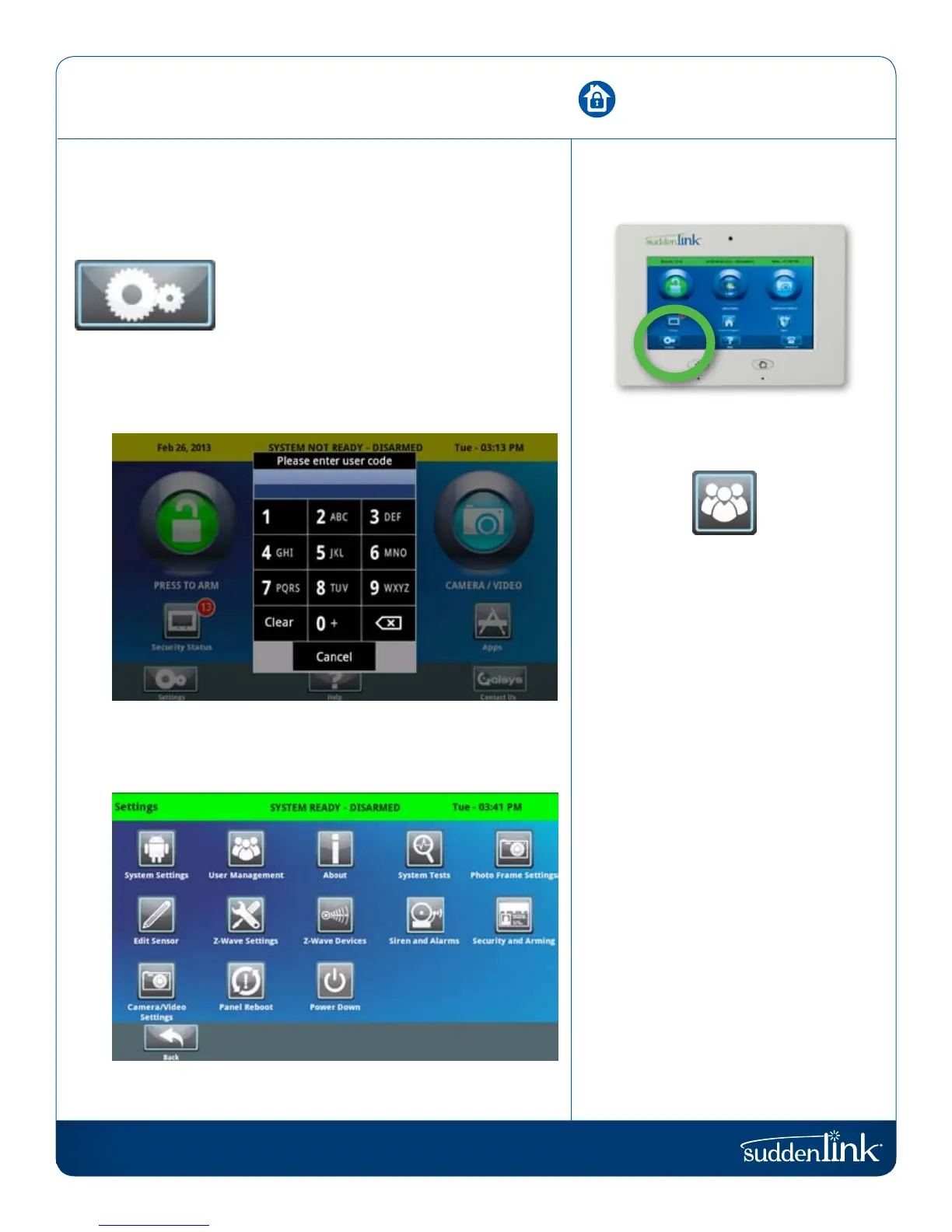
In order to access the system settings
you’ll need to enter the MASTER CODE
on the account.
To add, edit, or delete user codes,
select “User Management” in “Settings”.
While the account can have many
different codes, only the master code has
permission to adjust system settings.
DEFAULT CODE
For security purposes the default master
code should be changed when the
system has been installed in your home:
DEFAULT MASTER CODE:
1234
SETTINGS
The first icon in the footer/help section is “Settings.”
SETTINGS
Inside settings you’ll access a variety of options
to customize the panel’s interface and abilities to
your location and situation. A code is required
to access this part of the system.
Users have the ability to adjust various settings to customize
their experience. To access this area you will need to enter your
master code.
USER SETTINGS (REQUIRES MASTER CODE)
Note: Some features and settings are only accessible by us, so you may see
them “greyed out”. We will be happy to change these settings for you.
SETTINGS
FIND IT


 To Next Page