Suddenlink Confidential and Proprietary. © All rights reserved 6/2014
Connected Home User Manual 25
SM
AUTOUPDATE
When you make a change to a user, it
will automatically update the information
on your connectedhome.suddenlink.com
account.
If you make a change to a user on your
connectedhome.suddenlink.com account,
it will automatically update the information
on your Connected Home panel.
CODE TYPES
You can create users in the following
categories:
Master: Access panel functions as
well as system settings.
User: Access panel functions, but
NOT system settings
Guest: Used to give access to those
users who will only use the panel on
a temporary basis.
USERS
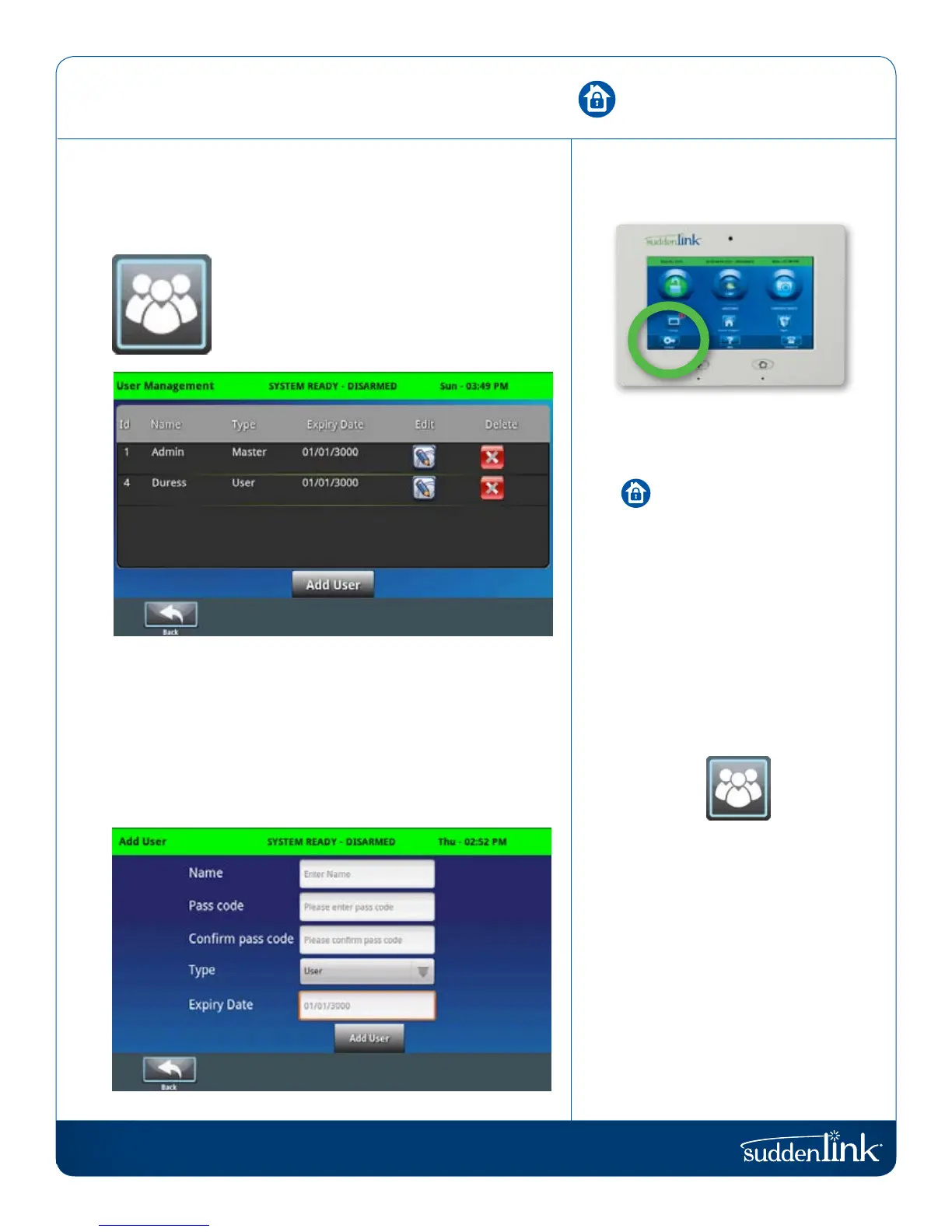
Access “User Management” in the “Settings”.
USERS
Add, delete, or edit the names, access levels
and individual passcodes for those who access
your system.
The Connected Home panel allows different users to operate the
system. Each user has a unique user code so that the Connected
Home panel can track who logs into and out of the system.
To access User Management, press the “Settings” button and
enter your master code. Then tap “User Management.” Users
have the option to add, edit, or delete users by pushing the
corresponding buttons on the screen. Make the desired changes
and tap “Save” to exit.
USERS
FIND IT
SM


 To Next Page