Suddenlink Confidential and Proprietary. © All rights reserved 6/2014
Connected Home User Manual 6
SM
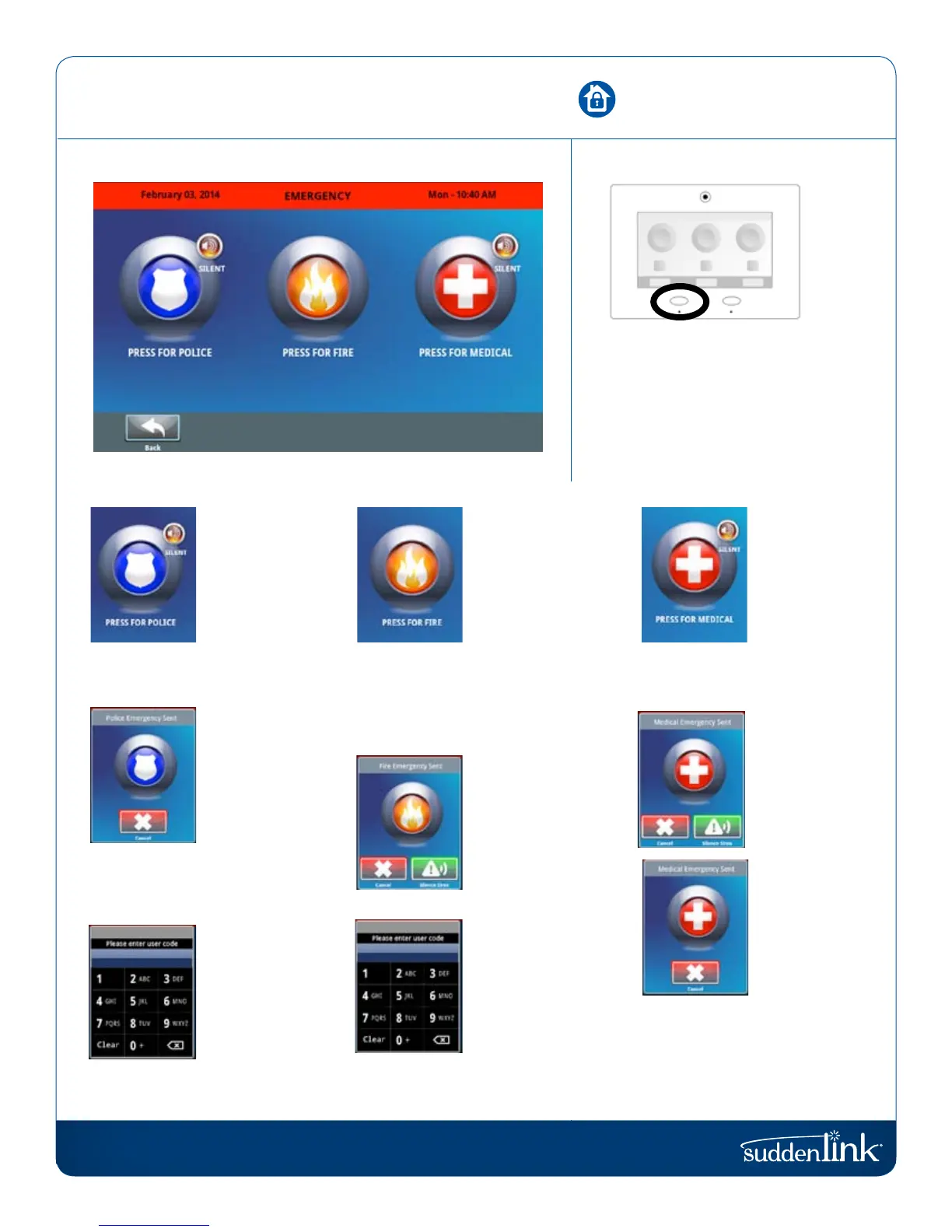
When you press the Emergency
Button the Emergency Panic screen
appears. Touching any of the buttons
will trigger an alarm manually.
POLICE
An “Intrusion”
alarm is triggered
when you touch
the “Police” panic
button. (touching
“Silent” triggers a
silent alarm.)
For your security,
once a police
siren has been
triggered it cannot
be silenced with-
out a passcode.
The alarm will
sound until you
touch “Cancel”.
Note: Touching
“Cancel” requires
your user code
and will cancel
the alarm reported
to us.
MEDICAL
A “Medical” alarm
is triggered when
you touch the
“Medical” panic
button. (touching
“Silent” triggers
a silent alarm.)
When the alarm is
going off you can
cancel it (requires
passcode) or
silence it until
authorities arrive.
If you create a
silent alarm only
the“Cancel” button
appears. Touching
it requires your
user code and will
cancel the alarm
reported to us.
FIRE
A “Fire” alarm is
triggered when
you touch the “Fire”
panic button.
Note: There is no
“Silent” function
on the button itself,
but once you touch
it you can silence it.
The alarm
will sound until
you touch
“Cancel” or touch
“Silence Siren”.
Note: Touching
“Cancel” requires
your user code and
will cancel the fire
alarm reported to us.
EMERGENCY PANIC


 To Next Page