Suddenlink Confidential and Proprietary. © All rights reserved 6/2014
Connected Home User Manual 21
SM
CUSTOM TEXT TO SPEECH
Because the Connected Home panel
uses an Android operating system, it
can read almost any name and speak
it when the sensor is opened.
Customize your system with specific
names like “Megan’s Upstairs Window”
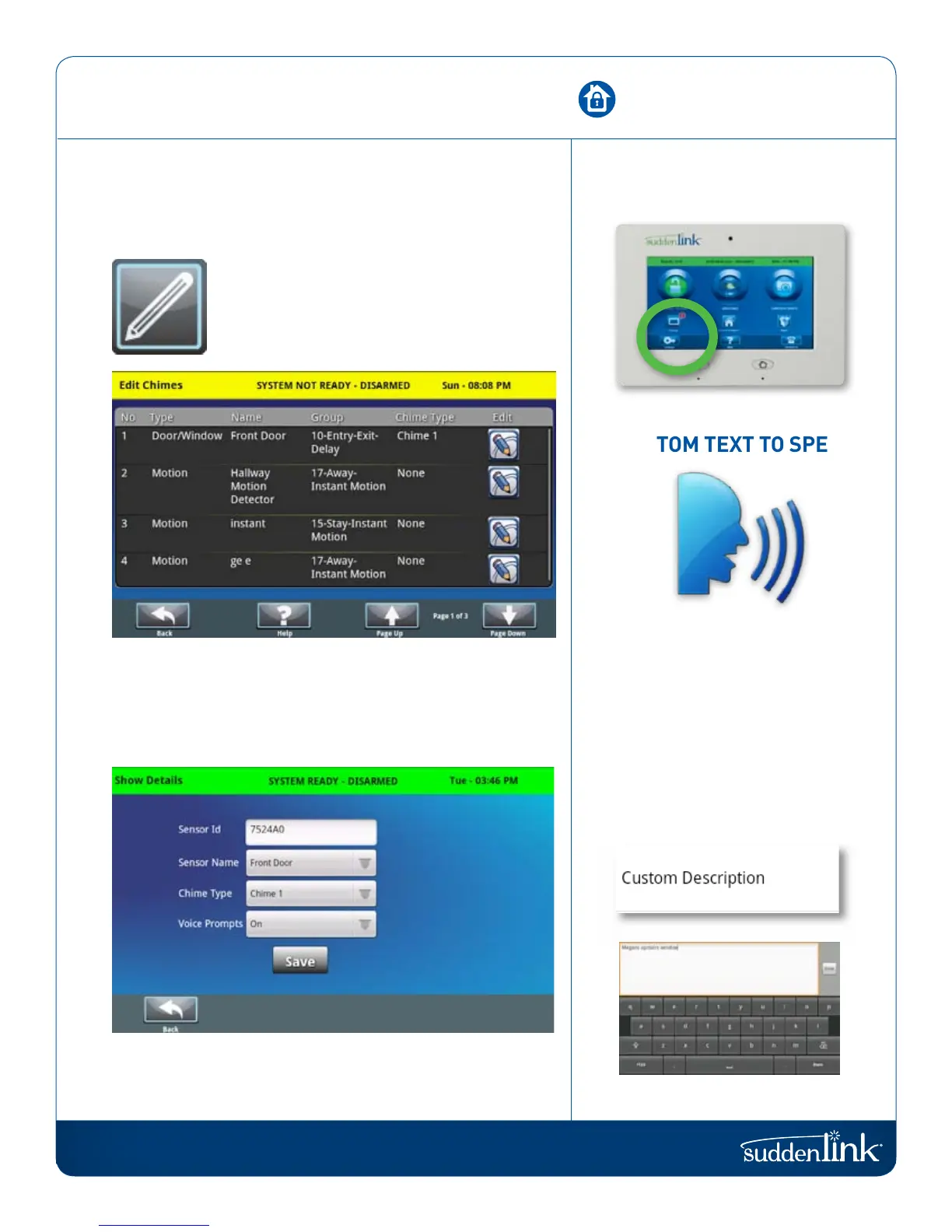
To customize a sensor name,
select “Custom Description” under
“Sensor Name”.
EDIT SENSOR
Edit the name and behavior of a sensor in the system.
EDIT SENSOR
Change the name of individual sensors.
To edit a sensor, click on the “Edit” button on the right side of the
sensor list and you will see a page displaying all the sensor details.
This includes the sensor name, chime type, and whether voice
prompts should be on or off.
Make any changes you like and click “Save” to exit.
EDIT SENSOR
FIND IT


 To Next Page