48 Sun Blade 150 Getting Started Guide • June 2002
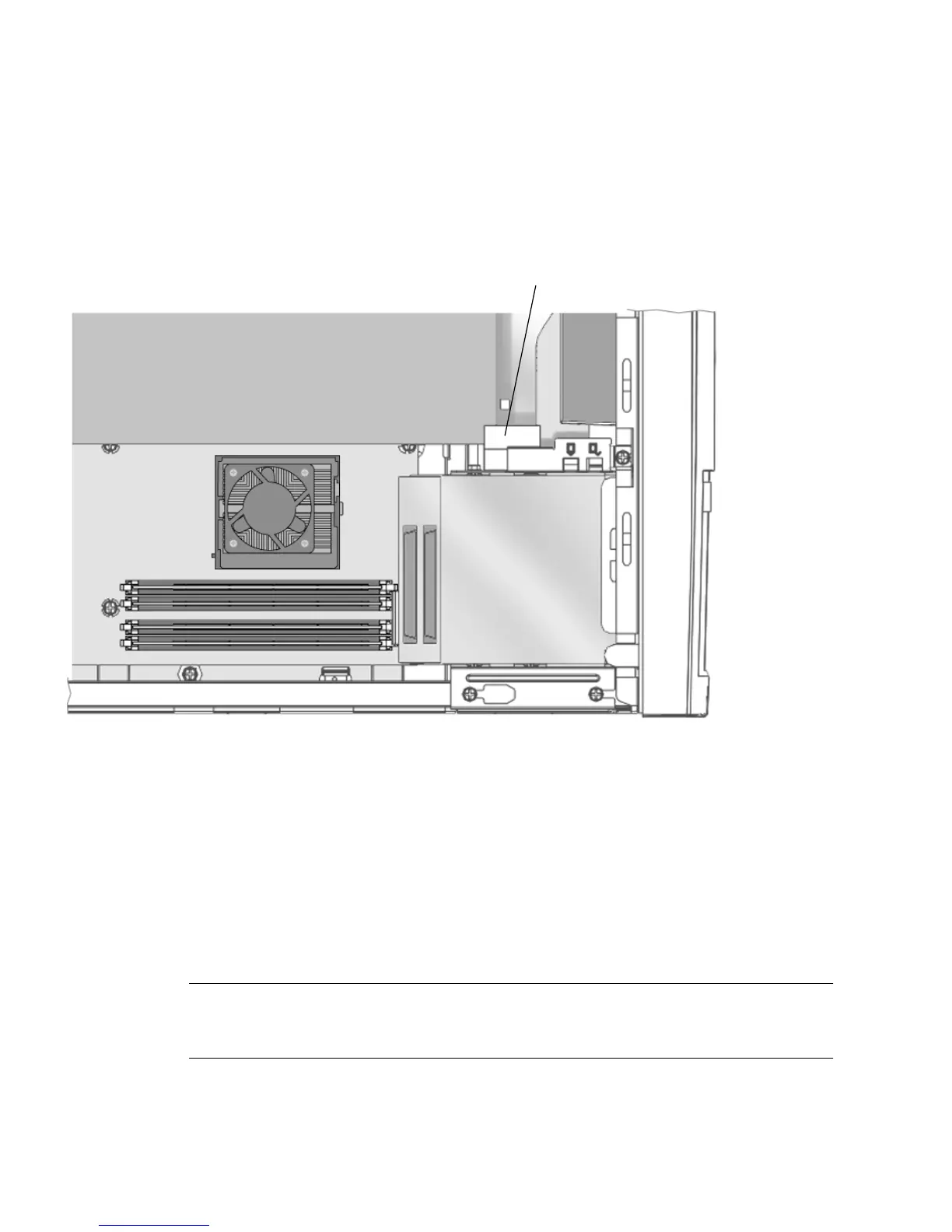
9. For long PCI cards or graphics accelerators, slide the adjustable PCI card guide
over the free end of the PCI card or graphics accelerator.
The adjustable PCI card guide is mounted on the side of the diskette drive bracket
(
FIGURE 4-9). This guide provides support for long PCI cards and graphics
accelerators.
FIGURE 4-9 PCI Card Guide
10. Continue with “Finishing Component Installation” on page 53.
Installing a CD-ROM or DVD-ROM Drive
1. Power off the workstation, power off peripherals, disconnect cables, remove the
cover, and attach an antistatic wrist strap as described in “Preparing for
Installation” on page 36.
Note – Before installing a new CD-ROM or DVD-ROM drive, ensure that the
jumpers for the drive are correctly positioned. If necessary, refer to the Sun Blade 150
Service Manual (816-4379).
Adjustable PCI card guide
PCI card or graphics accelerator board


 To Next Page