Chapter 4 Installing Optional Workstation Hardware 49
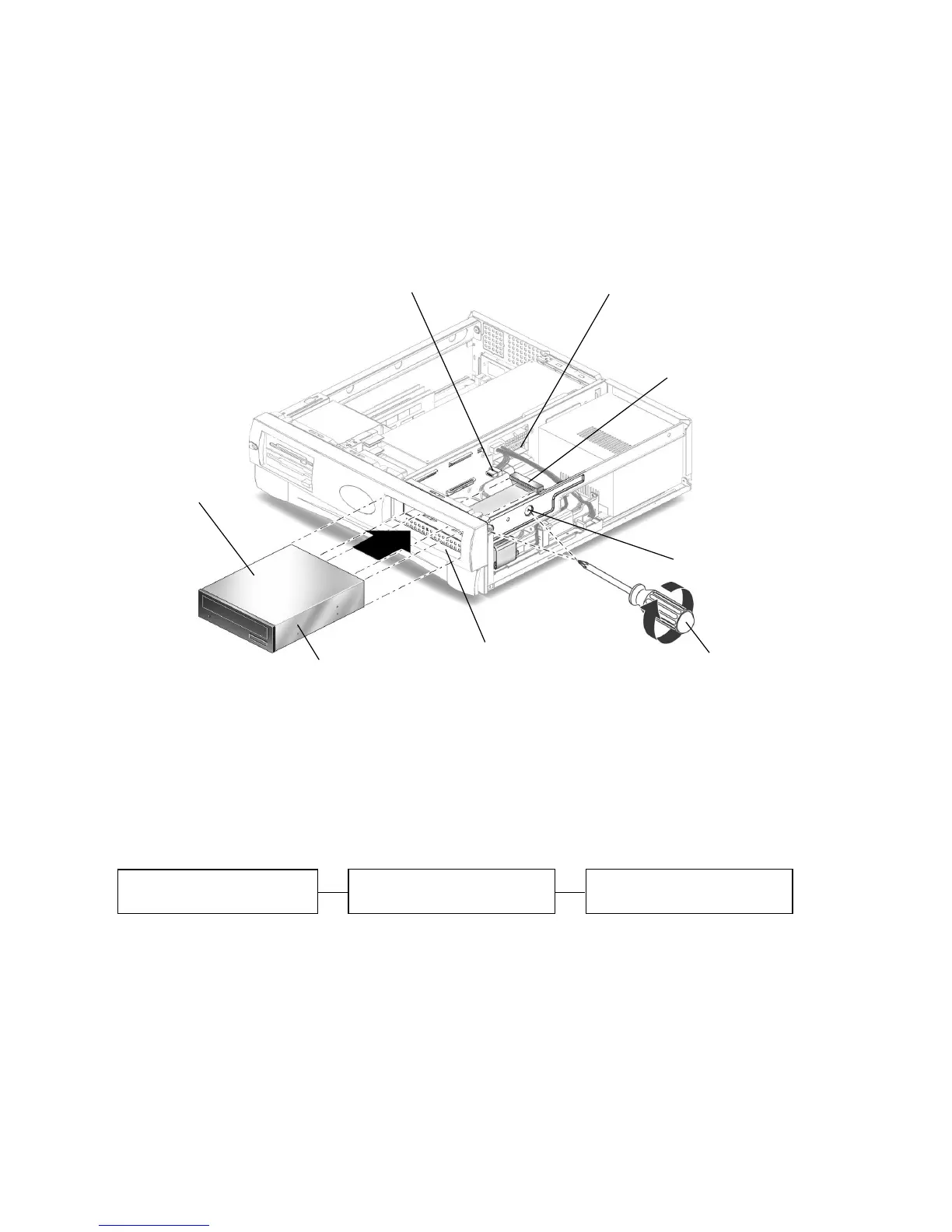
2. Position the drive into the drive opening on the front of the workstation and push
the drive in until the screw holes on the drive line up with the screw holes on the
chassis (
FIGURE 4-10).
3. Using a No. 2 Phillips screwdriver, install two screws that secure the drive to the
chassis.
FIGURE 4-10 Installing a CD-ROM or DVD-ROM Drive
4. Connect the primary IDE 1 and power cables to the rear of the drive (FIGURE 4-10).
The following block diagram shows the cabling path between the riser board, the
CD-ROM/DVD-ROM drive, and the primary hard drive. Use this diagram to help
you route the primary IDE 1 channel cable.
5. Continue with “Finishing Component Installation” on page 53.
Connector J504
Primary IDE 1 cable
Drive opening
No. 2 Phillips
screwdriver
Power cable
Screw holes in chassi
Screw holes on drive
CD-ROM or
DVD-ROM
drive
Riser board
Primary hard drive
CD-ROM/ DVD-ROM drive
(connector J504)


 To Next Page