- 17 -
7.2 Preset Tracking
Preset tracking is the same as home position tracking. The PTZ camera will
track a moving object at a pre-designated view. For example, if the camera
is installed at the house front, users can program the camera to start
tracking an object while the camera is exactly facing the front gate. In this
case, the front gate view and be added as a preset for tracking.
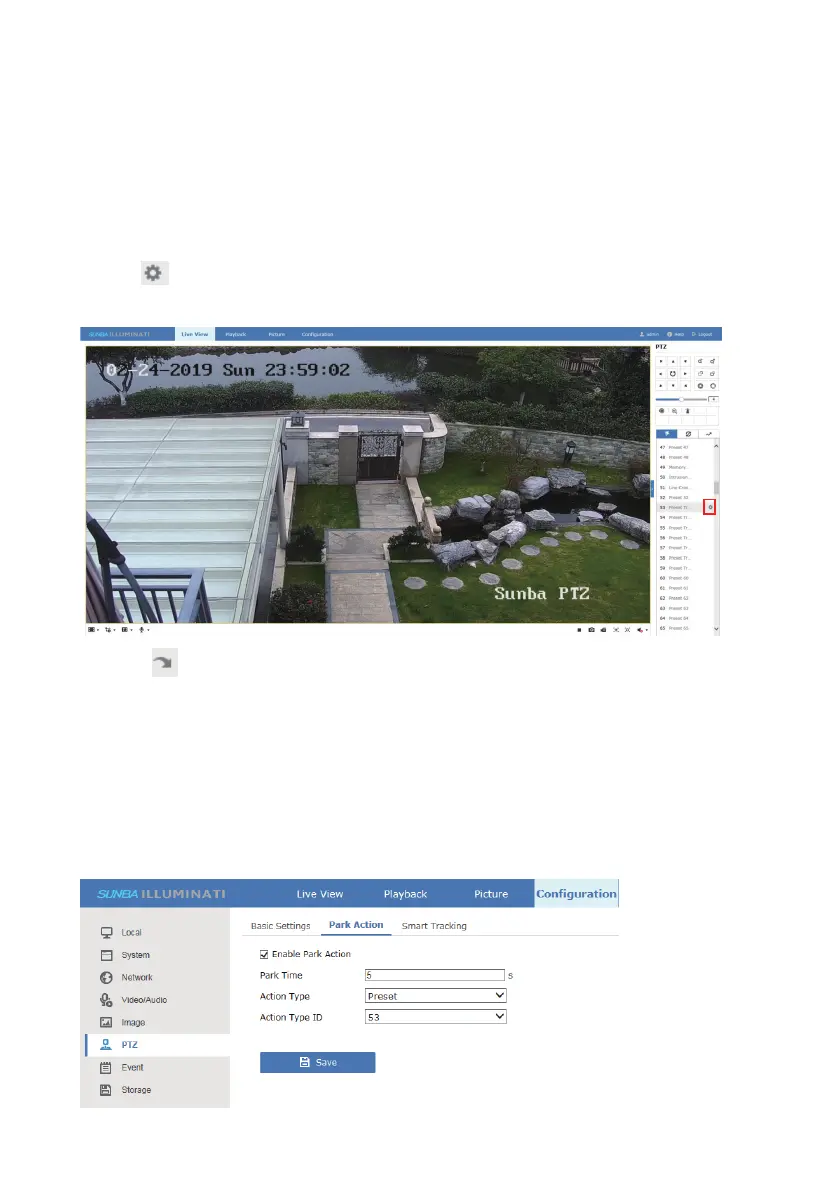
Steps to enable preset tracking:
1.Click to add a preset. The presets available to serve as a tracking
preset can be selected from 53-59.
2. Click the icon to call the preset set in step 1. The camera would then
follow a moving object for a set duration (set in Chapter 7.1) and return
back to the preset position.
If the user manually performs any pan tilt zoom related action, the preset
tracking will stop. To continue preset tracking, add the tracking preset into
Park Action (Configuration-PTZ-Park Action) so that the camera will
actively call the designated preset as long as the speed dome doesn’t
receive other commands from the user.



 To Next Page