- 18 -
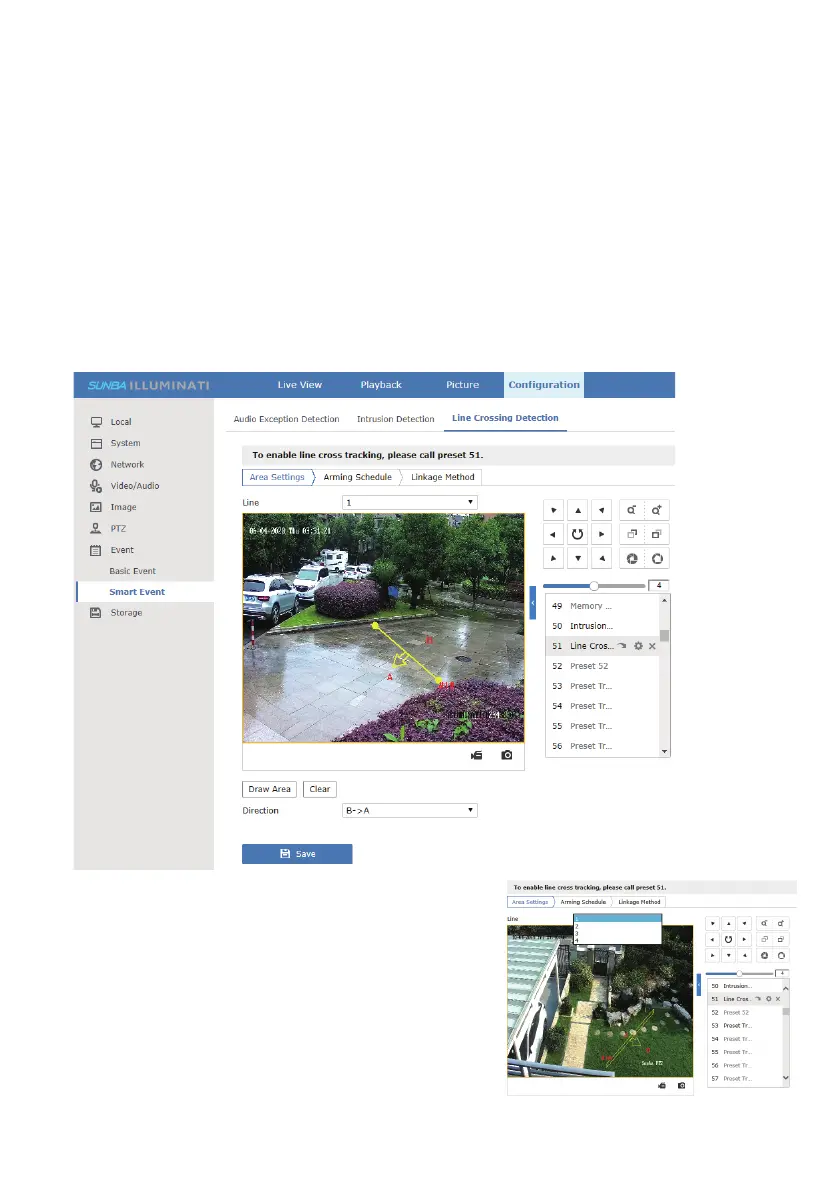
[Draw Area] Draw a virtual line
[Clear] Clear any existing lines
[Direction] Select the crossing direction to trigger
the alarm to be one of 1) A to B (A->B), 2) B to A
(B->A) or 3) bi-lateral (A<->B)
3. (Optional) Add additional lines if applicable.
Users can add up to 4 different lines.
7.3 Line Cross Tracking
Line cross tracking is an upgrade to conventional preset tracking to improve
tracking efficiency. Instead of tracking any moving object at the designated
view, it would only start tracking if a virtual line from the view has been
crossed by a moving object. For example, users can draw a line on their
front gate , and the camera will start following any moving object passing
the line (gate).
Steps to enable line cross tracking:
1.Set the desired surveillance view as preset 51
2.Set a line cross algorithm at Configuration->Event->Smart Event->Line
Crossing Detection



 To Next Page