- 19 -
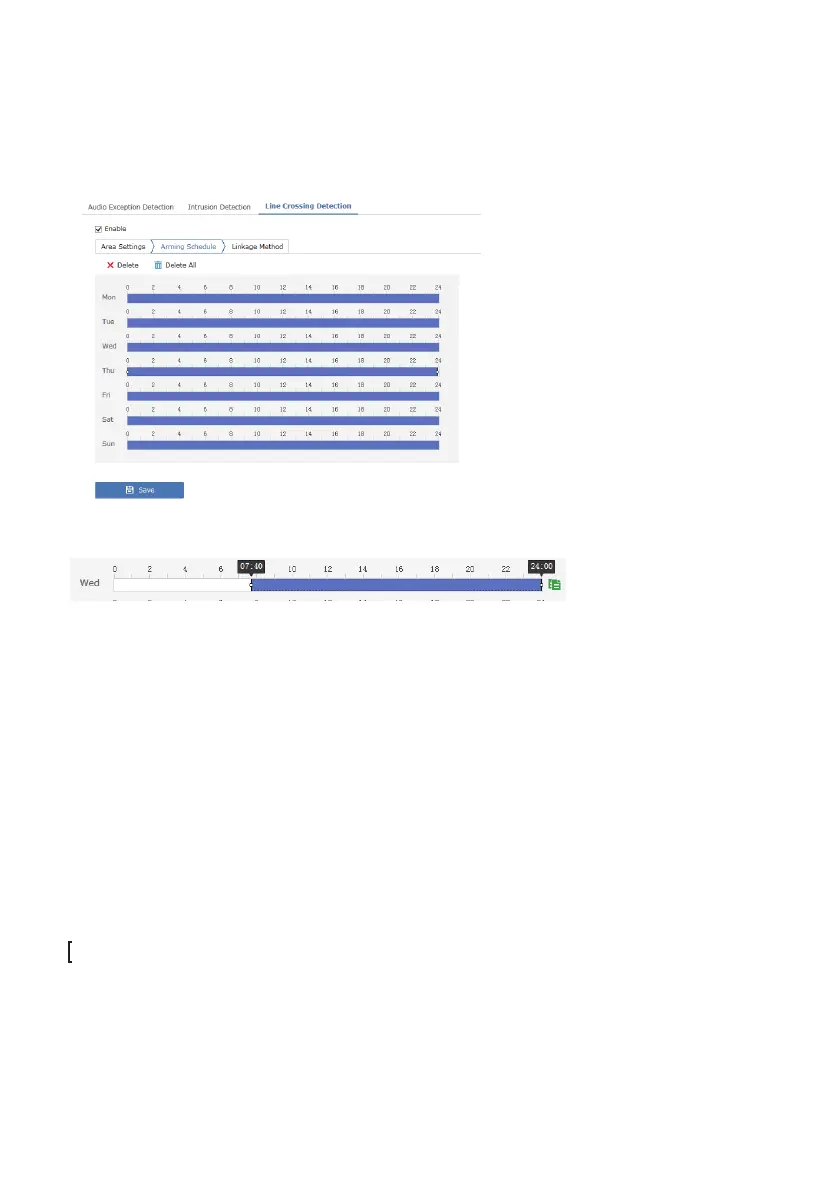
4.Set the Arming Schedule
The arming schedule is used to determine the alarm linkage actions
associated with line cross tracking. If it is not activated, the camera is not
able to send alarm emails, notify surveillance center or trigger recording.
Drag the time bar to adjust the arming schedule:
5.Set up Linkage Methods
The linkage method sets up a series of available actions the camera can do
in response to a line cross event.
[Send Email] Send an email alert for any line cross event. Please set up the
email sender/recipient information under
Configuration-Network-Advanced Setting-Email.
[Notify Surveillance Center] Send a push alert to client software and
smartphone apps such Guarding Vision app and the iFollow client software.
You must register a cloud account and enable push notification on your
smartphone first.
[Upload to FTP/Memory Card/NAS] Upload a video clip or a snapshot to
FTP, memory card and NAS for any line cross motion event. Note, without a
memory card (TF card), the camera is unable to upload a video to the FTP
due to limited ROM. The TF card serves as the transfer media to large
videos.
You can also “trigger recording” as a linkage method. This would add videos
on push notifications but a TF card is required before the camera can store
any video clips.



 To Next Page