- 21 -
7.5 Disable the tracking rules
Blue lines and rectangles represent any lines or perimeter set for the
tracking, and a green moving box corresponds to the current moving object
from the surveillance view. To turn off the tracking rule, go to
Configuration-Local and set the rules to “disable”.
After you enable/disable the display rule, you have to reboot the device to
take effect. The reboot can be performed by power cycling the unit or by
click the “Reboot” button via Configuration-System-Maintenance. A soft
reboot could take up to 10 mins.
[Draw Area] Draw a quadrangle as the perimeter of the protected region
[Clear] Clear any existing regions
3. (Optional) Add additional regions if applicable. Users can add up to 4
regions by drawing different tetragons.
4.Set the Arming Schedule: Please refer to chapter 7.3 (Step 4).
5.Set up Linkage Methods: Please refer to chapter 7.3 (Step 5).
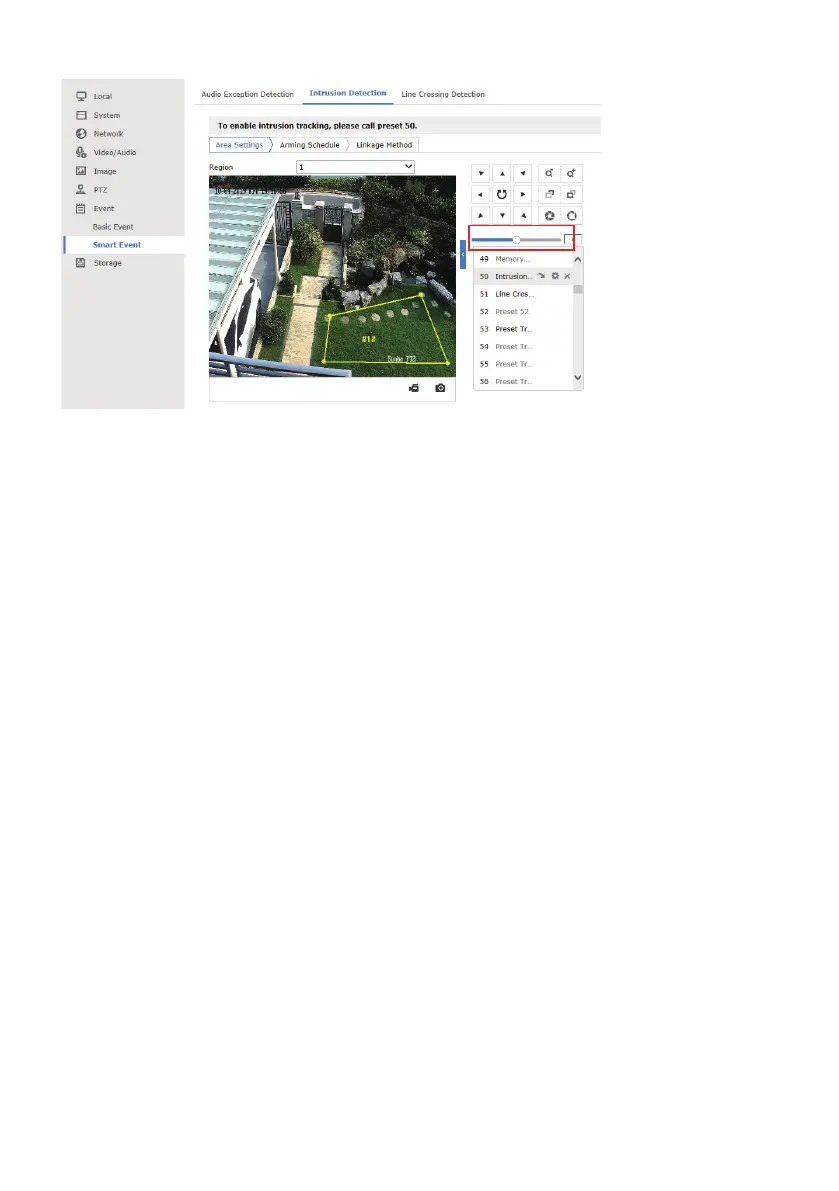
6. Call preset 50 to activate the intrusion tracking
Select preset 50 from the list and hit the call button. If tracking rule is
enabled, a text prompt will appear on the upper left corner. Once preset 50
has been called, the camera will begin tracking whenever a moving object
enters the restricted zone.



 To Next Page