LCD Menu Overview
Multifunction display
In this section, you will find an overview of
the menus and the symbols used to operate
the coffee machine.
The ®selection buttons A-B-C each have
different functions depending on the menu
selected.
Start display
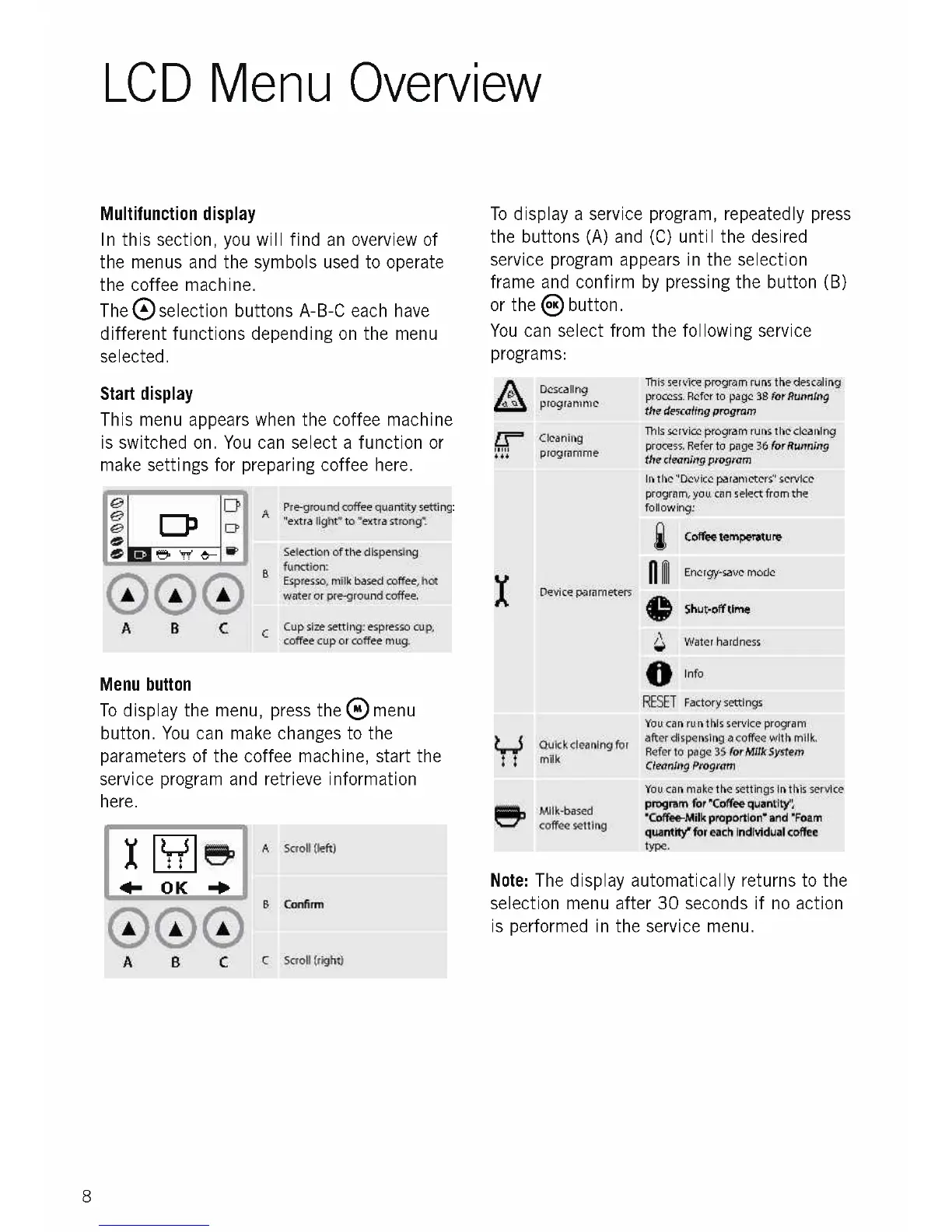
This menu appears when the coffee machine
is switched on. You can select a function or
make settings for preparing coffee here.
GP
999
A
Pre-ground coffee quantity setting:
"extra light" to "extra strong".
Selection of the dispensing
function:
Espresso, milk based coffee, hot
water or pre-ground coffee.
Cup size setting: espresso cup,
coffee cup or coffee mug.
Menu button
To display the menu, press the ()menu
button. You can make changes to the
parameters of the coffee machine, start the
service program and retrieve information
here.
X "5,
I- OK
000
A Scroll (left)
B
Confirm
A B
C
C Scroll (right)
8
To display a service program, repeatedly press
the buttons (A) and (C) until the desired
service program appears in the selection
frame and confirm by pressing the button (B)
or the 8button.
You can select from the following service
programs:
Desca ling
programme
Cleaning
' programme
Device parameters
Quick cleaning for
milk
Milk-based
coffee setting
This service program runs the descaling
process. Refer to page 38 for Running
the descaling program
This service program runs the cleaning
process. Refer to page 36 for Running
the cleaning program
In the "Device parameters" service
program, you can select from the
following:
1111
0
RESET Factory settings
You can run this service program
after dispensing a coffee with milk.
Refer to page 35 for Milk System
Cleaning Program
You can make the settings in this service
program for Toffee quantity;
Toffee-Milk proportion" and "Foam
quantity for each individual coffee
type.
Coffee temperature
Energy-save mode
Shut-off time
Water hardness
Info
Note: The display automatically returns to the
selection menu after 30 seconds if no action
is performed in the service menu.











 To Next Page