Menu settings
Setting and storing the coffee temperature
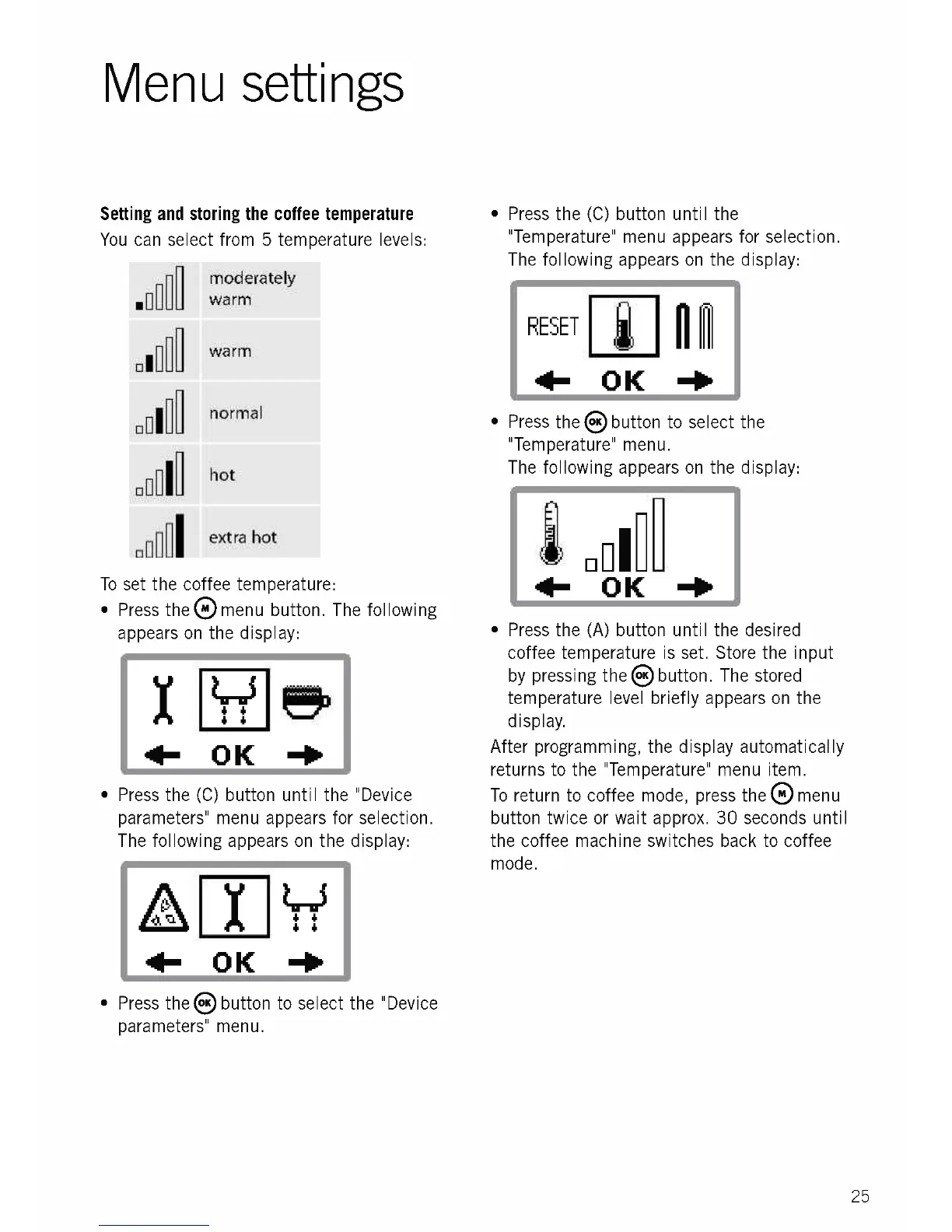
You can select from 5 temperature levels:
. 1]II
D o
di
To set the coffee temperature:
Press the Q menu button. The following
appears on the display:
moderately
warm
warm
normal
hot
Iextra hot
4 4
4 4
411- OK
Press the (C) button until the "Device
parameters" menu appears for selection.
The following appears on the display:
Press the 8 button to select the "Device
parameters" menu.
Press the (C) button until the
"Temperature" menu appears for selection.
The following appears on the display:
RESET
Press the 8 button to select the
"Temperature" menu.
The following appears on the display:
Press the (A) button until the desired
coffee temperature is set. Store the input
by pressing the 8 button. The stored
temperature level briefly appears on the
display.
After programming, the display automatically
returns to the "Temperature" menu item.
To return to coffee mode, press the menu
button twice or wait approx. 30 seconds until
the coffee machine switches back to coffee
mode.
25











 To Next Page