Menu settings continued
Restoring the factory default settings
This function resets all previously changed
values to their original factory settings.
The following settings and stored values are
affected:
Water hardness
Programming of cup filling level
Ground coffee quantity to cup filling level
setting
Coffee temperature
Shut-off time
Heating system
Settings for coffee filling quantity, coffee-
milk proportion and froth quantity for milk -
based coffee.
To restore the coffee machine to the factory
settings, proceed as follows:
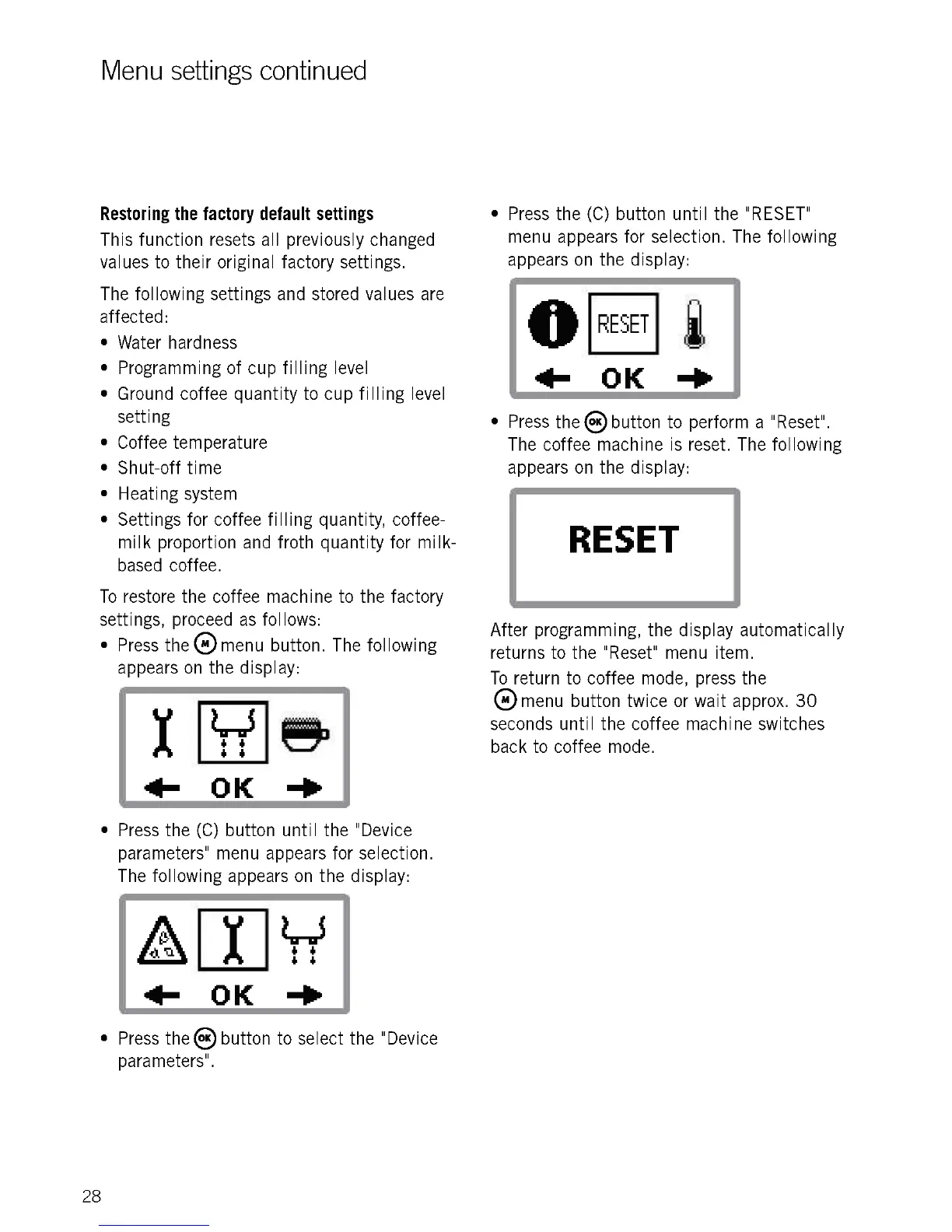
Press the e menu button. The following
appears on the display:
Lir5
6 6
6 6
+ OK
Press the (C) button until the "Device
parameters" menu appears for selection.
The following appears on the display:
4
6
4 6
OK -Po
Press the® button to select the "Device
parameters".
28
Press the (C) button until the "RESET"
menu appears for selection. The following
appears on the display:
RESET
411- OK -110
Press the ()button to perform a "Reset".
The coffee machine is reset. The following
appears on the display:
RESET
After programming, the display automatically
returns to the "Reset" menu item.
To return to coffee mode, press the
8 menu button twice or wait approx. 30
seconds until the coffee machine switches
back to coffee mode.











 To Next Page