Preparing your Sunbeam Caffe Bellissimo continued
Setting the water hardness
Before using the coffee machine for the first
time, it should be set to the appropriate
water hardness for your region. You can
determine the water hardness with the help
of the test strip supplied with the coffee
machine. Proceed as follows:
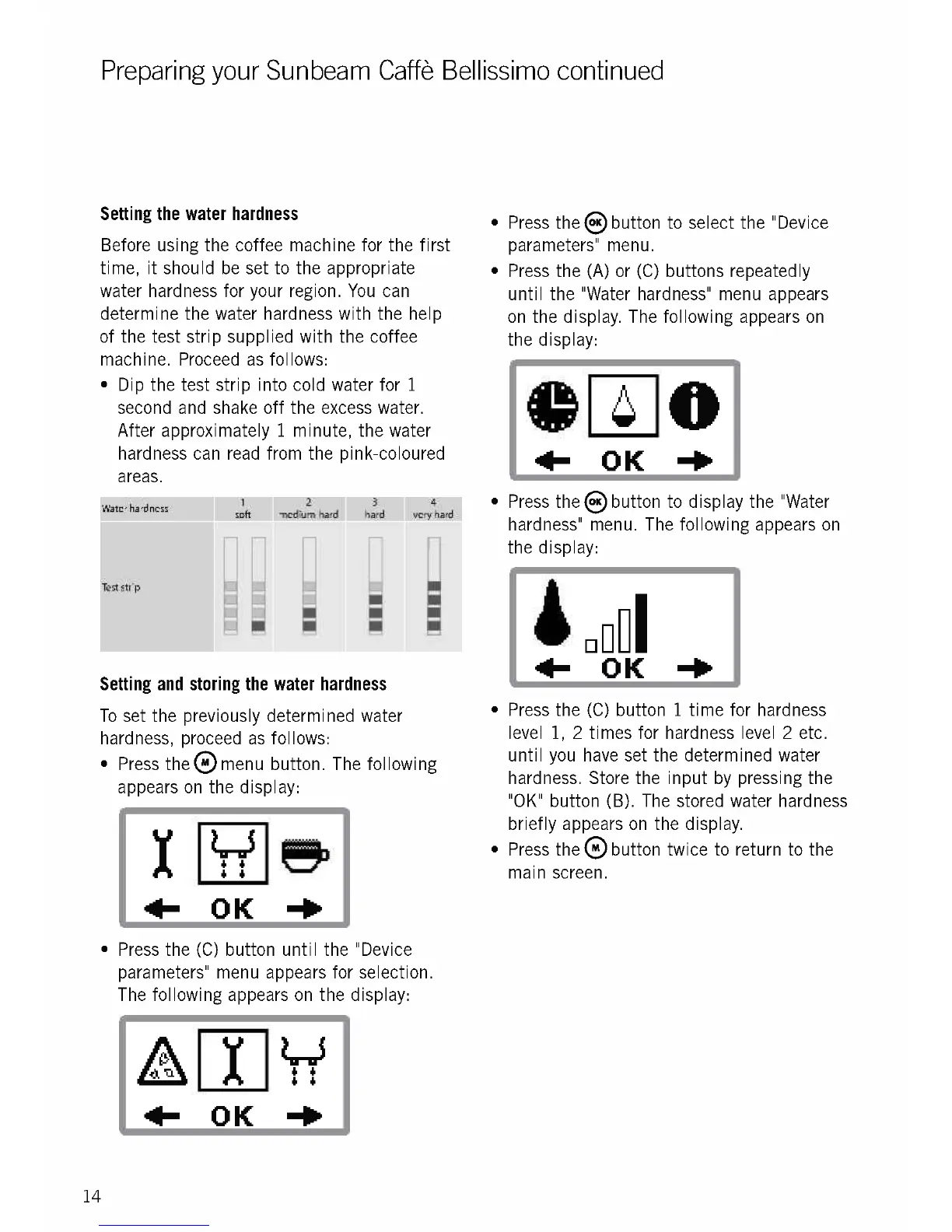
Dip the test strip into cold water for 1
second and shake off the excess water.
After approximately 1 minute, the water
hardness can read from the pink-coloured
areas.
Water hardness
I Oft
Test strip
2
3
medium-hard hard very hard
Setting and storing the water hardness
To set the previously determined water
hardness, proceed as follows:
Press the ()menu button. The following
appears on the display:
14
I "5
6 6
6 6
OK mill
Press the (C) button until the "Device
parameters" menu appears for selection.
The following appears on the display:
4
6
4 6
+ OK -Po
Press the ()button to select the "Device
parameters" menu.
Press the (A) or (C) buttons repeatedly
until the "Water hardness" menu appears
on the display. The following appears on
the display:
0
411- OK -Po
Press thesbutton to display the "Water
hardness" menu. The following appears on
the display:
091
411- OK -Po
Press the (C) button 1 time for hardness
level 1, 2 times for hardness level 2 etc.
until you have set the determined water
hardness. Store the input by pressing the
"OK" button (B). The stored water hardness
briefly appears on the display.
Press thee button twice to return to the
main screen.











 To Next Page