Programming continued
Programming the grind settings
You can set the grinding fineness with the
help of the lever located in the bottom right
hand corner of the coffee beans container.
Caution: Only set the grinding fineness when
the grinder is running. Setting the grinding
fineness when the grinder is not running can
damage your espresso machine.
To set the grinding fineness:
Place a cup under the coffee spouts and
select espresso.
Press the® button to prepare the coffee.
Adjust the grinding fineness with the
grinding fineness lever while the grinder
is running. The coffee is prepared and the
grinding fineness is set.
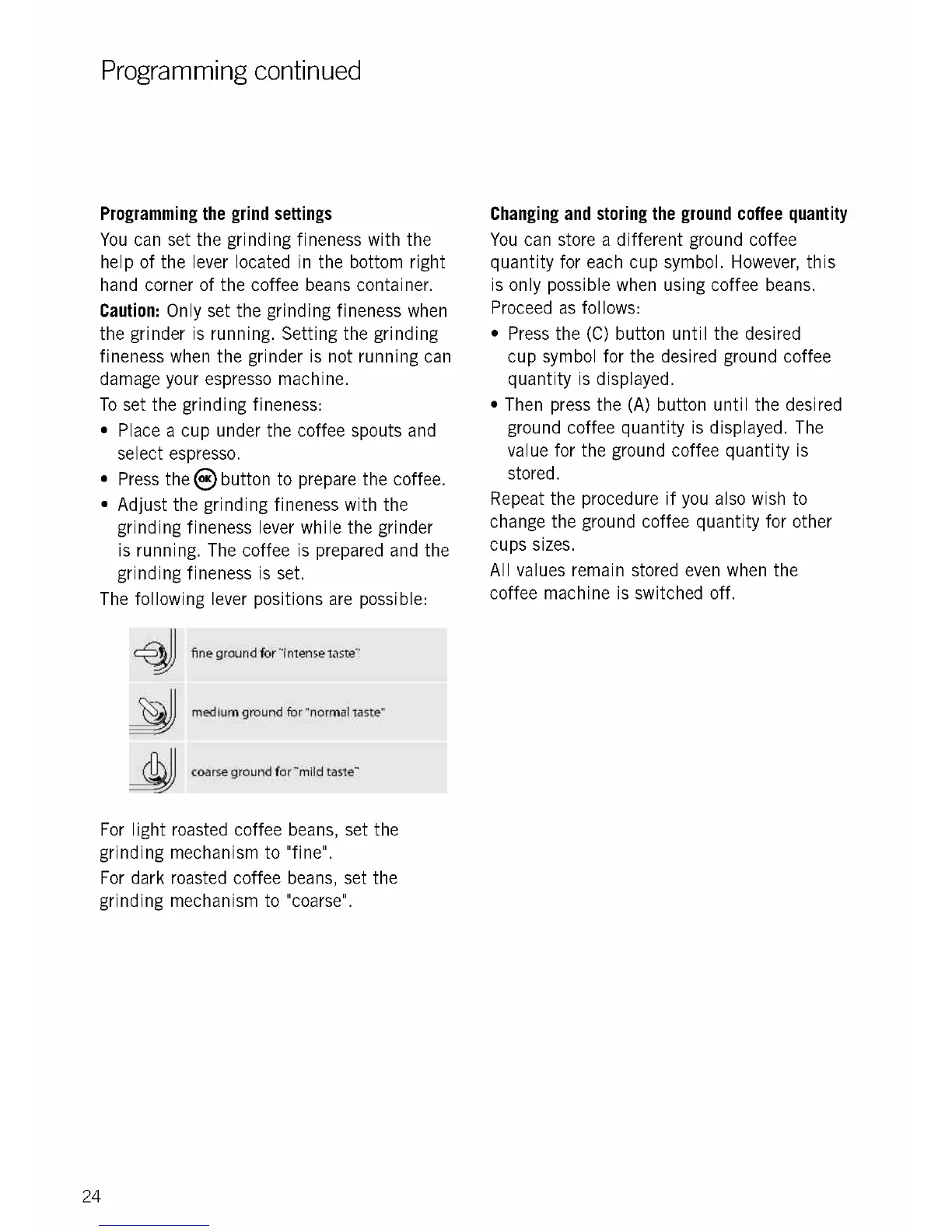
The following lever positions are possible:
fine ground for "intense taste"
medium ground for "normal taste"
coarse ground for "mild taste"
For light roasted coffee
grinding mechanism to
For dark roasted coffee
grinding mechanism to
24
beans, set the
"fine".
beans, set the
"coarse".
Changing and storing the ground coffee quantity
You can store a different ground coffee
quantity for each cup symbol. However, this
is only possible when using coffee beans.
Proceed as follows:
Press the (C) button until the desired
cup symbol for the desired ground coffee
quantity is displayed.
Then press the (A) button until the desired
ground coffee quantity is displayed. The
value for the ground coffee quantity is
stored.
Repeat the procedure if you also wish to
change the ground coffee quantity for other
cups sizes.
All values remain stored even when the
coffee machine is switched off.











 To Next Page