7
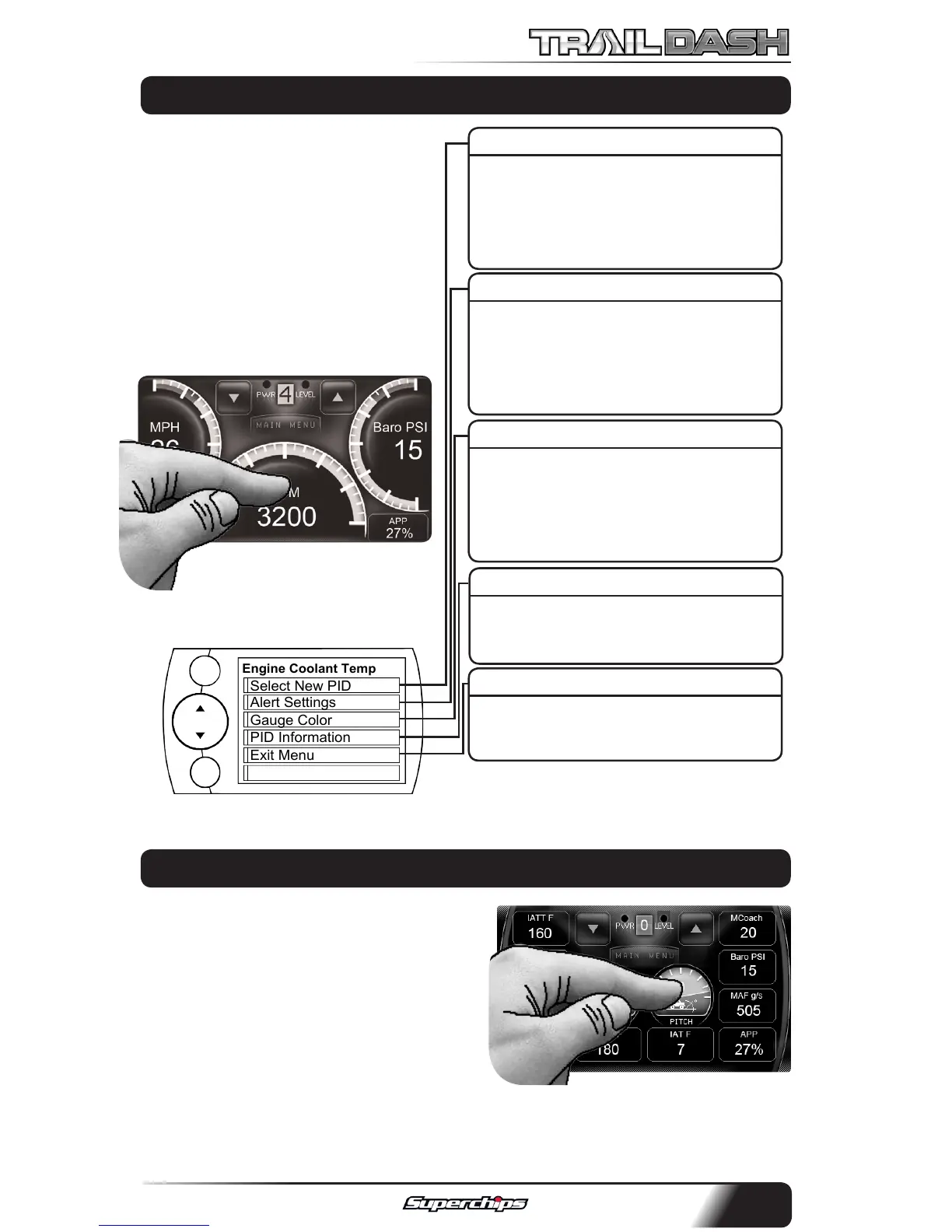
On each of the (3) Screen layouts,
there are either Digital and/
or Analog Gauges available to
display PID information. To adjust
what the gauge displays, follow
these instructions:
1. Touch the gauge you would
like to modify.
The following screen will appear:
SELECT NEW PID
Select the PID that you would like to
monitor from the provided list. This
list will vary based on your model
year.
ALERT SETTINGS
For more information, refer to the
“ALERT OPTIONS” section under
the “OPTIONS MENU” section of this
manual.
GAUGE COLOR
Choose a color from the list. This will
modify the gauge indicator.
NOTE: Only Analog gauges can
change colors.
PID INFORMATION
This briey explains what the se-
lected PID is and/or what it monitors.
EXIT MENU
Brings you back to the main gauge
screen.
Engine Coolant Temp
Gauge Color
PID Information
Exit Menu
Alert Settings
Select New PID
MENU
ENTER
ANALOG AND DIGITAL GAUGE SETUP
PITCH AND ROLL CALIBRATION
In order to calibrate your Pitch and Roll
gauges, you will need to:
1. Find at ground to park your vehicle.
2. Securely fasten your device. (We
recommend using our Dash Pods)
3. Press and hold a gauge for 3 seconds. Then let go. This will reset the
values for both gauges to zero.



 To Next Page