Chapter 4: AMI BIOS
4-61
4-7 Save & Exit
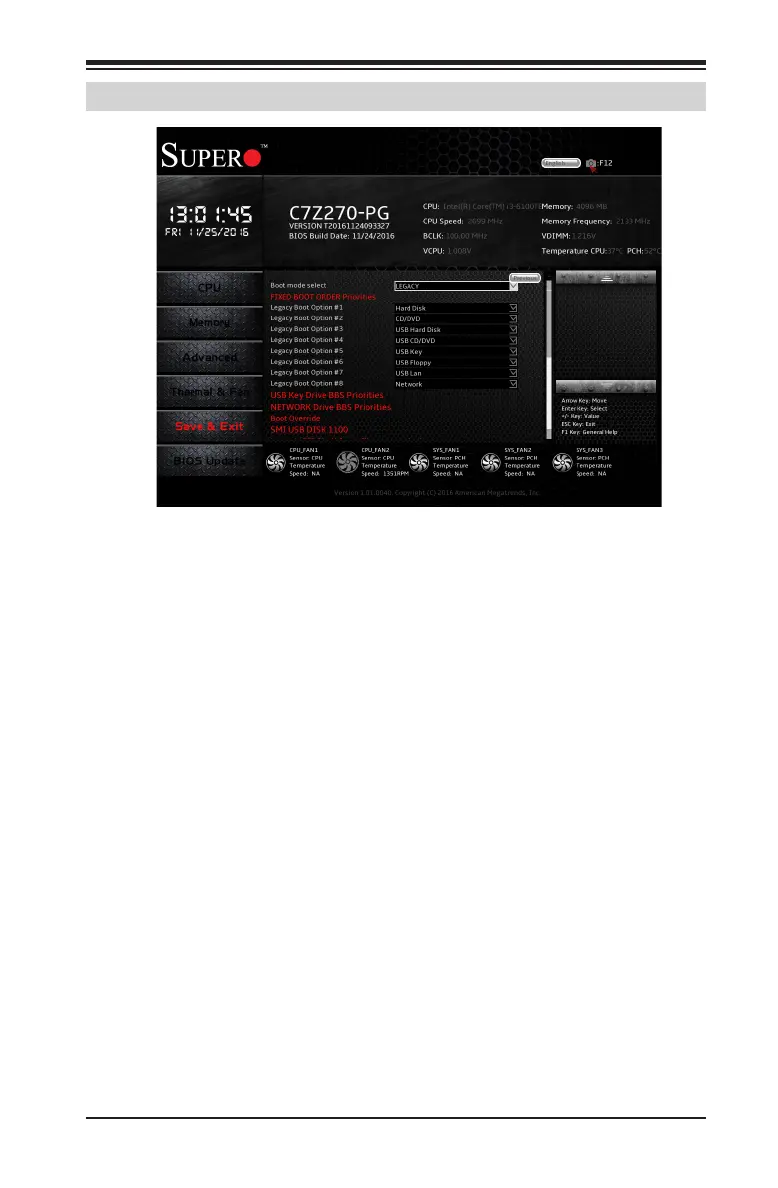
Boot mode select
Use this item to select the type of device to be used for system boot.
The options are Legacy, UEFI, and Dual.
FIXED BOOT ORDER Priorities
This option prioritizes the order of bootable devices from which the
system will boot. Choose an entry from top to bottom to select devices.
Legacy Boot Option #1~#8
The options are Hard Disk, CD/DVD, USB Hard Disk, USB CD/DVD, USB
Key, USB Floppy, USB LAN, Network and Disabled.
USB Key Drive BBS Priorities
Use this feature to specify the Boot Device Priority sequence from avail-
able USB Key Drives. The options are SMI USB DISK 110 and Disable.
NETWORK Drive BBS Priorities
Species the Boot Device Priority sequence from available Network Drives
the options are IBA CL Slot 00FE v0110 and Disabled.


 To Next Page