Chapter 2: Server Installation
2-7
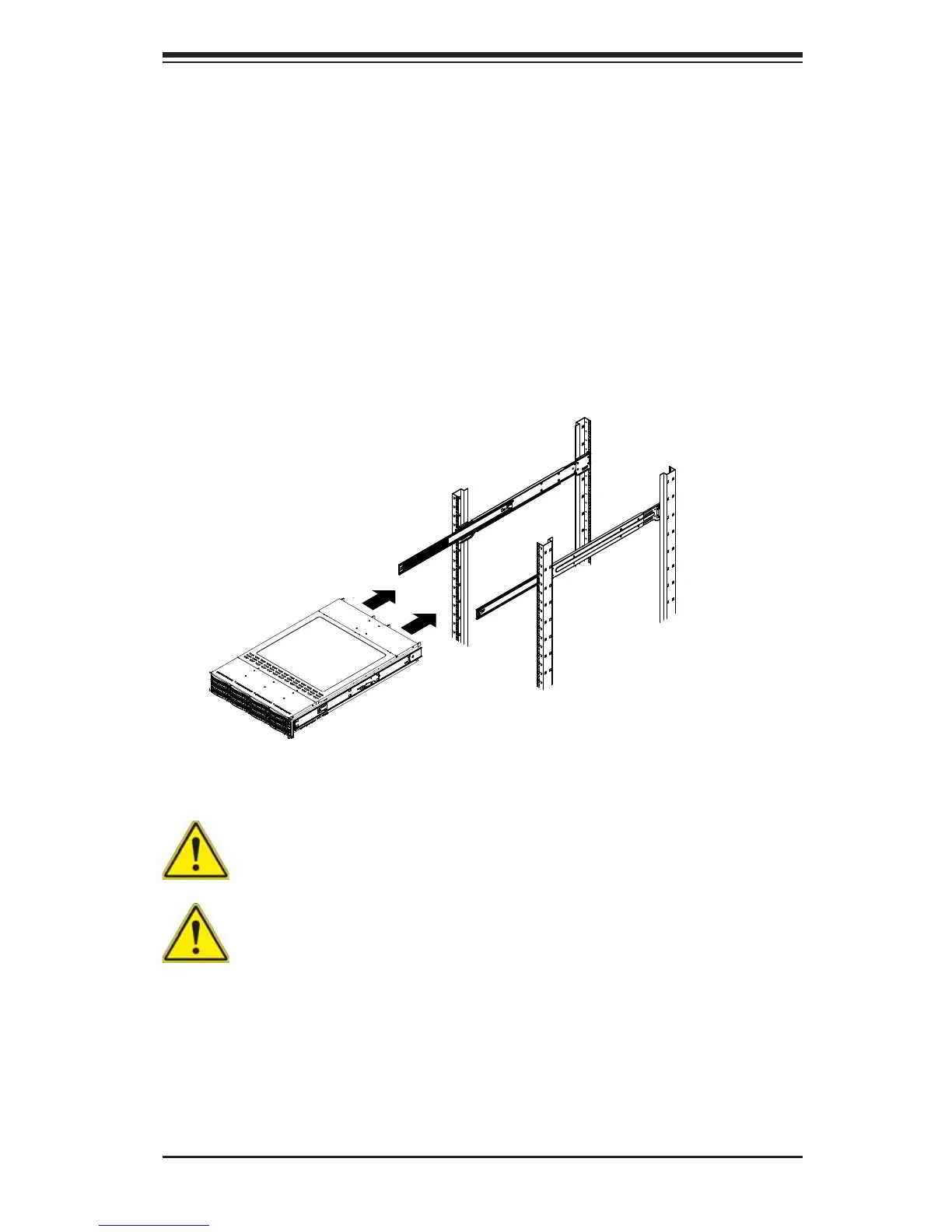
Figure 2-4: Installing the Rack Rails
Installing the Chassis into a Rack (Figure 2-4)
1. Extend the outer rails as illustrated above.
2. Align the inner rails of the chassis with the outer rails on the rack.
3. Slide the inner rails into the outer rails, keeping the pressure even on both
sides. When the chassis has been pushed completely into the rack, it should
click into the locked position.
4. Optional screws may be used to secure the to hold the front of the chassis to
the rack.
Stability hazard. The rack stabilizing mechanism must be in place, or the
rack must be bolted to the fl oor before you slide the unit out for servicing.
Failure to stabilize the rack can cause the rack to tip over.
Warning: do not pick up the server with the front handles. They are designed
to pull the system from a rack only.
Note: The fi gure above is for illustration purposes only. Always install servers to
the bottom of the rack fi rst.


 To Next Page