6-8
SUPERSERVER 6027TR-HTRF+/H70RF+/H71RF+ User's Manual
6-7 Removing and Installing the Backplane
The SC827 chassis backplane is located behind the hard drives and in front of the
front system fans. In order to change jumper settings on the backplane, it may be
necessary to remove the backplane from the chassis.
Removing the Backplane
Removing the Backplane from the Chassis
1. Power down and unplug the system from any power source.
2. Remove the chassis cover.
3. Disconnect the cabling to the backplane.
4. Remove all of the hard drive trays from the front of the chassis.
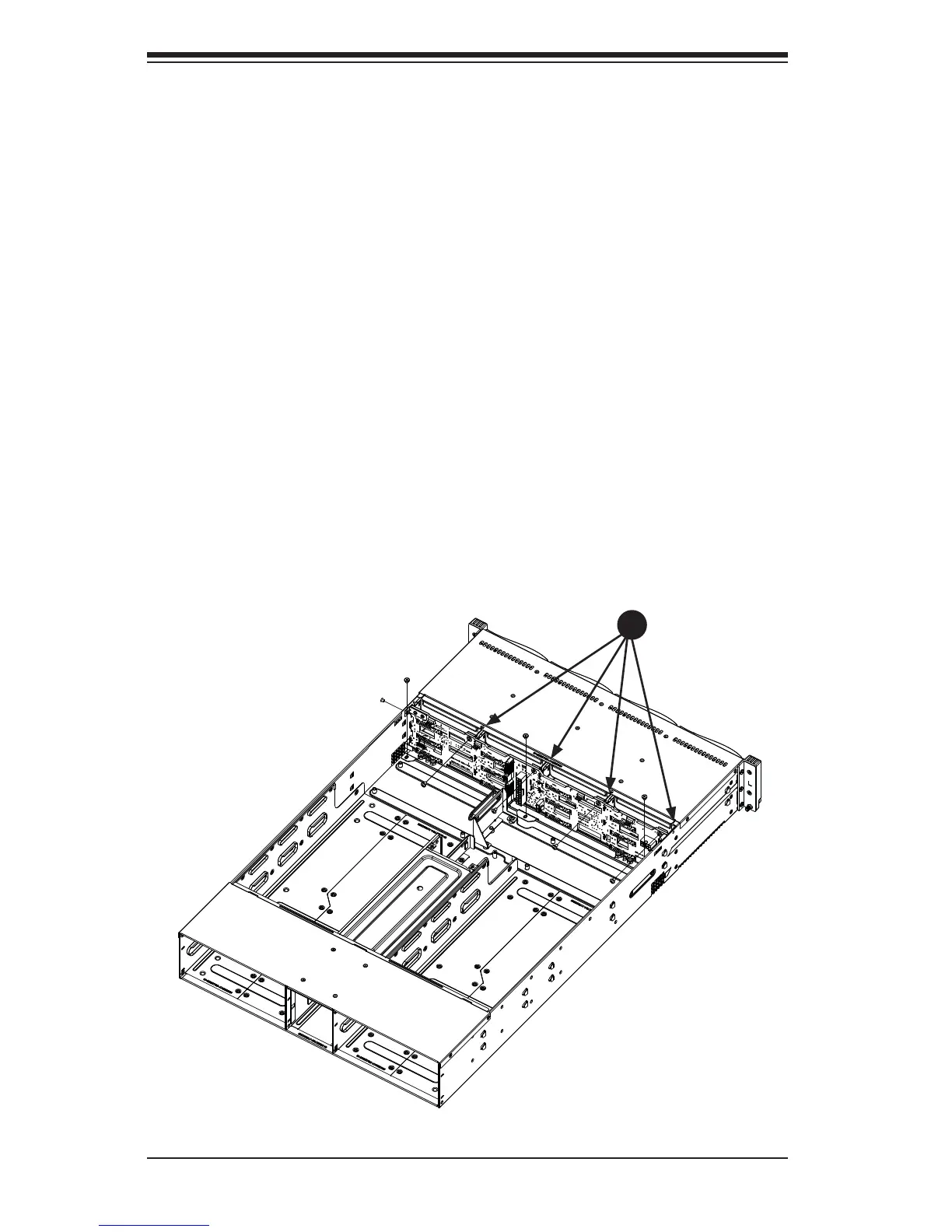
5. Remove the four upper screws at the top of the backplane, indicated by the
arrows below.
6. Loosen the three screws in the spring bar, located on the fl oor of the chassis,
indicated by the arrows below (Figure 6-6).
Figure 6-6. Removing the Screws at the Top of the Backplane
1
5


 To Next Page