2-8
SUPERSERVER 6027TR-HTRF+/H70RF+/H71RF+ User's Manual
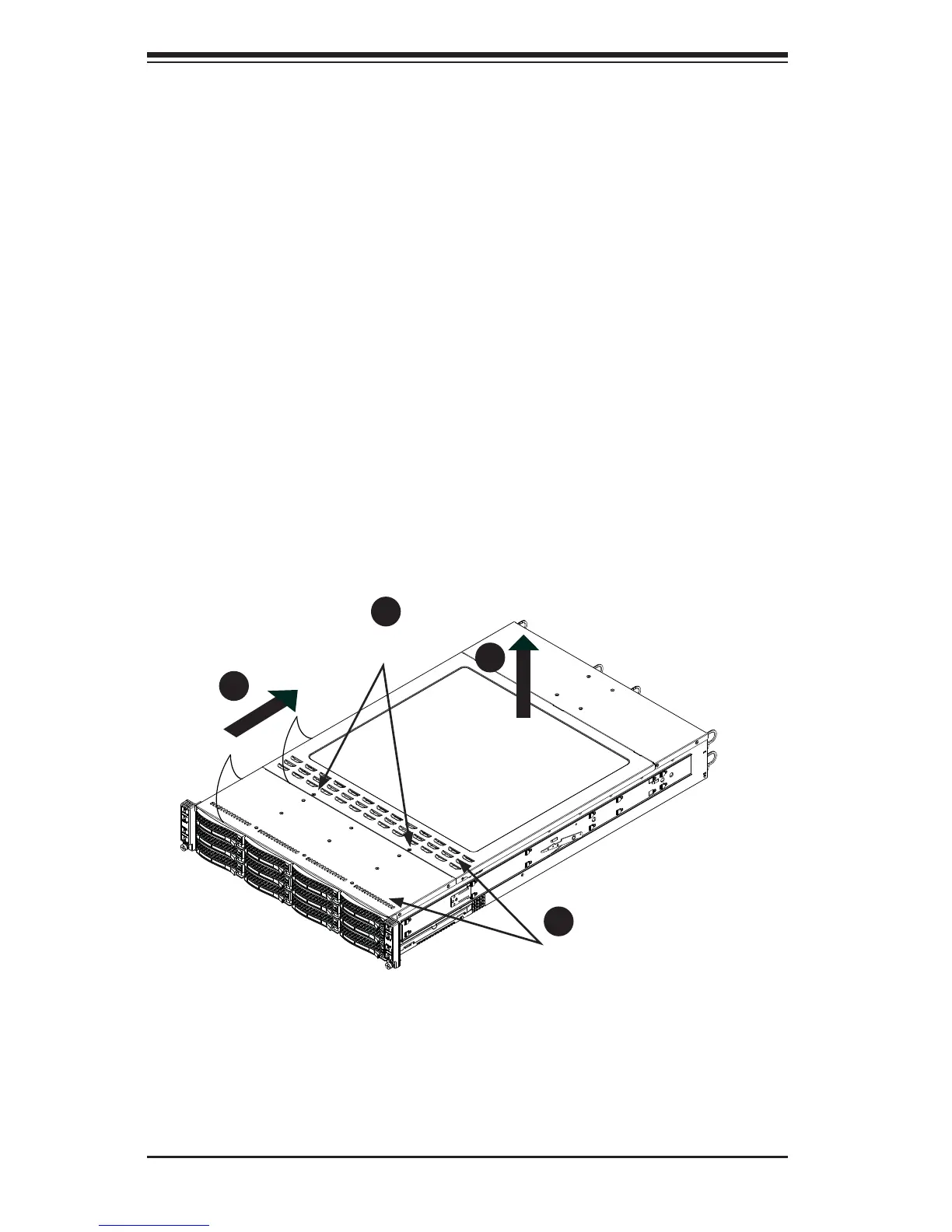
Figure 2-5. Accessing the Inside of the System
2-6 Checking the Serverboard Setup
After you install the SuperServer 6027TR-HTRF+/H70RF+/H71RF+ in the rack, you
will need to open the unit to make sure the serverboard is properly installed and all
the connections have been made.
Accessing the inside of the System
Before operating the server for the fi rst time, it is important to remove the protective
fi lm covering the top of the chassis, in order to allow for proper ventilation and
cooling.
Removing the Chassis Cover and Protective Film (Figure 2-5)
1. Remove the two screws which secure the top cover onto the chassis as
shown above.
2. Lift the top cover up and off the chassis.
3. Peel off the protective fi lm covering the top cover and the top of the chassis
4. Check that all ventilation openings on the top cover and the top of the chassis
are clear and unobstructed.
Remove two
screws
Check Ventilation
Openings
1
2
1
3
1
4
1
1


 To Next Page