Chapter 6: Advanced Chassis Setup
6-3
6-3 Chassis Cover
Before operating the SC827 chassis for the fi rst time, it is important to remove the
protective fi lm covering the top of the chassis, in order to allow for proper ventilation
and cooling.
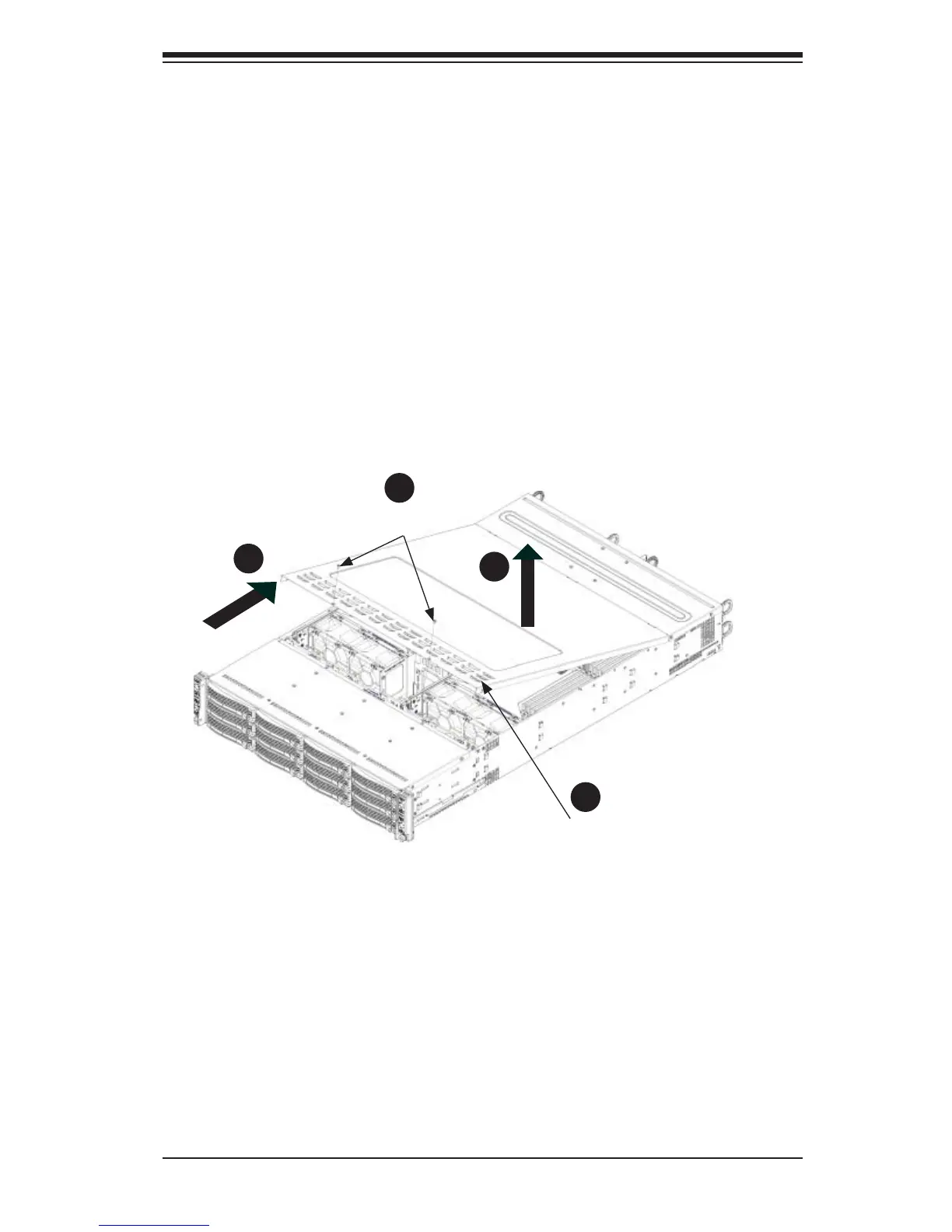
Removing the Chassis Cover and Protective Film (Figure 6-2)
1. Remove the two screws which secure the top cover onto the chassis as
shown above.
2. Lift the top cover up and off the chassis.
3. Peel off the protective fi lm covering the top cover and the top of the chassis
4. Check that all ventilation openings on the top cover and the top of the chassis
are clear and unobstructed.
Figure 6-2. Removing the Chassis Cover
Remove two
screws
Check Ventilation
Openings
1
2
1
3
1
4
1
1
Caution: Except for short periods of time, do NOT operate the server without
the cover in place. The chassis cover must be in place to allow proper airfl ow
and prevent overheating.


 To Next Page