Phantom Power
IN
RC-5
OUT
ON
OFF
IN
OFF
ON/
POWER
OUT
DIGITAL
OUT
AUX
LINE
MIX
IN
PEDAL
FOOT
OUT
IN
L
R
Input
Level
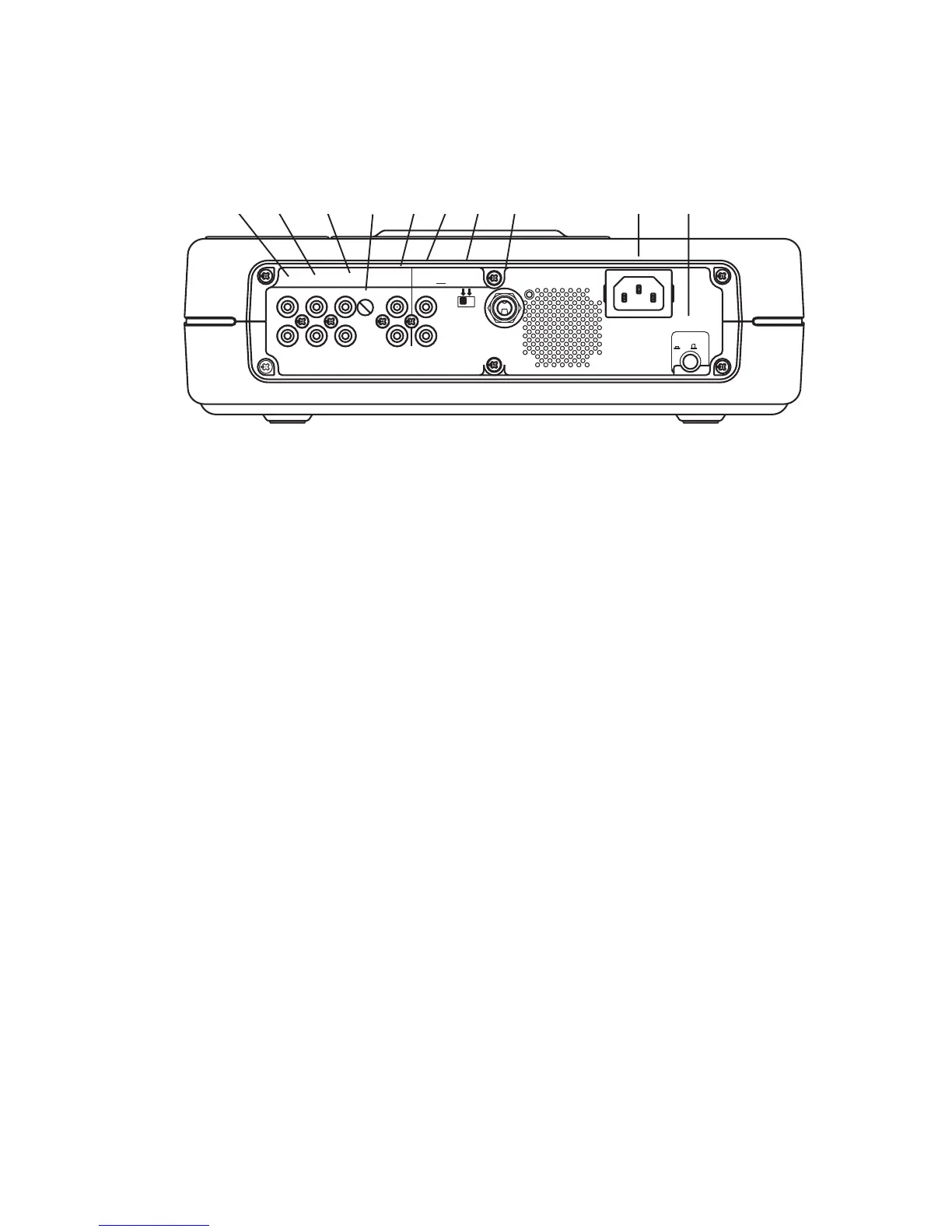
[1] MIX OUT jacks
Sound from the CD drive can be mixed with sound
from the MIC/LINE/INST input, the MIC/LINE/INT
MIC input, and the AUX IN jacks. The mixed signal
is output through the MIX OUT jack as L-R line
levels. This signal can be output to an external
recorder, amplifier or powered speakers. This signal
bypasses the CD-R drive, so it is available for output
even if the CD-R drive is stopped.
[2] LINE OUT jacks
Sound from the CD-R drive is output as L-R line
levels to an external recorder, amplifier or powered
speakers. When the CD-R drive is not recording,
the LINE OUT jacks output the MIX OUT signal.
Unlike the MIX OUT signal, the LINE OUT signal can
be adjusted by the LINE OUT level control and
equalized with the OUTPUT EQ feature (pg. 22).
[3] AUX IN jacks
Use this stereo RCA connection for recording onto
the CD-R drive from an external audio source such
as a cassette deck. Audio from the AUX IN can be
mixed with audio from the front panel inputs, the
internal microphone and the CD player drive.
[4] AUX IN level control
Turn to adjust the input signal level of the AUX IN.
[5] DIGITAL IN and OUT jacks
Plug in RCA coaxial cables here to connect to the
input and/or output of an external digital unit.
Use DIGITAL IN for recording onto the CD-R drive
from an external digital audio source. Use DIGITAL
OUT for going to an external digital device.
[6] REMOTE RC-5 IN and OUT jacks
Plug in RCA coaxial cables here to connect to the
input or output of an RC-5 remote control system.
For more information on the RC-5 system please
contact Superscope Technologies.
[7] Phantom Power ON/OFF switch
Switch ON to apply 48V phantom power to XLR
mic inputs. Switch OFF if the microphones being
used do not require 48V phantom power.
[8] FOOT PEDAL jack
An optional foot pedal can provide Play/Pause
control for the CD drive and Play/Pause or Record/
Pause control for the CD-R drive. The FT200 Foot
Pedal is available from Superscope Technologies
Inc. NOTE: Use foot pedal menu selection to
select which drive (CD or CD-R) the foot pedal is
controlling. (See pg. 22 for this menu selection).
[9] Power plug
Plug one end of the supplied power cord in here
and the other end into an AC outlet.
[10] MASTER Power switch
Press to turn power ON (in position). Press again
to turn power OFF (out position).
To retain certain settings in memory, leave this
switch ON and turn power ON and OFF with
the Standby POWER slide switch on the top of
the unit.
Back of Unit
(rear panel connections)
1 2 3 4 5 6 7 8 9 10
- 10 -



 To Next Page