POWER
TEMPO
KEY
STANDBY
PLAY
MIC
OPEN
MP3
PUSH
CD-RW PLAYBACK
REC REVIEW
VR
METRO TUNER
REV/DLY
REC/PLAY
REC
FINALIZE
ERASE
SELECT
PUSH ENTER
CANCEL/DELETE
PROG
DISP
BALANCE
TR INC
MENU/STORE
SINGLE
REPEAT
A-B
REC MODE
ò ó
-+
PSD340
Music Practice
CD RECORDING SYSTEM
Features
2
1
.2
5
-1
9 8 7 6
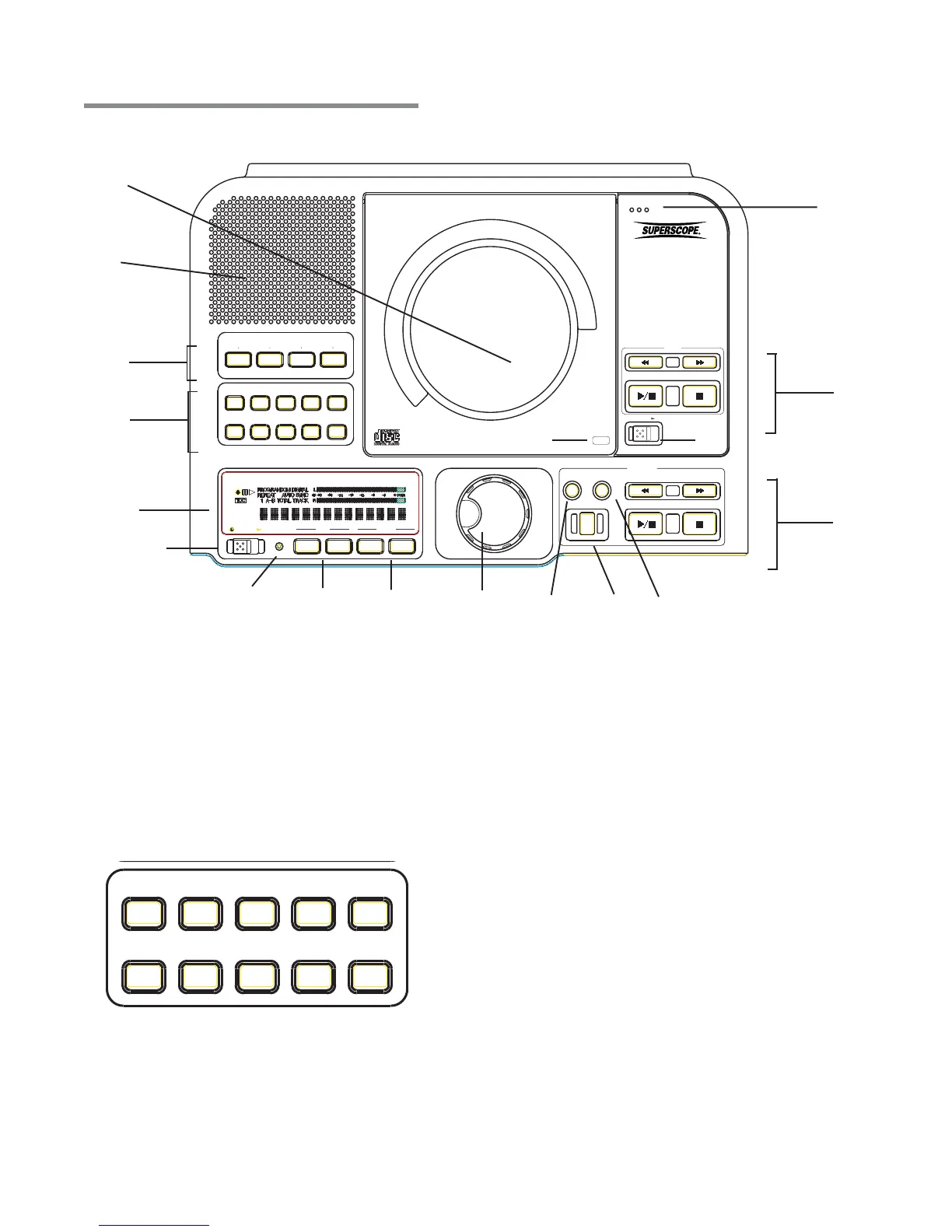
1 Control Buttons
2 Speaker
3 CD Player Drive
4 Internal Microphone
5 CD Player and CD Recorder Controls
11 Key Controls
12 Standby Light
13 Standby Power Button
14 Display
Top of Unit
3a
3b
5
-2
3
4
14
13
- 5-
1011
12
1
.1
CANCEL/DELETE
PROG
DISP
BALANCE
TR INC
MENU/STORE
SINGLE
REPEAT
A-B
REC MODE
A B C D E
F G H I J
A. Record Mode
B. A-B Loop
C. Repeat
D. Single Track Play
E. Menu/Store
F. Track Increment
G. Balance
H. Display
I. Program
J. Cancel/Delete
[1
-1
] Control Buttons
A. RECORD MODE (REC MODE) button
With a CD-R or CD-RW disc in the CD Recording
drive, press this button to enter Record mode.
Turn the SELECT jog wheel to select the recording
mode. Then press the SELECT jog wheel to
choose that mode.
B. A-B LOOP (A-B) button
While a CD is playing in the CD player drive, press
this button to start point A to point B repeat play
(pg. 15).
C. REPEAT button
There are two Repeat modes: Track or Entire CD.
6 Finalize Button
7 Record Button
8 Erase Button
9 Select Jog Wheel
Tempo Controls
10



 To Next Page