Music Practice & CD Playback
5. Press the TUNER button to stop the tone genera-
tor and exit the Tuner.
NOTE: The next time you press the TUNER button,
the 440Hz tone will sound. This is because the
PSD340 remembers which mode; Chromatic or
Tuning Tone was used last. To switch back to the
Chromatic Tuner, simply turn the SELECT jog wheel
and select “Chromatic Tuner.” The unit will return
to the Chromatic Tuner display.
Adjusting the Tuning Tone
The Tuning Tone can be adjusted between 435 and
445Hz. Follow these steps for adjusting Tuner
frequency.
1. While the Tone generator is active and the display
shows your current Tone frequency and volume
settings, press the SELECT jog wheel.
2. The display will now read “TUNER FREQ ADJ.”
Press the SELECT jog wheel to enter.
3. The current frequency setting will blink. Turn the
SELECT jog wheel to adjust the frequency.
4. Press the SELECT jog wheel to confirm changes.
The display will now show the current Tone
frequency and volume settings.
To adjust the volume of the Tuning Tone:
1. While the tone generator is active and the display
shows your current Tone frequency and volume
settings, press the SELECT jog wheel.
2. The display will now read “TUNER FREQ ADJ.”
Turn the SELECT jog wheel until the display reads
“TUNER VOL ADJ.” Press the SELECT jog wheel to
enter.
4. The current volume setting will now blink. Turn
the SELECT jog wheel to adjust the volume.
5. Press the SELECT jog wheel to confirm changes.
The display will show the current Tone frequency
and volume settings.
- 13 -
INST
MIX
SPLIT
STEREO
MIC/LINE
ON
OFF
-20dB
LINE
MIC
LEFT
RIGHT
MIC/LINE
C
LOSE
OPEN/CLOSE
SPEAKER
ALC/ATT
INPUT
ON
OFF
DIGITAL
ANALOG
PHONE SELECTOR
MIC/LINE
LINE
CD
PHONE/SPEAKER
MIC/LINE
AUX
R
LINE OUT
MIC
INT MIC
LEVEL
L
PHONES
LINE OUT
CD PLAY/RECORD
PUSH
NEUTRIK
PUSH
NEUTRIK
REMOTE
IN
RC-5
OUT
EXT.
INT.
IN
OFF
ON/
POWER
OUT
DIGITAL
OUT
AUX
LINE
MIX
IN
L
PEDAL
FOOT
R
OUT
IN
L
R
How to Use the Tuner
The PSD340 has two modes for tuning your instrument,
Chromatic Tuner or 440Hz Tuning Tone.
Using the Chromatic Tuner
The PSD340 Chromatic Tuner will pick up monophonic
signals from the Left Mic/Line/Inst input, the Right Mic/
Line input or the internal mic. The musical note corre-
sponding to the incoming frequency is displayed in
concert pitch as natural (no indication) or sharp (#). The
Tuner operates on a wide range of pitches from A0 to
C8. The CD and CD-R must be in Stop Mode for the
Tuner to operate.
1. Press the TUNER button.
2. Turn the SELECT Jog Wheel until the display reads
“Chromatic.” Press the SELECT Jog Wheel to accept
this selection. The chromatic tuner display will
appear.
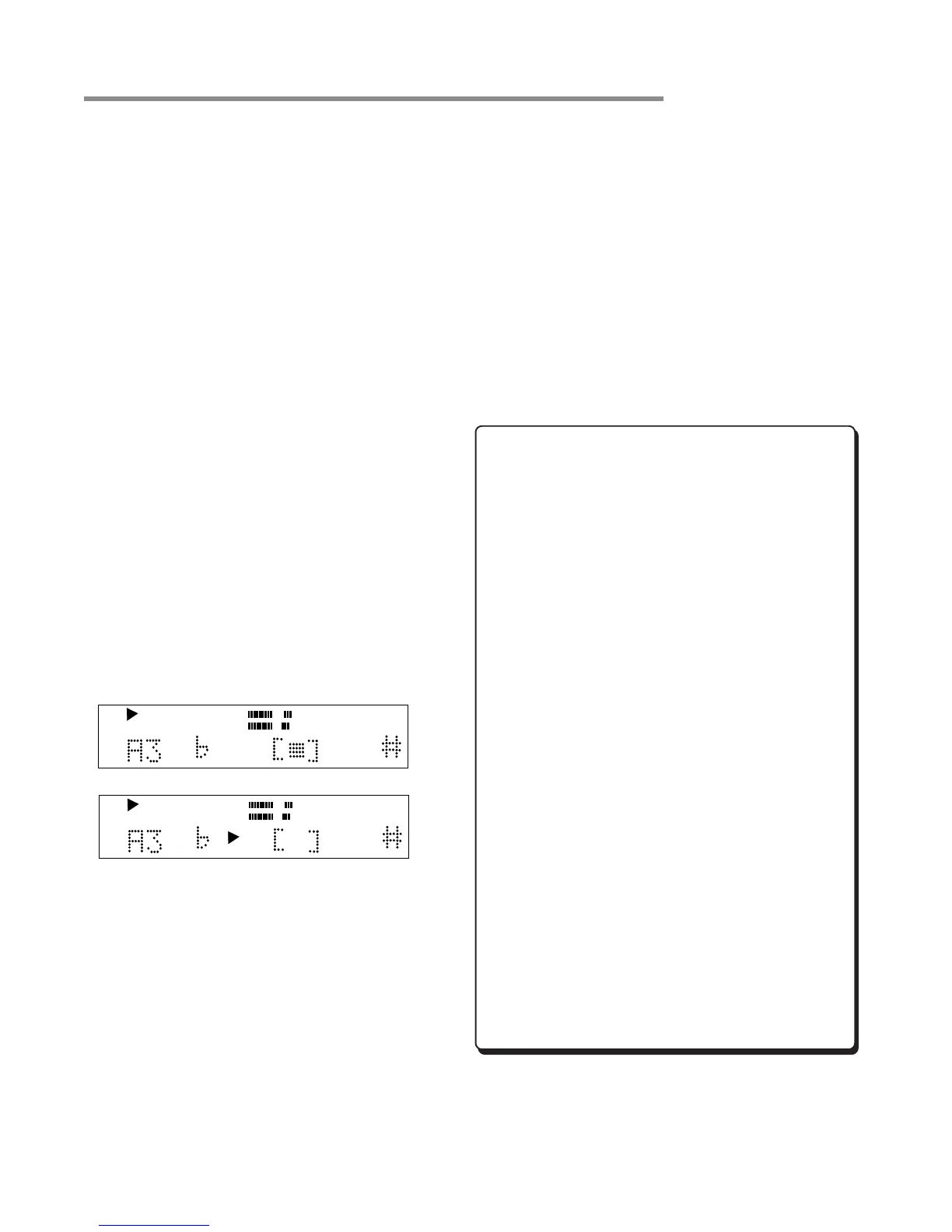
3. Play a note on your instrument and watch, as the
unit will display the closest musical pitch.
4. Adjust the pitch of your instrument until the square
indicator is in the center box. Right (sharp) or left
(flat) arrows indicate an out of tune condition.
5. Press the TUNER button to exit the Tuner.
How to Use the 440Hz Tuning Tone
1. Press the TUNER button.
2. If the display reads, “Chromatic”,turn the SELECT jog
wheel until the display reads “Tuner Tone.”
3. Press the SELECT jog wheel to accept change. A
440Hz tone will sound in the speaker, headphones,
and LINE OUT.
4. Play the appropriate tuning note on your instrument
and adjust the instrument to match the 440Hz tone
generated by the PSD340.
CD
R
L
dB-50 -30 -22 -16 -12 -8 -4 0
TOTAL
OUT OF TUNE
CD
R
L
dB-50 -30 -22 -16 -12 -8 -4 0
TOTAL
IN TUNE



 To Next Page